Table of contents
Updated October 2026 with current Lens Insights figures from my LinkedIn featured post. I started making Snapchat lenses for fun in 2017 and ended up with a small Fiverr side business, a utility other creators still use, and a phone call with Snapchat about Lens Studio.
1. By the numbers (Lens Insights)
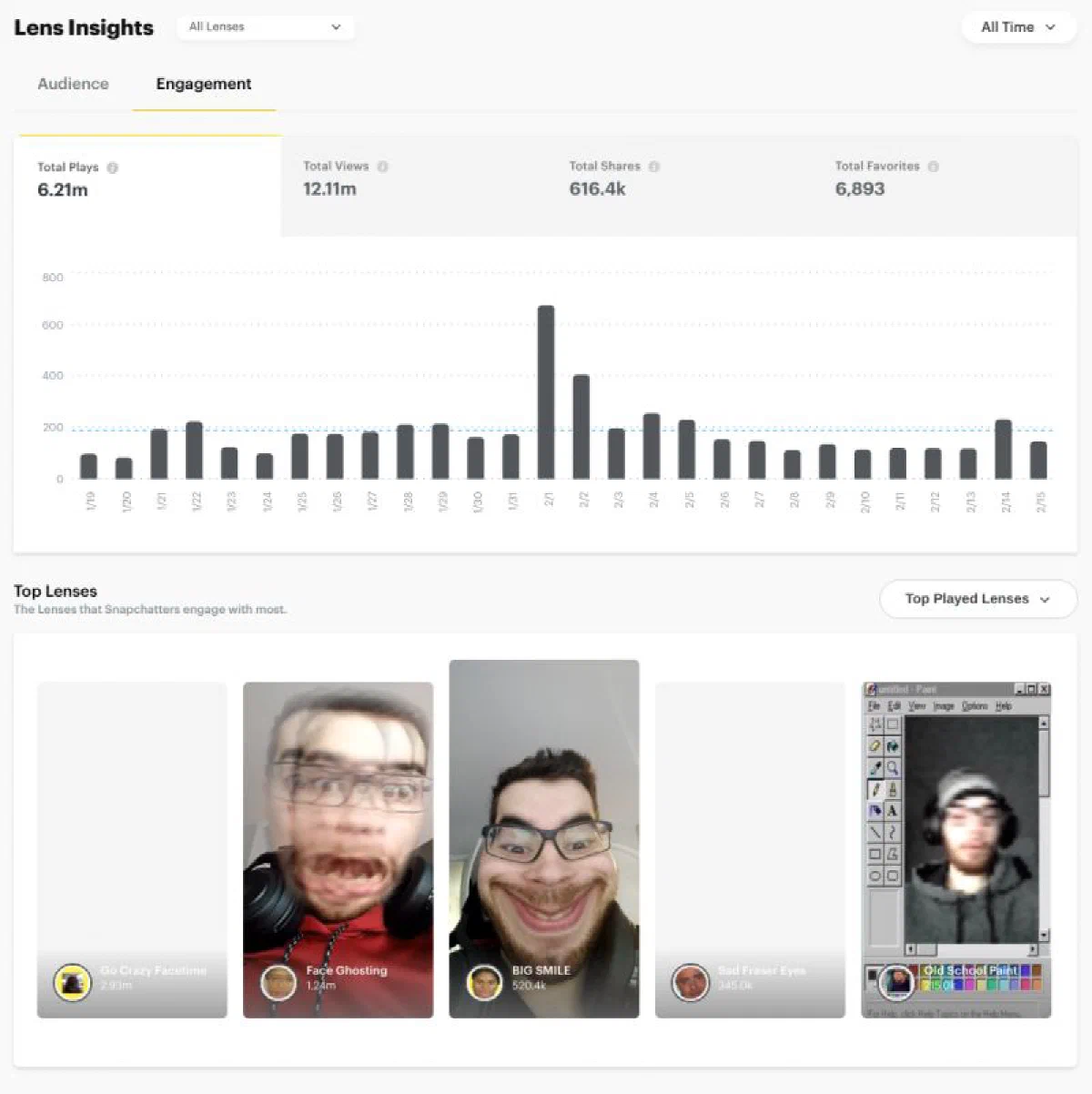
To date, my lenses have accumulated 14.07M plays, 20.48M views, 712.9k shares, 10,250 favorites, 804 posts, and 470 unique posters (all-time, Lens Insights). Plays and views are not the same metric: a lens can be opened once but watched multiple times, so I look at both when a client asks whether it worked.
Source for the 2026 totals: LinkedIn featured update[1].
Between 2017 and 2020 I shipped 42 lenses for myself and for clients. Standouts by usage:
| Lens | Rough plays |
|---|---|
| Go Crazy Facetime | ~2.9M |
| Face Ghosting | ~1.2M |
| BIG SMILE | ~520k |
Snapchat’s audience tools also frame the ecosystem: a reported ~596M–623M potential audience for lens users, with strong reach in India and the United States, and device mix roughly Android (~70%) vs iOS (~30%). That split matters when you test only on your own phone.
2. How I got started
Lens Studio was approachable before ARKit jargon was everywhere: face tracking, simple materials, publish to Snapchat. My first lenses were jokes for friends — face swaps, exaggerated expressions — then I noticed the metrics tab and started treating each release like a tiny product launch (thumbnail, preview video, one clear hook).
3. Fiverr workflow
Paid work followed the same pipeline:
- Brief — reference video or competitor lens, target vibe, deadline.
- Prototype — greybox in Lens Studio, send screen recording before polish.
- Review cycles — Snapchat review plus client taste (often stricter than Snapchat).
- Delivery — publish under their account or mine, depending on contract.
I kept a short reject checklist per lens: licensed audio, readable thumbnail at phone size, effect triggers on the intended face region, and a 10-second preview that shows the hook without explanation. That list saved more client arguments than any shader tweak.
Pricing stayed modest; the learning was scope control and revision limits. The worst projects were “make it viral” with no creative direction.
4. When review said no
Not every submission cleared Snapchat review or client approval. Common fails: copyrighted audio, unclear lens purpose, performance on low-end Android, or effects that trigger on the wrong face region. Each rejection became a checklist item for the next build — I kept a short notes file per lens.
5. GIF / video → PNG sequences
Lens Studio wants image sequences for many effects. I wrote a small utility to turn GIF or video into PNG sequences for pipeline work; other Lens Studio creators picked it up too.
GIF/Video to PNG for Lens Studio[2]
That tool saved more time than any single visual trick — batch export beats screenshotting frames by hand.
6. Lens Studio product feedback
Snapchat called by phone to collect Lens Studio feedback from active creators. I shared friction I hit daily: project load times, preview fidelity vs phone, documentation gaps for shader-adjacent features. It felt good to be heard even when not every note shipped.
7. Meta Spark next
I want to go deeper on Meta Spark for cross-platform AR. Official hub: Spark AR / Meta Spark learn[3]. If you have tutorials that map cleanly from a Lens Studio mental model, I am collecting recommendations.
8. Takeaway
AR lenses were my first experience shipping creative work to millions of anonymous users with real analytics — closer to product than to portfolio art. The skills transfer elsewhere: tight loops, device testing, graceful failure when platforms change rules.
9. Related posts
- Diagram prompts with ChatGPT and AIPRM — another “tooling for makers” thread
- Skate rack — from CAD to plywood — physical maker projects