uml-skill: Instructions with a small encoding fallback
uml-skill packages diagram-writing instructions and a small Python helper. It is a skill bundle, not an MCP server or an image-generation model. The helper can produce a Kroki URL from diagram source.
Repository languagesPython 100%1
Shares calculated from GitHub Linguist bytes.
| Language | % | Bytes |
|---|---|---|
| Python | 2,870 |
Overview
Why it exists
Agent skill bundle providing direct tool definitions and prompt guides for diagram generation.
Best fit
Drop-in diagram generation capabilities for LLM agent frameworks.
Getting started
These commands come from the repository documentation. They were not run during this review.
python kroki_url.py --helppython kroki_url.py -t mermaid diagram.mmd
python kroki_url.py -t plantuml -f png diagram.pumlGet-Content diagram.puml -Raw | python kroki_url.py -t plantumlcat diagram.puml | python kroki_url.py -t plantumlRepository references
Excerpts from the repository’s guides, in their original language. Links open the inspected source revision.
Prerequisites and first run
Install
README.md
| Route | What to do |
|---|---|
| Smithery (recommended for many agents) | Run npx @smithery/cli@latest skill add antoinebou12/uml. Open the Smithery skill page and use Install for client-specific steps (Cursor, Claude Code, Codex, Windsurf, Continue, GitHub Copilot, and others). |
| Cursor (manual) | Copy this repository (or the uml-skill folder) into .cursor/skills/diagramming-uml/ (or add a symlink). See Cursor · Rules & skills. |
| Other clients | Prefer the Smithery CLI and your product’s skill directory; paths and filenames vary. |
Configuration and usage
Usage
scripts/README.md
Features and components 2
- Instruction layer
- SKILL.md describes the workflow and points to diagram references. An agent can use those instructions with available diagram tools. References supply syntax guidance without becoming an application runtime.
- Encoding helper
- scripts/kroki_url.py uses standard-library compression and encoding to construct a rendering URL. Generating that URL and requesting the rendered image are separate operations.
Architecture
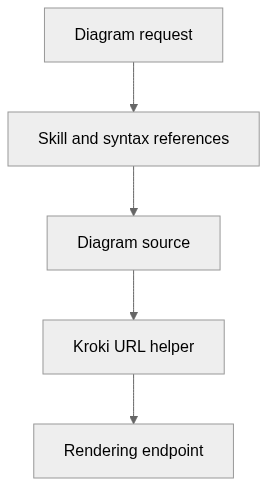
The components and their connections remain available as text. The diagram adds an interactive view.
- Diagram request
- Skill and syntax references
- Diagram source
- Kroki URL helper
- Rendering endpoint
Links verified in the repository.
Mermaid Interactive diagram (loads on open)
System overview of the components and connections verified in the repository.
flowchart LR
  n0["Diagram request"]
  n1["Skill and syntax references"]
  n2["Diagram source"]
  n3["Kroki URL helper"]
  n4["Rendering endpoint"]
  n0 --> n1
  n1 --> n2
  n2 --> n3
  n3 --> n4
Text version of the diagram
- Diagram request → Skill and syntax references
- Skill and syntax references → Diagram source
- Diagram source → Kroki URL helper
- Kroki URL helper → Rendering endpoint
Follow one path through the code
Read the encoder to see how source becomes a URL-safe payload. The helper transports the source; syntax validation and visual quality still depend on the diagram language and renderer.
File structure
The map shows the inspected files and their organization.
Reference
3 / 3 eligible files read (8 in the tree); 0 oversized, 0 failed reads and 0 syntax diagnostics.
What the scan covers
Known dependency/build folders, credential files and binaries are excluded. The scan covers READMEs, recognized manifests and parser-supported source files.
Linguist statistics cover the whole repository and may include other languages.
File map
flowchart TD
  root["uml-skill"]
  f0["README.md"]
  root --> f0
  f1["scripts/kroki_url.py"]
  root --> f1
  f2["scripts/README.md"]
  root --> f2