TCH099: One PHP router for pages and API calls
TCH099 is a teaching-oriented web project that combines static frontend pages with PHP API handlers. The route file makes the boundary visible: some paths return HTML files, while others dispatch to server-side scripts.
Repository languagesHTML 30.29%8
Shares calculated from GitHub Linguist bytes.
| Language | % | Bytes |
|---|---|---|
| HTML | 21,098 | |
| PHP | 17,017 | |
| Java | 16,757 | |
| Jupyter Notebook | 6,341 | |
| Shell | 5,061 | |
| Python | 2,782 |
2 more languages
| Dockerfile | 0.7% | 490 |
| CSS | 0.15% | 102 |
Overview
Why it exists
Isolated multi-container environment with bridge networking, MariaDB persistence, and web interfaces.
Best fit
Full-stack containerized database application reference.
Getting started
These commands come from the repository documentation. They were not run during this review.
cd db
python3 -m pip install mysql-connector-python python-dotenv
python3 db.pysudo usermod -aG docker $USER
newgrp docker # or log out and back incurl -fsSL https://raw.githubusercontent.com/yourusername/docker-install/main/install-docker.sh -o install-docker.sh
chmod +x install-docker.sh
sudo ./install-docker.shdocker-compose up -d --buildsudo curl -L "https://github.com/docker/compose/releases/download/v2.20.3/docker-compose-$(uname -s)-$(uname -m)" -o /usr/local/bin/docker-compose && \
sudo chmod +x /usr/local/bin/docker-composedocker --version
docker run hello-world
docker-compose --versionRepository references
Excerpts from the repository’s guides, in their original language. Links open the inspected source revision.
Prerequisites and first run
Docker Installation Guide
scripts/README.md
Prerequisites
scripts/README.md
Installing Docker Compose
scripts/README.md
Installing Docker Desktop
scripts/README.md
- Create and verify your Docker account first at Docker Hub
- Download Docker Desktop for your platform:
- Windows
- macOS
- Linux
- Install and launch the application
- Sign in with your Docker account when prompted
Automated Installation
scripts/README.md
Use our automated installation script for Ubuntu/Debian systems: The script will:
- Install Docker Engine and Docker Compose
- Optionally install Docker Desktop
- Add your user to the docker group
- Remind you about creating and verifying your Docker account Remember: Docker requires a Docker account for using Docker Desktop and Docker Hub features. Make sure to create an account at Docker Hub and verify your email before using Docker Desktop.
Configuration and usage
Configuration de l'environnement
README.md
Utilisation de Docker
README.md
Pour exécuter l’application localement via Docker: Une fois démarré, vous pourrez accéder aux points d’entrée suivants:
- Base de données: mysql:host=localhost;port=3306;dbname=mydatabase
- Administrateur: admin / rootpassword
- Utilisateur: user / password
Table Clients
db/README.md
| id | username | password | role | created_at | updated_at | |
|---|---|---|---|---|---|---|
| 1 | alice | [email protected] | pass123 | client | 2023-01-01 00:00:00 | 2023-01-01 00:00:00 |
| 2 | bob | [email protected] | pass456 | client | 2023-02-01 00:00:00 | 2023-02-01 00:00:00 |
| 3 | carol | [email protected] | pass789 | admin | 2023-03-01 00:00:00 | 2023-03-01 00:00:00 |
Utilisation de Variables d'Environnement
api/README.md
Exemple d'Utilisation
api/README.md
API and integration
Comment ajouter un nouveau point d'API
README.md
Pour ajouter un nouveau point d’API:
- Créer le fichier PHP Créez votre fichier PHP dans le dossier api/:
- Ajouter la route Ajoutez une nouvelle route dans routes.php:
- Tester votre API Vous pouvez tester votre API avec curl ou un navigateur:
Operations and troubleshooting
4. **UPDATE**
db/README.md
Troubleshooting
scripts/README.md
- Permission denied error:
- Docker daemon not running:
- WSL 2 issues on Windows:
- Enable WSL 2 in Windows features
- Update WSL 2 kernel with: wsl –update
Workflow 1: Deploy PHP App to Azure Web App
.github/workflows/README.md
Workflow 2: Deploy Static Content to GitHub Pages
.github/workflows/README.md
Source documentation
6 documents read from 6 candidates.
Features and components 2
- Page routes
- routes.php includes router.php, maps the home and login paths to frontend files, and defines 403 and 404 pages. The /admin callback explicitly branches on isAdmin before choosing its response.
- API handlers
- Login, signup, logout and user_details use individual API scripts. Demonstration routes include a language parameter and random-image responses. Their handlers own request processing; the router only chooses where it goes.
Architecture
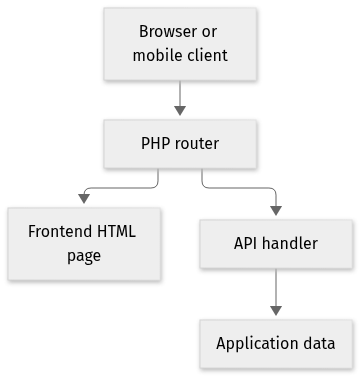
The components and their connections remain available as text. The diagram adds an interactive view.
- Browser or mobile client
- PHP router
- Frontend HTML page
- API handler
- Application data
Links verified in the repository.
Mermaid Interactive diagram (loads on open)
System overview of the components and connections verified in the repository.
flowchart LR
  n0["Browser or mobile client"]
  n1["PHP router"]
  n2["Frontend HTML page"]
  n3["API handler"]
  n4["Application data"]
  n0 --> n1
  n1 --> n2
  n1 --> n3
  n3 --> n4
Text version of the diagram
- Browser or mobile client → PHP router
- PHP router → Frontend HTML page
- PHP router → API handler
- API handler → Application data
Follow one path through the code
Compare GET /login with POST /api/login. The first selects a page; the second invokes authentication logic. Access checks belong on protected API operations as well as on the administrative page.
HTTP API and permissions
routes.php maps the paths below. The README shows paths such as /api/login.php and French status text. The handlers use the paths in this table and English messages. The access column records a check found in the handler.
| Method | Path | Verified access check | File |
|---|---|---|---|
POST | /api/login | No session check. loginUser verifies the password hash. | api/login.php |
POST | /api/signup | No session check. The body role must be admin or client, including admin for a new account. | api/signup.php |
POST | /api/logout | No session check. The handler destroys the session. | api/logout.php |
GET | /api/user_details | Requires the user_loggedin session key. Role is not checked. | api/user_details.php |
GET | /api/clients | Requires user_loggedin and session role admin. Otherwise the JSON says Access denied. | api/clients.php |
GET | /admin | Page, not JSON. isAdmin() includes admin.html, otherwise 403.html. | routes.php |
GET, POST | /api/hello-world/$langue | No session check. A logged-in session replaces prenom with the username. | api/hello-world.php |
GET, POST | /api/random-image | No session check in the handler. | api/random-image.php |
Sequence limited to the cited path.
sequenceDiagram
  participant Browser
  participant Login as api/login.php
  participant Users as Clients table
  Browser->>Login: POST /api/login JSON
  Login->>Users: SELECT by username
  Users-->>Login: row
Login-->>Browser: status, message, redirectPOST /api/login
Content-Type: application/json
{
"username": "example",
"password": "local-dev-password"
}Response and errors
- Success:
api/login.phpreturnsstatus: success,message: Login successful, andredirect: /home. - Failed credentials: the JSON body contains
status: errorandInvalid username or password. - Other HTTP methods: the JSON body contains
Invalid request method. - Message language: the handler uses English, while the README examples use French.
- Session details:
GET /api/user_detailsrequiresuser_loggedinand returnsuser_detailsfrom the session. - Client list:
GET /api/clientsalso requires theadminrole. ItsSELECT * FROM Clientsquery includes the password column in a successful response. - Public demos:
GETandPOSTrequests to/api/hello-world/$langueand/api/random-imagehave no session check. Hello World uses the session username forprenomwhen available. - Random image:
imageType: humanreturns the thispersondoesnotexist.com URL. Every other value calls The Cat API.
Authentication, limits and pagination
POST /api/signup accepts role admin or client from the JSON body. Nothing in signup.php requires an existing admin session before that role is stored. router.php sends Access-Control-Allow-Origin: *. These handlers do not set a rate limit. GET /admin is a page: routes.php calls isAdmin() and otherwise includes 403.html. Login does not set an HTTP error status; failures stay in the JSON body.
Deployment and operations
The ports, storage, and startup relationships below come from the repository configuration. depends_on records startup order, not service readiness.
Network. Bridge network tch099-network. The Compose file does not set host networking.
Deployment map
Compose topology of documented services, ports, and startup dependencies.
flowchart LR
  classDef svc fill:#1b3040,stroke:#6fdbd0,color:#edf4fb
  web["web<br/>8001:80"]:::svc
  db["db<br/>3306:3306"]:::svc
  phpmyadmin["phpmyadmin<br/>8060:80"]:::svc
  db --> web
  db --> phpmyadmin
Text version of the diagram
- web — Build from Dockerfile · 8001:80 → db, startup order only
- db — mariadb:latest · 3306:3306
- phpmyadmin — phpmyadmin/phpmyadmin · 8060:80 → db, startup order only
| Service | Image or build | Published ports | Startup | Storage |
|---|---|---|---|---|
| web | Build from Dockerfile | 8001:80 | db, startup order only | Bind mount of the repository at /var/www/html |
| db | mariadb:latest | 3306:3306 | Named volume dbdata | |
| phpmyadmin | phpmyadmin/phpmyadmin | 8060:80 | db, startup order only |
Documented variable names. Values are not copied here.
DB_HOSTDB_PORTMYSQL_ROOT_PASSWORDMYSQL_DATABASEMYSQL_USERMYSQL_PASSWORDPMA_HOST
Types and file structure
5 declared types, with 5 in the base-relationship overview.
Type diagram
classDiagram
direction TB
class t4c474a248da2["HttpClient"] {
  getInstance()
  execute()
  runOnUiThread()
  showToast()
}
class t8be3c8236c60["LoginActivity"] {
  onCreate()
  loginUser()
  sendNotification()
  createNotificationChannel()
}
class t30126744bba2["MainActivity"] {
  onCreate()
}
class t2369eda48b07["SignupActivity"] {
  onCreate()
  signupUser()
}
class ta93831bff0ab["UserDetailsActivity"] {
  onCreate()
  fetchUserDetails()
}
class b77dd461be19c["AppCompatActivity"] {
  <<unresolved_base>>
}
t8be3c8236c60 ..> b77dd461be19c : declared base
class bad280d6f8481["AppCompatActivity"] {
  <<unresolved_base>>
}
t30126744bba2 ..> bad280d6f8481 : declared base
class be4547a562aeb["AppCompatActivity"] {
  <<unresolved_base>>
}
t2369eda48b07 ..> be4547a562aeb : declared base
class bf6fdb00a13f1["AppCompatActivity"] {
  <<unresolved_base>>
}
ta93831bff0ab ..> bf6fdb00a13f1 : declared base
Unresolved bases remain labelled; full signatures are not reconstructed.
Type index
HttpClient(class) ·MyMobileApp/MyApplication/app/src/main/java/com/tch099/HttpClient.java:20Methods in the overview:
getInstance, execute, runOnUiThread, showToast.LoginActivity(class) ·MyMobileApp/MyApplication/app/src/main/java/com/tch099/LoginActivity.java:31Methods in the overview:
onCreate, loginUser, sendNotification, createNotificationChannel.Declared bases:
AppCompatActivity.MainActivity(class) ·MyMobileApp/MyApplication/app/src/main/java/com/tch099/MainActivity.java:11Methods in the overview:
onCreate.Declared bases:
AppCompatActivity.SignupActivity(class) ·MyMobileApp/MyApplication/app/src/main/java/com/tch099/SignupActivity.java:15Methods in the overview:
onCreate, signupUser.Declared bases:
AppCompatActivity.UserDetailsActivity(class) ·MyMobileApp/MyApplication/app/src/main/java/com/tch099/UserDetailsActivity.java:19Methods in the overview:
onCreate, fetchUserDetails.Declared bases:
AppCompatActivity.
Reference
28 / 28 eligible files read (109 in the tree); 0 oversized, 0 failed reads and 0 syntax diagnostics.
What the scan covers
Known dependency/build folders, credential files and binaries are excluded. The scan covers READMEs, recognized manifests and parser-supported source files.
Linguist statistics cover the whole repository and may include other languages.
File map
flowchart TD
  root["TCH099"]
  f0["README.md"]
  root --> f0
  f1["router.php"]
  root --> f1
  f2["routes.php"]
  root --> f2
  f3["config.php"]
  root --> f3
  f4["docker-compose.yml"]
  root --> f4
  f5["api/README.md"]
  root --> f5
  f6["api/clients.php"]
  root --> f6
  f7["api/hello-world.php"]
  root --> f7
  f8["api/login.php"]
  root --> f8
  f9["api/logout.php"]
  root --> f9
  f10["api/random-image.php"]
  root --> f10
  f11["api/signup.php"]
  root --> f11
  f12["api/user_details.php"]
  root --> f12
  f13["db/README.md"]
  root --> f13
  f14["db/db.py"]
  root --> f14
  f15["frontend/README.md"]
  root --> f15