switch-wifi: Separating network measurements from the UI
switch-wifi is a Switch network dashboard with a Borealis interface. It separates portable metric calculations from the console application so that host tests can exercise the core without requiring the Switch toolchain.
Repository languagesC++ 86.58%3
Shares calculated from GitHub Linguist bytes.
| Language | % | Bytes |
|---|---|---|
| C++ | 61,640 | |
| CMake | 5,914 | |
| Python | 3,639 |
Overview
Why it exists
Native C++ network configuration tool interfacing directly with Switch horizon OS wlan services.
Best fit
Fast headless Wi-Fi network credential provisioning on Switch.
Getting started
These commands come from the repository documentation. They were not run during this review.
git clone --recursive https://github.com/antoinebou12/switch-wifi.git
cd switch-wifipython3 scripts/verify_nro.py build-switch/switch-wifi.nrocmake -S . -B build-switch -DPLATFORM_SWITCH=ON -DUSE_GLFW=ON -DCMAKE_BUILD_TYPE=Release
cmake --build build-switch --target switch-wifi.nro --paralleldocker run --rm \
-v "$PWD:/work" -w /work \
devkitpro/devkita64:latest \
bash -lc 'cmake -S . -B build-switch \
-DPLATFORM_SWITCH=ON \
-DUSE_GLFW=ON \
-DCMAKE_BUILD_TYPE=Release && \
cmake --build build-switch --target switch-wifi.nro --parallel'Repository references
Excerpts from the repository’s guides, in their original language. Links open the inspected source revision.
Prerequisites and first run
Native devkitPro installation
README.md
Configuration and usage
Wi-Fi environment
README.md
- Basic saved-network metadata without requesting full saved credential profiles.
- Authentication/encryption labels.
- Horizon allowed-channel query on HOS 6.0.0+.
- 2.4 GHz and 5 GHz channel/frequency helpers.
- Tested channel-overlap and contention-proxy math.
- Nearby AP scan kept behind a hardware-verification boundary until opaque Horizon AP records can be decoded safely across firmware versions.
- RF noise floor and SNR shown as unavailable rather than inferred from unrelated values.
Development and contributions
Unit tests
README.md
The platform-independent metric, history, channel and benchmark-statistics code is tested on the host. The suite is split into:
- switch_wifi_metrics_tests;
- switch_wifi_history_tests;
- switch_wifi_benchmark_tests. Sanitizer build:
Development rules
CONTRIBUTING.md
- Keep Horizon/libnx IPC out of the Borealis UI layer.
- Add a host-side test for calculations and parsers whenever possible.
- Gate firmware-dependent behavior explicitly.
- Do not add code that retrieves Wi-Fi passphrases just to display profile information.
- Do not call a derived AP-overlap value “noise floor”, “SNR”, or “channel utilization” unless the underlying metric is actually measured.
- Keep Bluetooth diagnostics read-only.
Features and components 2
- Portable metric core
- CMake creates switch_wifi_core from src/core/metrics.cpp. Host test targets link this library separately from Borealis. Tests cover metrics, history and benchmark behavior, with optional sanitizers.
- Console integration
- The application target collects the src modules and links Borealis, libnx platform libraries and libcurl. Network activity and the UI therefore depend on platform services, while the numeric core can stay independent.
Architecture
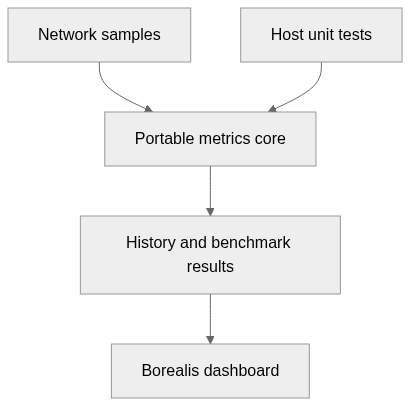
The components and their connections remain available as text. The diagram adds an interactive view.
- Network samples
- Portable metrics core
- History and benchmark results
- Borealis dashboard
- Host unit tests
Links verified in the repository.
Mermaid Interactive diagram (loads on open)
System overview of the components and connections verified in the repository.
flowchart LR
  n0["Network samples"]
  n1["Portable metrics core"]
  n2["History and benchmark results"]
  n3["Borealis dashboard"]
  n4["Host unit tests"]
  n0 --> n1
  n1 --> n2
  n2 --> n3
  n4 --> n1
Text version of the diagram
- Network samples → Portable metrics core
- Portable metrics core → History and benchmark results
- History and benchmark results → Borealis dashboard
- Host unit tests → Portable metrics core
Follow one path through the code
Start with the core library target and its tests, then inspect the network module feeding its samples. An HTTPS throughput measurement includes the chosen remote server and network path; it is not a direct reading of Wi-Fi radio capacity.
Deployment and operations
The ports, storage, and startup relationships below come from the repository configuration. depends_on records startup order, not service readiness.
Types and file structure
27 declared types, with 12 in the base-relationship overview.
Type diagram
classDiagram
direction TB
class tec54ffc64505["BluetoothService"] {
  snapshot()
  passiveScan()
}
class t17625c2744a3["IpConfig"] {
  <<struct>>
}
class t7988c53361f7["ConnectionSnapshot"] {
  <<struct>>
}
class t4a309fd00cd7["SavedNetwork"] {
  <<struct>>
}
class tc583422c7f0f["NearbyWifiNetwork"] {
  <<struct>>
}
class tff9ef4d0d29e["LatencyStats"] {
  <<struct>>
}
class t2488d1629c51["SpeedSample"] {
  <<struct>>
}
class t60189b23c9ad["BluetoothDevice"] {
  <<struct>>
}
class t28065228e336["BluetoothSnapshot"] {
  <<struct>>
}
class t6f2d7c0133a5["BluetoothScanResult"] {
  <<struct>>
}
class tcd996a2f6785["RingHistory"] {
  RingHistory()
  push()
  clear()
  size()
}
class tba04fe8b8282["NetworkService"] {
  initialize()
  shutdown()
  snapshot()
  savedNetworks()
}
Unresolved bases remain labelled; full signatures are not reconstructed.
Type index
BluetoothService(class) ·include/switch_wifi/bluetooth/bluetooth_service.hpp:9Methods in the overview:
snapshot, passiveScan.IpConfig(struct) ·include/switch_wifi/core/metrics.hpp:18ConnectionSnapshot(struct) ·include/switch_wifi/core/metrics.hpp:27SavedNetwork(struct) ·include/switch_wifi/core/metrics.hpp:39NearbyWifiNetwork(struct) ·include/switch_wifi/core/metrics.hpp:46LatencyStats(struct) ·include/switch_wifi/core/metrics.hpp:55SpeedSample(struct) ·include/switch_wifi/core/metrics.hpp:64BluetoothDevice(struct) ·include/switch_wifi/core/metrics.hpp:79BluetoothSnapshot(struct) ·include/switch_wifi/core/metrics.hpp:84BluetoothScanResult(struct) ·include/switch_wifi/core/metrics.hpp:92RingHistory(class) ·include/switch_wifi/core/metrics.hpp:216Methods in the overview:
RingHistory, push, clear, size.NetworkService(class) ·include/switch_wifi/network/network_service.hpp:8Methods in the overview:
initialize, shutdown, snapshot, savedNetworks.
Reference
25 / 25 eligible files read (51 in the tree); 0 oversized, 0 failed reads and 3 syntax diagnostics.
What the scan covers
Known dependency/build folders, credential files and binaries are excluded. The scan covers READMEs, recognized manifests and parser-supported source files.
Linguist statistics cover the whole repository and may include other languages.
File map
flowchart TD
  root["switch-wifi"]
  f0["CMakeLists.txt"]
  root --> f0
  f1["src/main.cpp"]
  root --> f1
  f2["src/core/metrics.cpp"]
  root --> f2
  f3["README.md"]
  root --> f3
  f4["library/CMakeLists.txt"]
  root --> f4
  f5["scripts/check_release_version.py"]
  root --> f5
  f6["scripts/package_release.py"]
  root --> f6
  f7["scripts/verify_nro.py"]
  root --> f7
  f8["tests/test_benchmark.cpp"]
  root --> f8
  f9["tests/test_history.cpp"]
  root --> f9
  f10["tests/test_metrics.cpp"]
  root --> f10
  f11["include/switch_wifi/version.hpp"]
  root --> f11
  f12["src/bluetooth/bluetooth_service.cpp"]
  root --> f12
  f13["src/network/network_service.cpp"]
  root --> f13
  f14["src/network/speed_test.cpp"]
  root --> f14
  f15["src/ui/main_tabs.cpp"]
  root --> f15