Table of contents
Simulateur
Simulateur is a stock-market simulation platform built with Django: an admin prepares a scenario with fictional companies, news and events, and teams of players trade the simulated stocks while prices move in real time. It is an AlgoÉTS repository for groups that want to run a market game together, with an admin interface that controls the settings and the flow of each simulation.
1. Overview
The Django project lives in simulateur/. simulateur/settings.py registers two local apps, simulation and backtesting, and uses SQLite unless DATABASE_ENGINE=postgresql is set.
- Price engine.
simulation/logic/simulation_manager.pyholds oneSimulationManagerper simulation. While the state isongoing, it sleeps for the configured timer step, skips New York market-closed hours if asked, and writes an OHLC candle per stock from the chosen noise model (brownian,perlin,random_walk,fbm,randomormonte_carloinlogic/noise_patterns/). Each candle is stored asStockPriceHistoryand pushed to the WebSocket layer. - Lifecycle.
manage.py start_simulation <ids>sets the simulations toongoing, polls their state every five seconds and applies changed settings. The states are initialized, created, published, ongoing, stopped and finished. - Live updates.
simulation/channels/consumers.pyservesws/simulation/<room>/and relays stock updates, news, events and triggers to the game dashboard. - Trading.
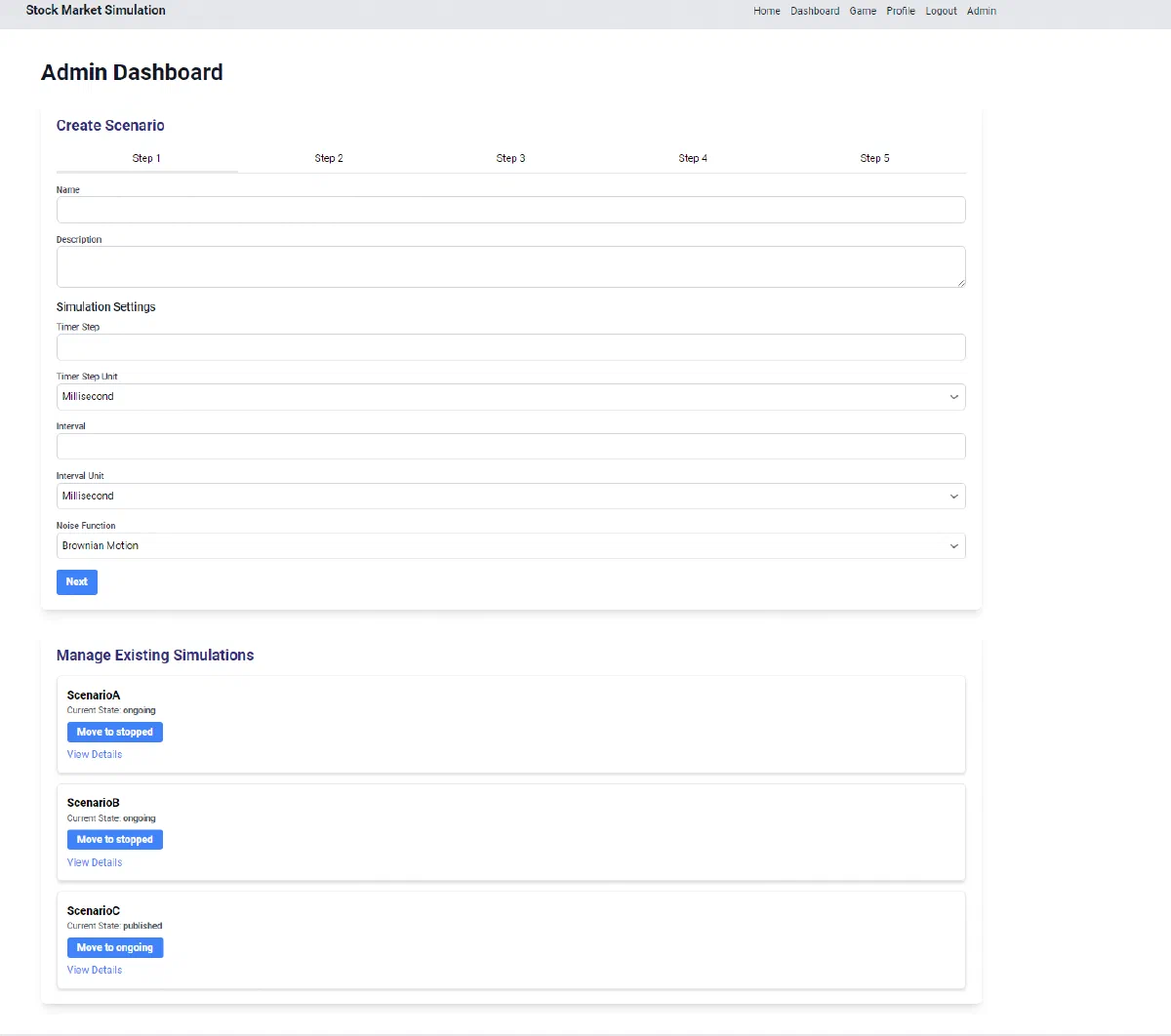
simulation/api/portfolio.pyhandles buy and sell orders against the latest price and the portfolio balance, and exposes holdings, performance and leaderboards. - Scenario authoring. The admin dashboard walks through five steps (settings, companies and stocks, teams, events, review).
simulation/api/ai_llm.pycan draft news, events, triggers, companies or whole scenarios with an Ollama model (OLLAMA_MODEL,llama3by default). - Backtesting app.
backtesting/adds chart search, strategy management and a sandbox page, data endpoints named for FMP, CoinGecko and yfinance, and Celery tasks for strategy runs.
run.py ties it together: it installs requirements, applies migrations, creates a superadmin, seeds the CSV files in data/, then starts Daphne (and optionally simulations and the Wagtail CMS on port 8001) in separate threads. In the Docker image, run.sh runs the same migrate, seed and superadmin steps before run.py --start-simulation 1.
2. Use cases
Django stock-market game where admins run scripted scenarios and teams trade simulated stocks live.
- Build a scenario
- Simulation admin
The admin dashboard walks through five form steps (settings, companies and stocks, teams, events, review) backed by the scenario and simulation-manager APIs.
- Run a market simulation
- Simulation admin
manage.py start_simulation sets a simulation to ongoing; SimulationManager then writes OHLC candles from the chosen noise model (Brownian, Perlin, random walk, fBm, Monte Carlo) at each time step.
- Generate content with AI
- Simulation adminOllama LLM
simulation/api/ai_llm.py exposes create-news-ai, create-event-ai, create-trigger-ai, create-company-stock-ai and create-scenario-ai, which prompt an Ollama model (OLLAMA_MODEL, llama3 by default).
- Join a team
- Player
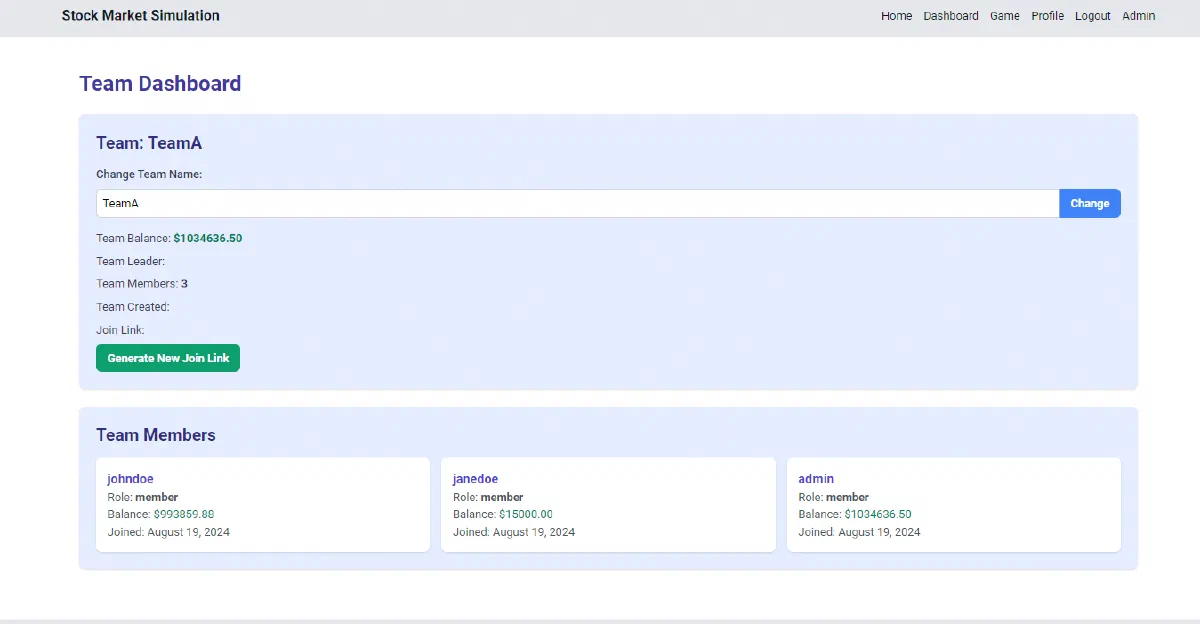
A team member generates a join link from the team dashboard (team/generate-join-link/) and other players join with it; the same page shows members and leaderboards.
- Buy and sell stocks
- Player
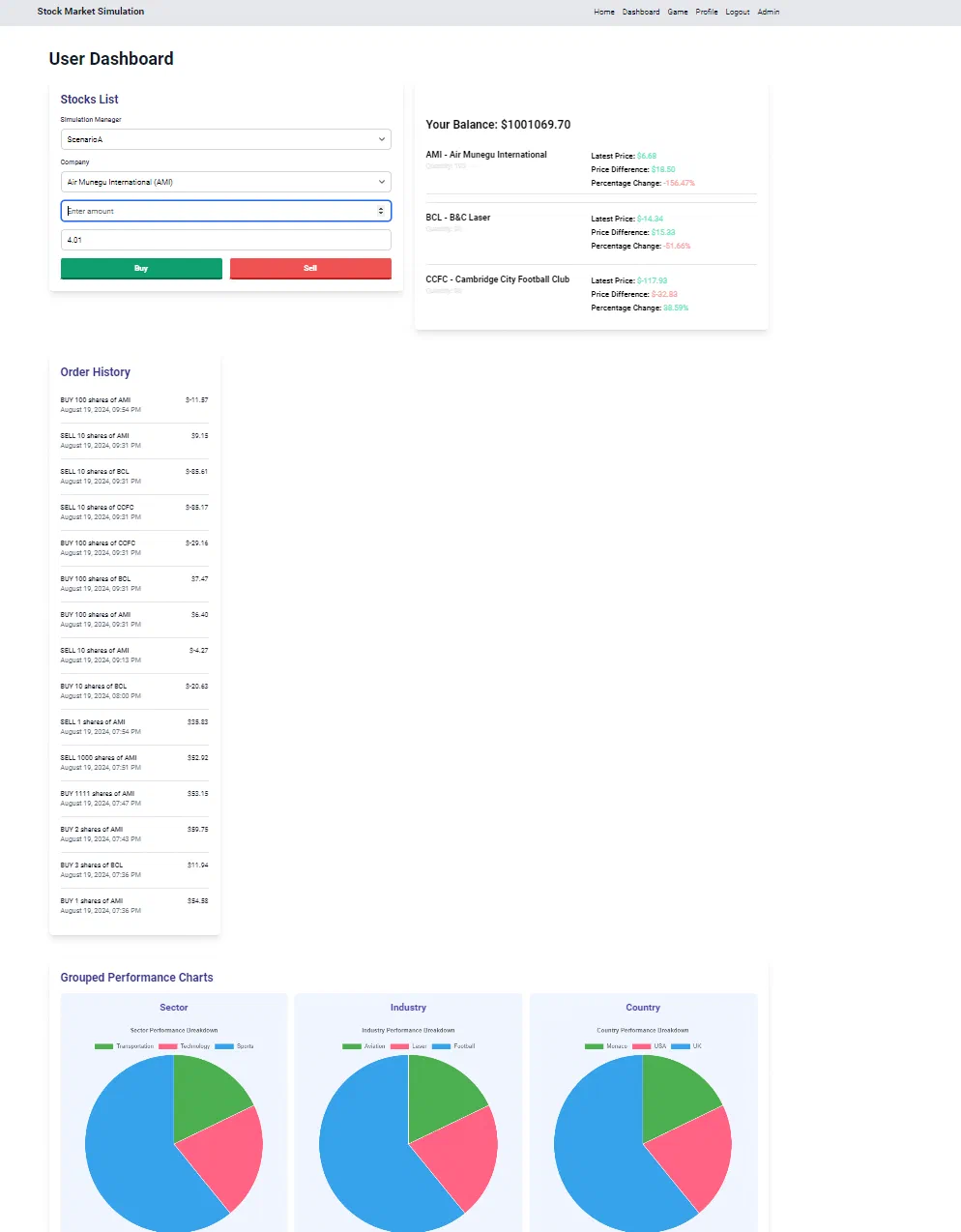
From /dashboard/, the order form calls POST /api/stock/buy/ or /api/stock/sell/, which check the balance against the latest price, record an order and update holdings.
- Follow live prices
- Player
The game dashboard opens ws/simulation/<id>/ and Django Channels pushes stock updates, news, events and triggers from SimulationConsumer.
2.1. Scenario: Run the seeded demo simulation
- In simulateur/, copy env-default to .env and run python3 run.py --install to install packages, migrate, create admin/admin and seed the CSV data.
- Start the ASGI server and simulation 1 with python3 run.py --start-simulation 1 (Daphne on port 8000).
- Sign in as admin and open /dashboard/admin to review the scenario, settings and noise function.
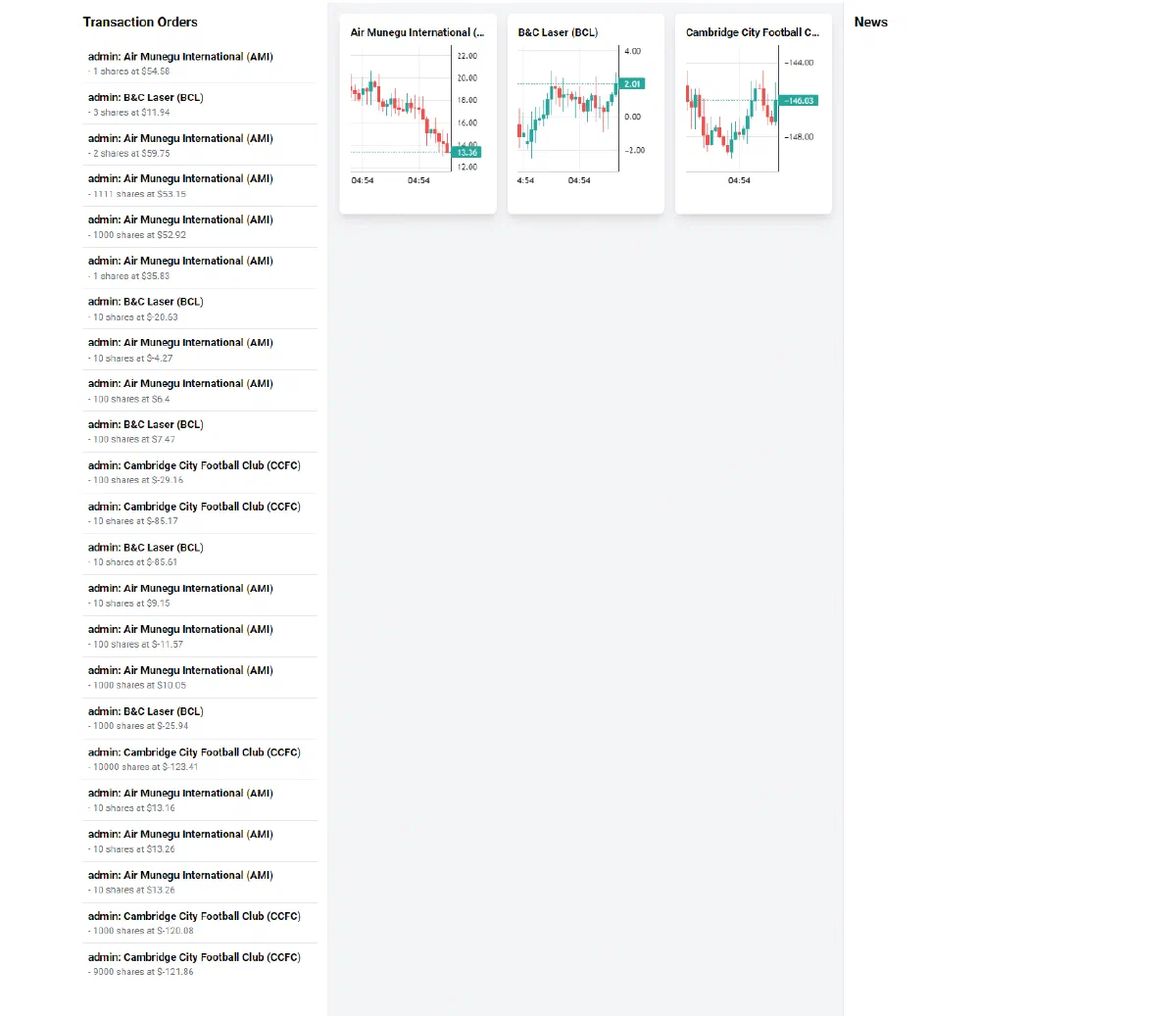
- Open /dashboard/game: candles arrive over the ws/simulation/ WebSocket at each timer step.
- From /dashboard/, choose the simulation and a stock and press Buy, which calls POST /api/stock/buy/; then check holdings and leaderboards.
Files readREADME.mdsimulateur/run.pysimulateur/entrypoint.shsimulateur/docker-compose.ymlsimulateur/requirements.txtsimulateur/simulateur/settings.pysimulateur/simulateur/urls.pysimulateur/simulation/urls.pysimulateur/simulation/logic/simulation_manager.pysimulateur/simulation/logic/broker.pysimulateur/simulation/logic/BuySellQueue.pysimulateur/simulation/api/portfolio.pysimulateur/simulation/api/ai_llm.pysimulateur/simulation/channels/consumers.pysimulateur/simulation/management/commands/start_simulation.pysimulateur/simulation/management/commands/seed_database.pydocs/diagrams/actors.plantumlsimulateur/simulation/templates/dashboard/user_dashboard.html
3. How prices move
Every tick, SimulationManager.apply_changes reads the stock’s last close P (or 0.0 when the stock has no history yet) and asks the selected noise model for one candle. Each model implements NoiseStrategy.generate_noise(price, fluctuation_rate, time_index). In the formulas below, σ is the simulation’s fluctuation_rate (0.1 by default), N(0, σ) is a normal draw and U(a, b) a uniform draw. The open is always P.
| Setting | Class | Close | High and low |
|---|---|---|---|
brownian | BrownianMotion | P + N(0, σ) | max/min of open and close, pushed out by U(0, 2σ) |
perlin | Perlin | P + pnoise1(0.1 · t) · 10σ | same wicks as brownian |
random_walk | RandomWalk | P ± U(0, 5σ), sign chosen by a coin flip | max/min of open and close, no wicks |
fbm | Fbm | uniform between low and high | P + U(0, 5σ) and P − U(0, 5σ) |
random | RandomCandle | same code as fbm | same code as fbm |
monte_carlo | MonteCarlo | mean of 100 simulated paths | max and min of those paths |
What each one means in practice:
- Brownian motion. Each close adds a Gaussian step to the previous close. Steps are independent, so the series wanders with no memory and no trend. The step is absolute (dollars), not a percentage.
- Perlin noise.
noise.pnoise1returns a smooth, continuous value for a given input, so successive candles drift in waves instead of jumping.tis one counter shared by every stock in the simulation and incremented after each candle, so with three stocks each one reads every third sample of the same curve. - Random walk. A coin flip picks up or down, then a uniform amount up to
5σsets the size. Candles have bodies but no shadows. - “Fractional Brownian motion” and random. Both draw a high and a low around the open, then drop the close anywhere between them. Nothing links one candle’s increment to the next, so the long-range correlation that defines fractional Brownian motion is not modelled; the two classes are line-for-line the same.
- Monte Carlo. The class simulates 100 geometric Brownian motion paths with zero drift,
S(t) = S(t−1) · exp(−σ²/2 · dt + σ · √dt · Z), and summarises them as a candle. This is the only multiplicative model, so it cannot cross zero. With the defaulttime_horizon=1, though, the loopfor t in range(1, 1)never runs, every path stays atP, and the candle is flat.
Because the first five models add an absolute step to the price, nothing stops a price from going below zero. The game-dashboard screenshot below shows exactly that: the Cambridge City Football Club stock trades around −146.
4. Simulation lifecycle
SimulationManager.state is a Django TextChoices field. ChangeSimulationManagerState in simulation/api/simulation_manager.py only accepts the transitions below, and the admin dashboard’s “Move to …” buttons offer the same list. The simulation loop reacts to the state it reads from the database: it starts on ongoing, leaves its loop on stopped or finished, and the monitoring thread exits for good on finished.
stateDiagram-v2
  [*] --> initialized
  initialized --> created
  created --> published
  published --> ongoing: admin starts the game
  ongoing --> stopped: admin pauses
  stopped --> ongoing: admin resumes
  stopped --> finished: admin ends the game
  ongoing --> finished: run_duration reached (loop sets it)
  finished --> [*]
Two loops drive this. manage.py start_simulation <ids> sets each simulation to ongoing inside a select_for_update transaction, then runs one thread per simulation that polls the row every five seconds, calls start_simulation() when the state is ongoing, and re-applies SimulationSettings when they change. Inside start_simulation(), each iteration refreshes the row, checks the state, skips pricing while the New York market is closed (weekends, and outside 09:00 to 16:00 Eastern) if close_stock_market_at_night is set, writes the candles, then sleeps timer_step × unit seconds (10 seconds by default). After run_duration (100,000 seconds) the loop itself writes finished.
5. Live updates over WebSocket
Prices reach the browser through Django Channels with a Redis pub/sub channel layer (channels_redis.pubsub.RedisPubSubChannelLayer, host redis by default).
sequenceDiagram
  participant Sim as SimulationManager loop
  participant DB as PostgreSQL
  participant Layer as Redis channel layer
  participant Consumer as SimulationConsumer
  participant Browser as Game dashboard
  Browser->>Consumer: connect ws/simulation/<simulation_manager_id>/
  Consumer->>Layer: group_add("simulation_<id>")
  loop every timer step
    Sim->>Sim: noise model builds an OHLC candle
    Sim->>DB: StockPriceHistory.objects.create(...)
    Sim->>Layer: group_send("simulation_1", type="stock_update")
    Layer->>Consumer: stock_update(event)
    Consumer->>Browser: JSON {ticker, open, high, low, close, timestamp}
    Browser->>Browser: bufferUpdate() redraws the candle chart
  end
  Browser->>Consumer: JSON type news with a message
  Consumer->>Layer: group_send(type="news_update")
  Layer->>Consumer: news_update(event)
  Consumer->>Browser: JSON type news with the message
The consumer (simulation/channels/consumers.py) joins one group per room and dispatches incoming messages by their type: stock, news, trigger, event and transaction. Each handler re-broadcasts to the group, and the matching *_update method sends the payload back down to every connected browser. The game dashboard (templates/dashboard/game_dashboard.html) reads the simulation id from the simulation_manager_id query parameter (default 1), reconnects up to ten times at five-second intervals, and routes messages that carry a ticker and a timestamp to the chart buffer.
6. Screens
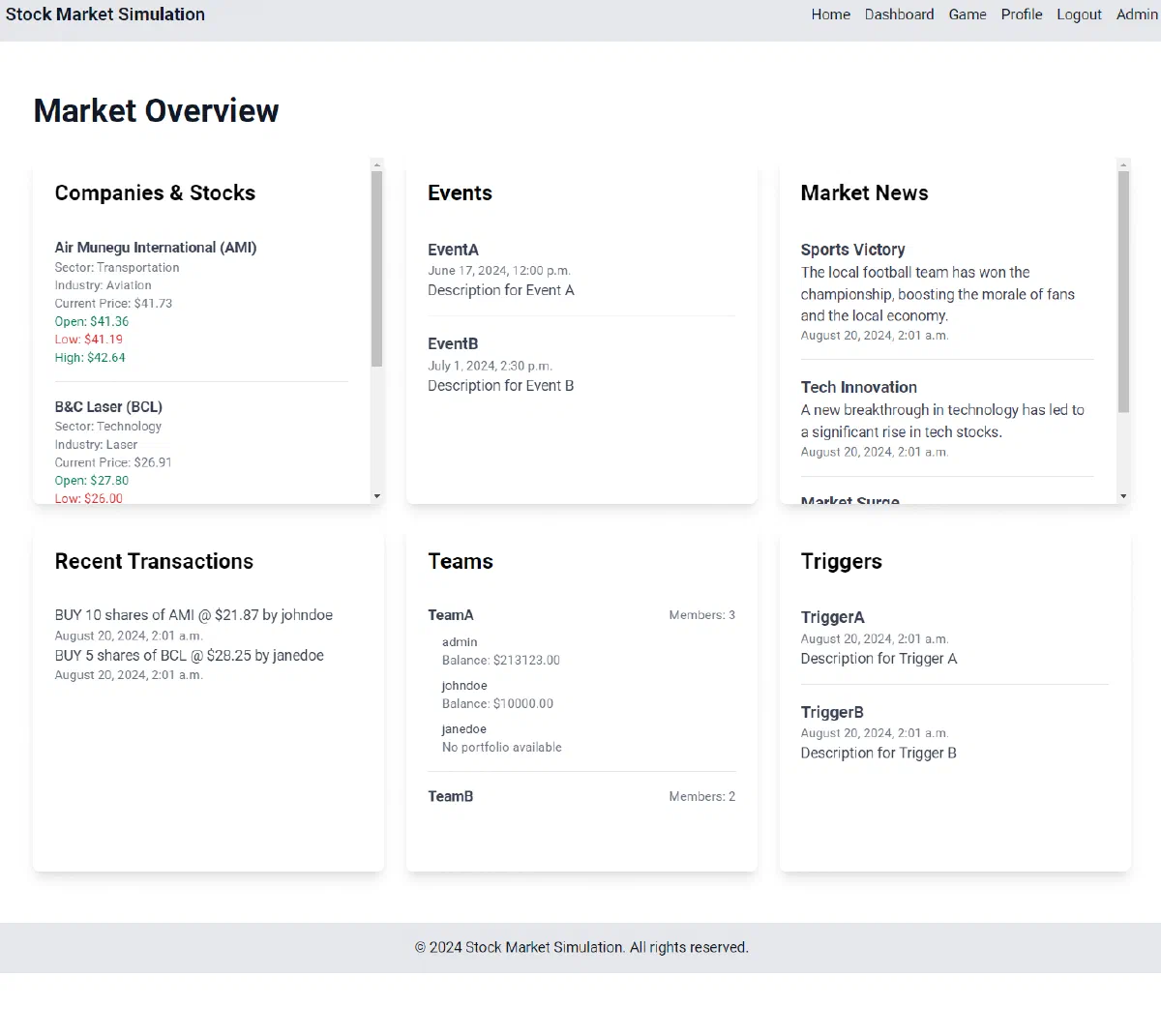
These screenshots come from the repository README.
7. Getting started
The README’s Docker Compose path runs Django, Celery, PostgreSQL, a Redis-compatible Dragonfly server and MinIO. The compose file and its .env live in simulateur/:
cd simulateur
cp env-default .env
docker compose --profile all down
docker compose --profile all up -d --build
Without Docker, use run.py (the README writes python3 -m run.py, but the script is run directly):
cd simulateur
python3 run.py --install
python3 run.py --start-simulation 1
--install creates a local-development superadmin with the README’s sample admin/admin login and seeds the database; change it before exposing the app. Another superadmin can be created with your own values:
python3 manage.py createsuperadmin --username=<name> --password=<password> --email=<email>
The Django test suite under simulation/tests/ runs with python3 manage.py test. Swagger and ReDoc pages are served at /swagger/ and /redoc/.
8. Repository guide
simulateur/run.py: install, migrate, seed and start Daphne, simulations or the CMS.simulateur/simulateur/: settings, URL root, ASGI entry (asgi.py) and Celery app.simulateur/simulation/logic/: simulation loop, noise models, broker and buy/sell queue.simulateur/simulation/api/: REST views for companies, stocks, scenarios, simulation managers, news, events, triggers, teams, portfolios and AI generation.simulateur/simulation/channels/: WebSocket consumer and routing.simulateur/simulation/models/: scenario, company, stock, team, portfolio, order and settings models.simulateur/simulation/management/commands/:start_simulation,seed_databaseandcreatesuperadmin.simulateur/simulation/templates/: admin, game, team and user dashboards built from partials.simulateur/simulation/tests/: tests for the API, models, logic, channels and commands.simulateur/backtesting/: backtesting views, data APIs, models and Celery tasks.simulateur/cms/: a separate Wagtail project.simulateur/data/: CSV seed data (companies, stocks, scenarios, teams, users, events, triggers …).notebooks/: prototypes for the broker, agents, noise, charts and strategies.docs/diagrams/: PlantUML use-case and sequence diagrams.
9. Features
- create companies with backstories, stocks, teams and user profiles;
- configure the timer step, fluctuation rate, market-hours closing and noise model per simulation;
- start, stop and finish simulations from the admin dashboard or the command line;
- stream OHLC candles, news, events and triggers to players over WebSockets;
- buy and sell stocks within a portfolio balance and follow holdings and performance;
- rank players and teams on leaderboards and invite players with team join links;
- draft scenario content with a local Ollama model;
- sign in with accounts or Google, GitHub, Microsoft and Notion through django-allauth;
- expose health checks, Prometheus metrics and an OpenAPI description.
10. Limits
- The README lists Django 4.2.13;
requirements.txtpins Django 5.0.8. The README badge says Python 3.12 while the Docker image uses Python 3.10. - Price broadcasts are sent to WebSocket room
1regardless of the simulation id, so only simulation 1 receives live updates as written. - The
dynamictrading mode relies onlogic/broker.py, which imports theBuySellQueuemodule instead of the class and omits thesimulation_managerargument; that path looks unfinished. The default mode isstatic. logic/noise_patterns/also contains GBM, Heston, Ornstein-Uhlenbeck and Vasicek models that the simulation manager does not offer.- The settings form offers
otheras a noise function and the manager acceptsrandom; neither matches the other list, so choosingotherraisesUnsupported noise function. - The
monte_carlomodel returns flat candles with its default one-step horizon, and the additive models allow negative prices (see How prices move). - The consumer sends news as
{"type": "news", "message": …}, but the game dashboard readsmessageData.news_itemsandmessageData.transactions, so WebSocket news and transactions arrive asundefinedon that page. - The
intervalsetting is stored and re-applied but the loop only sleeps fortimer_step. - The buy and sell view accepts a
pricefield from the request and only falls back to the latest close when it is missing. backtesting/batchbacktesting.pyimportssrc.dataandstrategiesmodules that are not in the repository.- The AI endpoints need a reachable Ollama server;
entrypoint.shstarts one and pulls a model, but the Dockerfile and compose file do not use it. - Defaults use weak demo credentials (
admin/admin,minioadmin,postgres), andscripts/contains a localhost certificate and key.
11. Sources
- GitHub repository
- README
simulateur/run.pysimulateur/simulation/logic/simulation_manager.pysimulateur/simulation/logic/noise_patterns/simulateur/simulation/api/simulation_manager.pysimulateur/simulation/channels/consumers.pysimulateur/simulation/management/commands/start_simulation.pysimulateur/simulation/urls.pysimulateur/simulation/api/portfolio.pysimulateur/docker-compose.yml
12. CI/CD pipeline
No CI/CD pipeline in the repository. The code is built and run by hand, as described above.
Generated from the source at commit 77f9e70.
13. Deployment diagram
Mermaid Deployment diagram
flowchart LR
  repo[("GitHub repository")]
  image["Docker image<br/>FROM python:3.10-slim"]
  subgraph compose["Docker Compose"]
    svc_django["django"]
    svc_redis["redis"]
    svc_minio["minio"]
    svc_minio_client["minio-client"]
    svc_db["db"]
    svc_celery["celery"]
  end
  repo -->|"docker build"| image
  image -->|"docker compose up"| compose
14. External dependencies
193 declared packages (193 runtime, 0 development) in simulateur/requirements.txt, simulateur/cms/requirements.txt.
Package table 80 / 193
| Package | Version | Scope | Purpose | Registry |
|---|---|---|---|---|
amqp | ==5.2.0 | runtime | Low-level AMQP client for Python (fork of amqplib). | pypi.org |
annotated-types | ==0.7.0 | runtime | Reusable constraint types to use with typing.Annotated | pypi.org |
anyio | ==4.4.0 | runtime | High-level concurrency and networking framework on top of asyncio or Trio | pypi.org |
asgiref | ==3.8.1 | runtime | ASGI specs, helper code, and adapters | pypi.org |
async-timeout | ==4.0.3 | runtime | Timeout context manager for asyncio programs | pypi.org |
attrs | ==24.2.0 | runtime | Data validation | pypi.org |
babel | ==2.16.0 | runtime | Build tooling | pypi.org |
beautifulsoup4 | ==4.12.3 | runtime | Scraping and parsing | pypi.org |
bleach | ==6.1.0 | runtime | An easy safelist-based HTML-sanitizing tool. | pypi.org |
build | ==1.2.1 | runtime | Build tooling | pypi.org |
cachecontrol | ==0.14.0 | runtime | httplib2 caching for requests | pypi.org |
certifi | ==2023.11.17 | runtime | Python package for providing Mozilla's CA Bundle. | pypi.org |
cffi | ==1.17.0 | runtime | Foreign Function Interface for Python calling C code. | pypi.org |
channels | ==4.1.0 | runtime | Real-time messaging | pypi.org |
channels-redis | — | runtime | Database access | pypi.org |
chardet | ==5.2.0 | runtime | Universal character encoding detector | pypi.org |
charset-normalizer | ==3.3.2 | runtime | The Real First Universal Charset Detector. Open, modern and actively maintained alternative to Chardet. | pypi.org |
cleo | ==2.1.0 | runtime | Cleo allows you to create beautiful and testable command-line interfaces. | pypi.org |
click | ==8.1.7 | runtime | Command line | pypi.org |
click-didyoumean | ==0.3.1 | runtime | Enables git-like *did-you-mean* feature in click | pypi.org |
colorama | ==0.4.6 | runtime | Command line | pypi.org |
constantly | ==23.10.4 | runtime | Symbolic constants in Python | pypi.org |
contourpy | ==1.2.1 | runtime | Python library for calculating contours of 2D quadrilateral grids | pypi.org |
crashtest | ==0.4.1 | runtime | Testing | pypi.org |
cryptography | ==43.0.0 | runtime | Authentication and security | pypi.org |
cssselect2 | ==0.7.0 | runtime | CSS selectors for Python ElementTree | pypi.org |
cycler | ==0.12.1 | runtime | Composable style cycles | pypi.org |
daphne | ==2.5.0 | runtime | Django ASGI (HTTP/WebSocket) server | pypi.org |
defusedxml | ==0.8.0rc2 | runtime | XML bomb protection for Python stdlib modules | pypi.org |
distlib | ==0.3.8 | runtime | Distribution utilities | pypi.org |
django | ==5.0.8 | runtime | Web framework | pypi.org |
django-allauth | ==64.1.0 | runtime | Web framework | pypi.org |
django-allauth-ui | ==1.4.1 | runtime | Web framework | pypi.org |
django-any-urlfield | ==2.7.post1 | runtime | Web framework | pypi.org |
django-appconf | ==1.0.6 | runtime | Web framework | pypi.org |
django-check-seo | ==1.0.1 | runtime | Web framework | pypi.org |
django-classy-tags | ==4.1.0 | runtime | Web framework | pypi.org |
django-cms | ==3.11.6 | runtime | Web framework | pypi.org |
django-colorfield | ==0.11.0 | runtime | Web framework | pypi.org |
django-cors-headers | ==4.4.0 | runtime | Web framework | pypi.org |
django-easy-audit | ==1.3.6 | runtime | Web framework | pypi.org |
django-extensions | ==3.2.3 | runtime | Web framework | pypi.org |
django-filer | ==3.1.4 | runtime | Web framework | pypi.org |
django-formtools | ==2.5.1 | runtime | Web framework | pypi.org |
django-guest-user | ==0.5.5 | runtime | Web framework | pypi.org |
django-health-check | ==3.18.3 | runtime | Web framework | pypi.org |
django-imagekit | ==5.0.0 | runtime | Web framework | pypi.org |
django-jet-reboot | ==1.3.7 | runtime | Web framework | pypi.org |
django-meta | ==2.4.2 | runtime | Web framework | pypi.org |
django-money | ==3.5.3 | runtime | Web framework | pypi.org |
django-organizations | ==2.4.1 | runtime | Web framework | pypi.org |
django-perf-rec | ==4.26.0 | runtime | Web framework | pypi.org |
django-pictures | ==1.3.3 | runtime | Web framework | pypi.org |
django-polymorphic | ==3.1.0 | runtime | Web framework | pypi.org |
django-prometheus | ==2.3.1 | runtime | Web framework | pypi.org |
django-pwa | ==2.0.0 | runtime | Web framework | pypi.org |
django-robots | ==6.1 | runtime | Web framework | pypi.org |
django-rq | ==2.10.2 | runtime | Web framework | pypi.org |
django-sekizai | ==4.1.0 | runtime | Web framework | pypi.org |
django-sslserver | ==0.22 | runtime | Web framework | pypi.org |
django-storages | ==1.12.3 | runtime | Web framework | pypi.org |
django-tinymce | ==4.1.0 | runtime | Web framework | pypi.org |
django-treebeard | ==4.7.1 | runtime | Web framework | pypi.org |
django-typer | ==2.2.1 | runtime | Web framework | pypi.org |
django-webpack-loader | ==3.1.0 | runtime | Web framework | pypi.org |
django-widget-tweaks | ==1.5.0 | runtime | Web framework | pypi.org |
djangocms-admin-style | ==3.3.1 | runtime | Web framework | pypi.org |
djangocms-page-meta | ==1.4.4 | runtime | Web framework | pypi.org |
djangorestframework | ==3.15.2 | runtime | Web framework | pypi.org |
drf-yasg | ==1.21.7 | runtime | Automated generation of real Swagger/OpenAPI 2.0 schemas from Django Rest Framework code. | pypi.org |
dulwich | ==0.21.7 | runtime | Python Git Library | pypi.org |
easy-thumbnails | ==2.9 | runtime | Easy thumbnails for Django | pypi.org |
fastjsonschema | ==2.20.0 | runtime | Data validation | pypi.org |
feedparser | ==6.0.11 | runtime | Scraping and parsing | pypi.org |
filelock | ==3.15.4 | runtime | A platform independent file lock. | pypi.org |
fonttools | ==4.53.1 | runtime | Tools to manipulate font files | pypi.org |
google-api-python-client | ==1.4.1 | runtime | Google API Client Library for Python | pypi.org |
h11 | ==0.14.0 | runtime | A pure-Python, bring-your-own-I/O implementation of HTTP/1.1 | pypi.org |
hiredis | ==3.0.0 | runtime | Database access | pypi.org |
hyperlink | ==21.0.0 | runtime | A featureful, immutable, and correct URL for Python. | pypi.org |
113 more packages are listed in the manifests.
15. Glossary
Repository
The versioned source files, configuration, and history of a project.
README
The repository’s entry document, usually covering its purpose and initial setup.
Dependency
A library, tool, or service that another component needs to build or run.
API
An interface through which software components exchange requests and results. An API does not have to use HTTP.
HTTP
A request-and-response protocol used by browsers and web services. A method, path, headers, and optional body describe a request.
Session
State kept across related requests, often to track a signed-in user. Authentication and permission checks remain separate concerns.
Container
An isolated process environment created from an image. Persistent data needs storage outside the container’s disposable filesystem.
Docker Compose
A configuration format and tool for starting related containers, networks, and volumes. Startup order alone does not guarantee service readiness.
Volume and bind mount
A volume is storage managed by the container platform; a bind mount exposes a chosen host path inside a container.
Published port
A host port mapped to a service’s container port. Publishing a port can expose that service beyond its container network.
CLI
A text interface in which commands and arguments select operations. Exit codes let scripts detect success or failure.
Build
The steps that turn source files and dependencies into a runnable program or distributable artifact.
Continuous integration
Automated checks that run when source changes, such as building, testing, and linting. Passing checks cover only what those checks exercise.
Mermaid
A text-based diagram language. Nodes and connections describe a model; the diagram itself does not execute the project.
Database
A system for storing and querying structured records. Its schema, access rules, and persistence determine how the application can use that data.
16. References
- AlgoÉTS. (2026, November 5). [Web page] github.com.
- AlgoETS. (2026, November 5). Simulateur. [Software repository] github.com.
- AlgoETS. (2026, November 5). README. [Source file or documentation] github.com.
- AlgoETS. (2026, November 5). simulateur/run.py. [Source file or documentation] github.com.
- AlgoETS. (2026, November 5). simulateur/simulation/logic/simulation_manager.py. [Source file or documentation] github.com.
- AlgoETS. (2026, November 5). simulateur/simulation/logic/noise_patterns/. [Source file or documentation] github.com.
- AlgoETS. (2026, November 5). simulateur/simulation/api/simulation_manager.py. [Source file or documentation] github.com.
- AlgoETS. (2026, November 5). simulateur/simulation/channels/consumers.py. [Source file or documentation] github.com.
- AlgoETS. (2026, November 5). simulateur/simulation/management/commands/start_simulation.py. [Source file or documentation] github.com.
- AlgoETS. (2026, November 5). simulateur/simulation/urls.py. [Source file or documentation] github.com.
- AlgoETS. (2026, November 5). simulateur/simulation/api/portfolio.py. [Source file or documentation] github.com.
- AlgoETS. (2026, November 5). simulateur/docker-compose.yml. [Source file or documentation] github.com.
Sources without a publication date show the date they were last checked, November 5, 2026. File links retain the inspected revision where available.