Serilog.Sinks.SentrySDK: Adapting log events to Sentry
Serilog.Sinks.SentrySDK bridges a .NET logging pipeline and the Sentry SDK. The application emits structured log events; a sink adapts that information for Sentry rather than asking every call site to invoke the SDK directly.
Repository languagesC# 98.04%2
Shares calculated from GitHub Linguist bytes.
| Language | % | Bytes |
|---|---|---|
| C# | 89,769 | |
| PowerShell | 1,795 |
Overview
Why it exists
Production .NET 6+ Serilog sink bridging structured logging and Sentry error telemetry with zero allocation overhead.
Best fit
Enterprise .NET microservice error observability and distributed trace correlation.
Getting started
These commands come from the repository documentation. They were not run during this review.
dotnet add package Serilog.Sinks.SentrySDK
Install-Package Serilog.Sinks.SentrySDKdotnet restore src/Serilog.Sinks.SentrySDK/Serilog.Sinks.SentrySDK.csproj
dotnet build src/Serilog.Sinks.SentrySDK/Serilog.Sinks.SentrySDK.csproj -c Release
dotnet build src/Serilog.Sinks.SentrySDK.AspNetCore/Serilog.Sinks.SentrySDK.AspNetCore.csproj -c Release
dotnet test src/Serilog.Sinks.SentrySDK.Tests/Serilog.Sinks.SentrySDK.Tests.csproj
dotnet test src/Serilog.Sinks.SentrySDK.AspNetCore.Tests/Serilog.Sinks.SentrySDK.AspNetCore.Tests.csprojdotnet test /p:CollectCoverage=true /p:CoverletOutputFormat=cobertura /p:CoverletOutput=./reports/coverage src/Serilog.Sinks.SentrySDK.Tests/Serilog.Sinks.SentrySDK.Tests.csprojdotnet restore src/Serilog.Sinks.SentrySDK.sln
dotnet format src/Serilog.Sinks.SentrySDK.slndotnet format src/Serilog.Sinks.SentrySDK.sln --verify-no-changesRepository references
Excerpts from the repository’s guides, in their original language. Links open the inspected source revision.
Prerequisites and first run
Installation
README.md
Build, run tests, and coverage (local development)
README.md
Installation
src/PACKAGE_README.md
Getting started
src/PACKAGE_README.md
Installation
src/PACKAGE_README_NET6.md
API and integration
Serilog.Sinks.SentrySDK
README.md
Sentry SDK
README.md
Contributing to Serilog.Sinks.SentrySDK
CONTRIBUTING.md
Serilog.Sinks.SentrySDK
src/PACKAGE_README.md
Sentry SDK options vs this sink
src/PACKAGE_README.md
Development and contributions
Tests and coverage
CONTRIBUTING.md
- Run tests locally before pushing:
- CI runs these tests and uploads coverage to Codecov. Prefer new tests for new code paths (e.g. factories, sink behavior, middleware) so coverage does not drop unnecessarily.
Demos, build, contributing
src/PACKAGE_README.md
- Demos: demos/README.md on GitHub
- Solution and local build/test commands: README — Build, run tests, and coverage
- CONTRIBUTING.md Full documentation (CI, publishing, formatting): README.md on GitHub.
Source documentation
README.mdCONTRIBUTING.mddemos/README.mdsrc/PACKAGE_README.mdsrc/PACKAGE_README_NET6.mdsrc/PACKAGE_README_NET10.md
6 documents read from 6 candidates.
Features and components 2
- Sink and SDK boundary
- SentrySink.cs defines an SDK wrapper interface with capture-message, capture-exception and transaction methods. The wrapper delegates to SentrySdk. This boundary gives tests a substitute for the external SDK calls.
- Application context
- The source tree separates the sink package from ASP.NET Core integration and tests. Request and user factories adapt HTTP context. Logging configuration and request enrichment therefore have different responsibilities.
Architecture
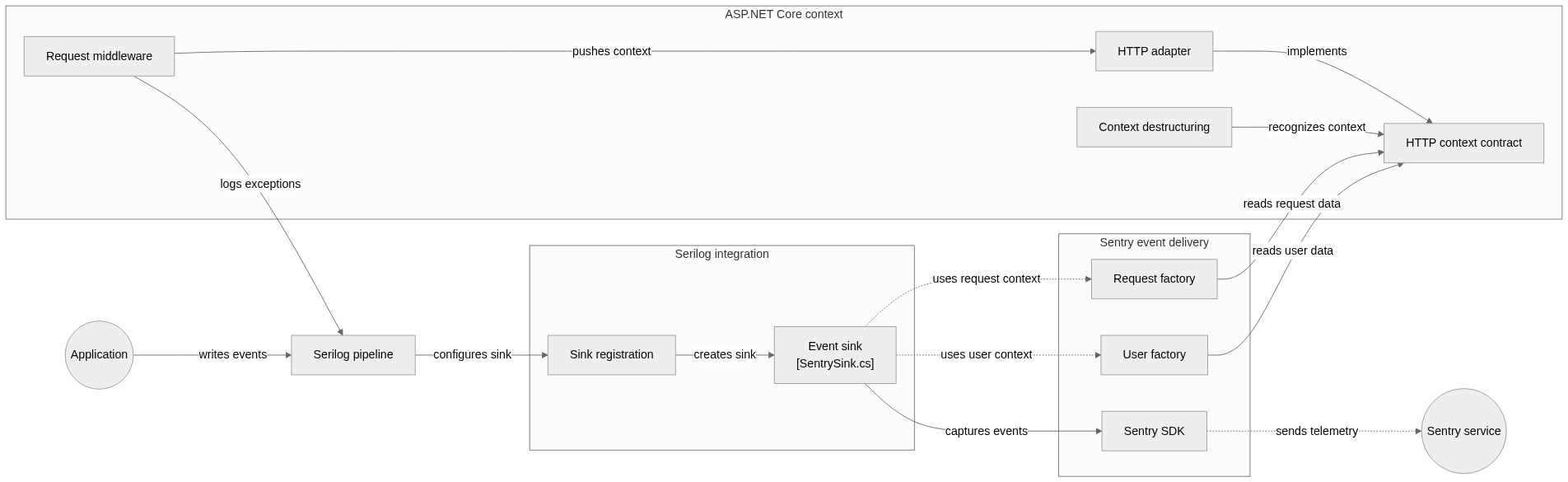
The components and their connections remain available as text. The diagram adds an interactive view.
- Application log event
- Serilog pipeline
- Sentry sink and context
- SDK wrapper
- Sentry SDK
Links verified in the repository.
Mermaid Interactive diagram (loads on open)
System overview of the components and connections verified in the repository.
flowchart LR

subgraph group_logging["Serilog integration"]
  node_sinkconfig["Sink registration"]
  node_sink["Event sink<br/>[SentrySink.cs]"]
end

subgraph group_sentry["Sentry event delivery"]
  node_requestfactory["Request factory"]
  node_userfactory["User factory"]
  node_sentrysdk["Sentry SDK"]
end

subgraph group_web["ASP.NET Core context"]
  node_contextadapter["HTTP adapter"]
  node_middleware["Request middleware"]
  node_destructure["Context destructuring"]
  node_contextcontract["HTTP context contract"]
end

node_app(("Application"))
node_serilog["Serilog pipeline"]
node_sentryservice(("Sentry service"))

node_app -->|"writes events"| node_serilog
node_serilog -->|"configures sink"| node_sinkconfig
node_sinkconfig -->|"creates sink"| node_sink
node_sink -->|"captures events"| node_sentrysdk
node_sentrysdk -.->|"sends telemetry"| node_sentryservice
node_middleware -->|"pushes context"| node_contextadapter
node_middleware -->|"logs exceptions"| node_serilog
node_contextadapter -->|"implements"| node_contextcontract
node_destructure -->|"recognizes context"| node_contextcontract
node_requestfactory -->|"reads request data"| node_contextcontract
node_userfactory -->|"reads user data"| node_contextcontract
node_sink -.->|"uses request context"| node_requestfactory
node_sink -.->|"uses user context"| node_userfactory


class node_sinkconfig,node_sink toneBlue
class node_requestfactory,node_userfactory,node_sentrysdk toneAmber
class node_contextadapter,node_middleware,node_destructure,node_contextcontract toneMint
class node_app,node_serilog,node_sentryservice toneIndigo
A Serilog sink that configures the Sentry SDK and maps log events to messages, exceptions, breadcrumbs and optional traces. The ASP.NET Core package adds request and user context through an HTTP-context adapter.
- Components
- 12
- Connections
- 13
- Links supported by code or README
- 10/13
Text version of the diagram
- Application log event → Serilog pipeline
- Serilog pipeline → Sentry sink and context
- Sentry sink and context → SDK wrapper
- SDK wrapper → Sentry SDK
Follow one path through the code
Follow an exception-bearing log through the sink and compare it with a message-only event. The wrapper exposes separate capture operations, so a useful test checks the chosen operation and its event data, not only that a call occurred.
Types and file structure
38 declared types, with 12 in the base-relationship overview.
Type diagram
classDiagram
direction TB
class ta0f4fc6d8b31["ISentryRequestFactory"] {
  <<interface>>
  Create()
}
class tab0f434b248f["SentryRequestFactory"] {
  SentryRequestFactory()
  Create()
}
class t94a164d611c8["ISentryRequest"] {
  <<interface>>
}
class t66938c58944a["SentryRequest"] {
}
class td9dd9f1be134["ISentrySdkWrapper"] {
  <<interface>>
  CaptureMessage()
  CaptureException()
  StartTransaction()
}
class t436d77520181["SentrySdkWrapper"] {
  SentrySdkWrapper()
  CaptureMessage()
  CaptureException()
  StartTransaction()
}
class t9aa877270a99["ITransactionService"] {
  <<interface>>
  StartChild()
}
class t7f1535817357["TransactionService"] {
  StartChild()
}
class t53092b4cd27d["SentrySink"] {
  SentrySink()
  Emit()
  EmitWithoutTracing()
  GetBreadcrumbLevel()
}
class t3bef4532763b["SentrySinkExtensions"] {
  Sentry()
}
class t6b344cd3bb4d["Program"] {
  Main()
  ThrowDivideByZeroSecondTier()
  DivByZero()
  ThrowParseExceptionSecondTier()
}
class t0108ee6641d7["HomeController"] {
  Index()
  About()
  Contact()
  Error()
}
ta0f4fc6d8b31 <|.. tab0f434b248f
t94a164d611c8 <|.. t66938c58944a
td9dd9f1be134 <|.. t436d77520181
t9aa877270a99 <|.. t7f1535817357
class bc2d528bdb08a["ILogEventSink"] {
  <<unresolved_base>>
}
t53092b4cd27d ..> bc2d528bdb08a : declared base
class b06fa01e7e2b1["IDisposable"] {
  <<unresolved_base>>
}
t53092b4cd27d ..> b06fa01e7e2b1 : declared base
class bd8f3faa41a98["Controller"] {
  <<unresolved_base>>
}
t0108ee6641d7 ..> bd8f3faa41a98 : declared base
Unresolved bases remain labelled; full signatures are not reconstructed.
Type index
ISentryRequestFactory(interface) ·src/Serilog.Sinks.SentrySDK/AspNetCoreSentryRequestFactory.cs:9Methods in the overview:
Create.SentryRequestFactory(class) ·src/Serilog.Sinks.SentrySDK/AspNetCoreSentryRequestFactory.cs:21Methods in the overview:
SentryRequestFactory, Create.Declared bases:
ISentryRequestFactory.ISentryRequest(interface) ·src/Serilog.Sinks.SentrySDK/AspNetCoreSentryRequestFactory.cs:58SentryRequest(class) ·src/Serilog.Sinks.SentrySDK/AspNetCoreSentryRequestFactory.cs:79Declared bases:
ISentryRequest.ISentrySdkWrapper(interface) ·src/Serilog.Sinks.SentrySDK/SentrySink.cs:20Methods in the overview:
CaptureMessage, CaptureException, StartTransaction.SentrySdkWrapper(class) ·src/Serilog.Sinks.SentrySDK/SentrySink.cs:45Methods in the overview:
SentrySdkWrapper, CaptureMessage, CaptureException, StartTransaction.Declared bases:
ISentrySdkWrapper.ITransactionService(interface) ·src/Serilog.Sinks.SentrySDK/SentrySink.cs:77Methods in the overview:
StartChild.TransactionService(class) ·src/Serilog.Sinks.SentrySDK/SentrySink.cs:93Methods in the overview:
StartChild.Declared bases:
ITransactionService.SentrySink(class) ·src/Serilog.Sinks.SentrySDK/SentrySink.cs:106Methods in the overview:
SentrySink, Emit, EmitWithoutTracing, GetBreadcrumbLevel.Declared bases:
ILogEventSink, IDisposable.SentrySinkExtensions(class) ·src/Serilog.Sinks.SentrySDK/SentrySinkExtensions.cs:13Methods in the overview:
Sentry.Program(class) ·demos/SentryConsole/Program.cs:15Methods in the overview:
Main, ThrowDivideByZeroSecondTier, DivByZero, ThrowParseExceptionSecondTier.HomeController(class) ·demos/SentryWeb/Controllers/HomeController.cs:12Methods in the overview:
Index, About, Contact, Error.Declared bases:
Controller.
Reference
32 / 32 eligible files read (117 in the tree); 0 oversized, 0 failed reads and 0 syntax diagnostics.
What the scan covers
Known dependency/build folders, credential files and binaries are excluded. The scan covers READMEs, recognized manifests and parser-supported source files.
Linguist statistics cover the whole repository and may include other languages.
File map
flowchart TD
  root["Serilog.Sinks.SentrySDK"]
  f0["src/Serilog.Sinks.SentrySDK/AspNetCoreSentryRequestFactory.cs"]
  root --> f0
  f1["src/Serilog.Sinks.SentrySDK/SentrySink.cs"]
  root --> f1
  f2["src/Serilog.Sinks.SentrySDK/SentrySinkExtensions.cs"]
  root --> f2
  f3["README.md"]
  root --> f3
  f4["demos/README.md"]
  root --> f4
  f5["demos/SentryConsole/Program.cs"]
  root --> f5
  f6["demos/SentryWeb/Program.cs"]
  root --> f6
  f7["demos/SentryWeb/Startup.cs"]
  root --> f7
  f8["src/Serilog.Sinks.SentrySDK.AspNetCore.Tests/AspCoreHttpContextAdapterTests.cs"]
  root --> f8
  f9["src/Serilog.Sinks.SentrySDK.AspNetCore.Tests/ExceptionExtensionsTests.cs"]
  root --> f9
  f10["src/Serilog.Sinks.SentrySDK.AspNetCore.Tests/HttpContextDestructingPolicyTests.cs"]
  root --> f10
  f11["src/Serilog.Sinks.SentrySDK.AspNetCore.Tests/SentrySinkContextMiddlewareTests.cs"]
  root --> f11
  f12["src/Serilog.Sinks.SentrySDK.AspNetCore.Tests/SerilogSentryExtensionsTests.cs"]
  root --> f12
  f13["src/Serilog.Sinks.SentrySDK.AspNetCore/AspCoreHttpContextAdapter.cs"]
  root --> f13
  f14["src/Serilog.Sinks.SentrySDK.AspNetCore/ExceptionExtensions.cs"]
  root --> f14
  f15["src/Serilog.Sinks.SentrySDK.AspNetCore/HttpContextDestructingPolicy.cs"]
  root --> f15
Files to read 3
References
- GitHubSource repository
- READMERepository documentation
- Serilog.Sinks.SentrySDK: connecting structured logs to error reportingBlog article