retroarch-web-games: Packaging an emulator for a static web server
retroarch-web-games is an archived container setup around a web build of RetroArch. The repository combines browser runtime files with scripts and container assembly. Hosting the player and supplying game content are separate concerns.
Repository languagesHTML 46.67%5
Shares calculated from GitHub Linguist bytes.
| Language | % | Bytes |
|---|---|---|
| HTML | 19,054 | |
| JavaScript | 9,638 | |
| Python | 5,600 | |
| Shell | 4,742 | |
| Dockerfile | 1,789 |
Overview
Why it exists
Containerized WebAssembly RetroArch emulator bundle ready to run in any browser with zero installation.
Best fit
Zero-friction retro gaming via Docker on desktop, mobile, or smart TVs.
Getting started
These commands come from the repository documentation. They were not run during this review.
docker-compose up -dRepository references
Excerpts from the repository’s guides, in their original language. Links open the inspected source revision.
Prerequisites and first run
Retroarch Web with Installed Games
README.md
Features and components 2
- Container assembly
- The Dockerfile prepares the web-serving environment and installation material. entrypoint.sh controls container startup, while index.html and libretro.js belong to the browser-facing runtime.
- Runtime and content
- The browser loads the emulator runtime and its associated assets. Game files must match the expected core and format. Repository download scripts describe content acquisition separately from running the web interface.
Architecture
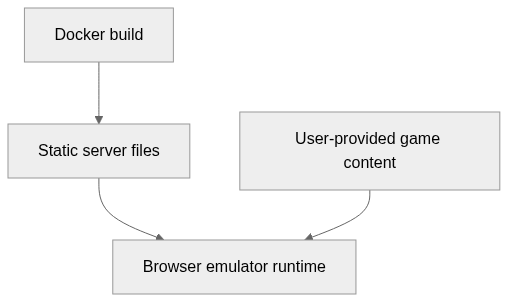
The components and their connections remain available as text. The diagram adds an interactive view.
- Docker build
- Static server files
- Browser emulator runtime
- User-provided game content
Links verified in the repository.
Mermaid Interactive diagram (loads on open)
System overview of the components and connections verified in the repository.
flowchart LR
  n0["Docker build"]
  n1["Static server files"]
  n2["Browser emulator runtime"]
  n3["User-provided game content"]
  n0 --> n1
  n1 --> n2
  n3 --> n2
Text version of the diagram
- Docker build → Static server files
- Static server files → Browser emulator runtime
- User-provided game content → Browser emulator runtime
Follow one path through the code
Read the Dockerfile alongside entrypoint.sh to separate image-build downloads from runtime serving. An image that builds successfully may still lack a browser-compatible core or the assets needed by a selected game.
Deployment and operations
The ports, storage, and startup relationships below come from the repository configuration. depends_on records startup order, not service readiness.
File structure
The map shows the inspected files and their organization.
Reference
8 / 8 eligible files read (15 in the tree); 0 oversized, 0 failed reads and 0 syntax diagnostics.
What the scan covers
Known dependency/build folders, credential files and binaries are excluded. The scan covers READMEs, recognized manifests and parser-supported source files.
Linguist statistics cover the whole repository and may include other languages.
File map
flowchart TD
  root["retroarch-web-games"]
  f0["entrypoint.sh"]
  root --> f0
  f1["InternetArchive.py"]
  root --> f1
  f2["InternetArchive.sh"]
  root --> f2
  f3["README.md"]
  root --> f3
  f4["docker-compose.yml"]
  root --> f4
  f5["libretro.js"]
  root --> f5
  f6["setup_retroarch.sh"]
  root --> f6
  f7["sort_mkdir.sh"]
  root --> f7