RawAnalyser: From raw sensor values to diagnostic plots
RawAnalyser is an older Python image-analysis experiment for clipping, channel values, gamma and vignetting. Its input assumptions are visible in the implementation, including a fixed raw frame shape and regions selected through a JSON file.
Repository languagesPython 100%1
Shares calculated from GitHub Linguist bytes.
| Language | % | Bytes |
|---|---|---|
| Python | 101,536 |
Overview
Why it exists
Sensor pixel analysis tool computing clipping histograms and dynamic range for RAW camera frames.
Best fit
Camera sensor benchmarking and exposure verification in computational photography.
Getting started
These commands come from the repository documentation. They were not run during this review.
python RawAnalyser.py <pathfolder> <pointfile> --func <clipping,gamma,vignette,histogram,noHist,basic, default all> --bl <black level, default 1024> --vignette <pathvignette>python GUI.pypython RawPixel.pt input<file> x y --bitdepth <8,10,16,default 16>Repository references
Excerpts from the repository’s guides, in their original language. Links open the inspected source revision.
Prerequisites and first run
Prerequisites
README.md
You need to have Python 2.7 installed and the following libraries:
- json
- time
- numpy
- scipy
- pyqt5
- argparse
- argcomplete
- watchdog
- logging
- colorama
- plotly
- matplotlib
Configuration and usage
Usage
README.md
- Run the RawAnalyser script:
- Start the GUI:
- Check the value of the pixel and the color with the bayer pattern:
Features and components 2
- File watcher and raw layout
- NewAnalyse reacts to file creation, loads region coordinates and reads uint16 data. The code reshapes the array to 1088 by 1928 pixels and writes a TIFF. Those dimensions are part of the implementation, not inferred from the file.
- Regions and channels
- The analysis builds crop and gray-reference matrices before separating channel samples with fixed index patterns. Plots and statistics therefore depend on both the region file and the assumed sensor layout.
Architecture
The components and their connections remain available as text. The diagram adds an interactive view.
- Raw frame and region JSON
- Watchdog event
- uint16 array and reshape
- Region and channel extraction
- TIFF and diagnostic plots
Links verified in the repository.
Mermaid Interactive diagram (loads on open)
System overview of the components and connections verified in the repository.
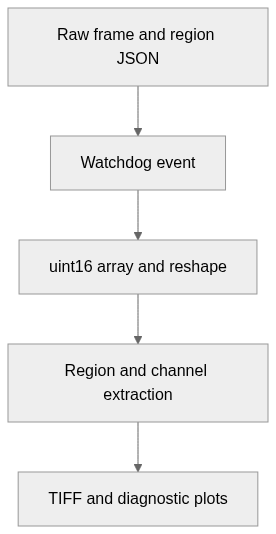
flowchart LR
  n0["Raw frame and region JSON"]
  n1["Watchdog event"]
  n2["uint16 array and reshape"]
  n3["Region and channel extraction"]
  n4["TIFF and diagnostic plots"]
  n0 --> n1
  n1 --> n2
  n2 --> n3
  n3 --> n4
Text version of the diagram
- Raw frame and region JSON → Watchdog event
- Watchdog event → uint16 array and reshape
- uint16 array and reshape → Region and channel extraction
- Region and channel extraction → TIFF and diagnostic plots
Follow one path through the code
Follow np.fromfile into reshape, then compare the crop bounds with the channel loops. A plausible-looking plot can still be wrong if the input dimensions or Bayer layout differ from those fixed assumptions.
Types and file structure
3 declared types, with 3 in the base-relationship overview.
Type diagram
classDiagram
direction TB
class t67aaaf89d49b["MenuFile"] {
  __init__()
  Menu()
  showDialog()
}
class t2831ebc76ef2["FormWidget"] {
  __init__()
  UI()
  eventFilter()
  getPos()
}
class tbf7f85dbbc2d["NewAnalyse"] {
  on_created()
}
class bc56111853d56["QMainWindow"] {
  <<unresolved_base>>
}
bc56111853d56 <|-- t67aaaf89d49b
class b8e0cc8fba905["QWidget"] {
  <<unresolved_base>>
}
b8e0cc8fba905 <|-- t2831ebc76ef2
class b5c54f16f78bf["FileSystemEventHandler"] {
  <<unresolved_base>>
}
b5c54f16f78bf <|-- tbf7f85dbbc2d
Unresolved bases remain labelled; full signatures are not reconstructed.
Type index
MenuFile(class) ·GUI.py:17Methods in the overview:
__init__, Menu, showDialog.Declared bases:
QMainWindow.FormWidget(class) ·GUI.py:42Methods in the overview:
__init__, UI, eventFilter, getPos.Declared bases:
QWidget.NewAnalyse(class) ·RawAnalyser.py:56Methods in the overview:
on_created.Declared bases:
FileSystemEventHandler.
Reference
8 / 8 eligible files read (65 in the tree); 0 oversized, 0 failed reads and 0 syntax diagnostics.
What the scan covers
Known dependency/build folders, credential files and binaries are excluded. The scan covers READMEs, recognized manifests and parser-supported source files.
Linguist statistics cover the whole repository and may include other languages.
File map
flowchart TD
  root["RawAnalyser"]
  f0["GUI.py"]
  root --> f0
  f1["RawAnalyser.py"]
  root --> f1
  f2["RawPixel.py"]
  root --> f2
  f3["20MPto5MP.py"]
  root --> f3
  f4["README.md"]
  root --> f4
  f5["Raw2Tiff.py"]
  root --> f5
  f6["RawAnalyserNew.py"]
  root --> f6
  f7["requirements.txt"]
  root --> f7