nxsand: A GPU grid for falling sand
nxsand is a falling-sand simulation for Switch with a desktop development target. Materials live in an integer grid. Simulation passes update that grid, and a separate rendering path turns material identifiers into the displayed image.
Repository languagesC++ 80.07%7
Shares calculated from GitHub Linguist bytes.
| Language | % | Bytes |
|---|---|---|
| C++ | 526,697 | |
| GLSL | 65,789 | |
| Python | 29,193 | |
| PowerShell | 21,830 | |
| Makefile | 10,750 | |
| Shell | 2,016 |
1 more languages
| Just | 0.23% | 1,491 |
Overview
Why it exists
Cellular automaton sand physics simulation engine running on libnx with touch and controller input.
Best fit
Interactive physics simulations on handheld console touchscreens.
Getting started
These commands come from the repository documentation. They were not run during this review.
dkp-pacman -Q libnx switch-sdl2
dkp-pacman -Syu # pull newer libnx / switch-sdl2 when availabledkp-pacman -S switch-dev switch-sdl2 switch-mesa switch-glm switch-freetype switch-harfbuzzmakemake desktop
./build/NXSand
make test # CPU reference tests, no GPUpacman -S --needed mingw-w64-x86_64-gcc mingw-w64-x86_64-make mingw-w64-x86_64-SDL2 mingw-w64-x86_64-freetype mingw-w64-x86_64-angleprojectRepository references
Excerpts from the repository’s guides, in their original language. Links open the inspected source revision.
Prerequisites and first run
Install on Switch (players)
README.md
You need a homebrew-ready Switch (setup guide).
- Get NXSand.nro — build it yourself (below), download the latest NXSand-switch zip from GitHub Actions (switch/NXSand.nro inside; optional NXSand.nsp forwarder when CI has SWITCH_PROD_KEYS), or use a release tag (Switch + Linux + Windows portable zips).
- Copy to the SD card: sdmc:/switch/NXSand.nro (unzip the artifact at the card root, or copy switch/NXSand.nro into switch/).
- Launch from the Homebrew Menu. Saves live in sdmc:/switch/nxsand/. Legacy sdmc:/switch/nxengine/ data is migrated on first launch when possible. Full install notes: docs/INSTALL.md.
1. Install devkitPro
README.md
| OS | Install |
|---|---|
| Windows | Download and run the installer from devkitPro installer releases. Use the MSYS2 shortcut it adds (e.g. “devkitPro MSYS2”) so make and dkp-pacman are on your PATH. |
| Linux / macOS | Follow Getting Started on devkitpro.org. |
| Set DEVKITPRO if your environment does not (the installer usually does). |
2. Install Switch libraries
README.md
Installing NXSand on Nintendo Switch
docs/INSTALL.md
Install on Switch
docs/INSTALL.md
- Copy NXSand.nro to sdmc:/switch/NXSand.nro (required).
- Install NXSand.nsp with your CFW tool (Tinfoil, DBI, Goldleaf, etc.).
- Launch NXSand from the Home menu. If the forwarder fails, launch the .nro from the homebrew menu instead. Forwarders need a CFW setup that allows unsigned NSP installs. Keep prod.keys private; never commit them.
Operations and troubleshooting
Troubleshooting
docs/INSTALL.md
- The app file must be sdmc:/switch/NXSand.nro, not inside the save folder.
- Build and deploy: powershell -File scripts\build-native.ps1 → copy dist/switch/NXSand.nro to sdmc:/switch/NXSand.nro. Run powershell -File scripts\verify-nro.ps1 before copying.
- Confirm the deployed NRO: delete sdmc:/switch/nxsand/launch.log, launch once, and check the latest block includes build: switch-sim-log-v11, switch: sim shader=sim.frag, romfs: sim.frag=… sim_rules_body.glsl=…, sim shader path: shaders/sim.frag, switch: default sim backend=fragment, and no preferring compute sim. Recopy from a fresh build-native.ps1 build if you still see sim_switch paths.
- If the app opens then exits, NXSand shows a fatal text screen and writes sdmc:/switch/nxsand/launch.log when possible.
- Why linking felt slow: full sim_rules_body.glsl on Mesa can take many minutes on first play (same shader as desktop). Mesa…
When to update
docs/diagrams/README.md
- sim-pipeline.mmd, sim-margolus-step.mmd: sim/render pass wiring, compute backend, active-tile scissor rules.
- material-reactions.mmd, reaction-lava-water-quench.puml: shaders/sim.frag / sim_common.glsl reaction branches.
- save-load-flow.puml: source/save/save.cpp JSON fields or paths.
- game-scenes.mmd, brush-input-flow.mmd: menu flow, input mapping, PlayRegion.
- core-runtime-classes.puml, source-modules.mmd: new top-level modules or ownership changes.
Source documentation
3 documents read from 3 candidates.
Features and components 2
- Simulation state
- SimState holds dimensions, tick state and brush parameters. SimPipeline owns two textures and framebuffers and exposes paint, step, readback and upload operations. Ping-pong storage keeps the previous grid available while producing the next.
- Backend and tests
- The fragment path uses GL_R8UI; the compute path uses GL_R32UI for imageStore. Active-tile tracking and fallback state are exposed in the pipeline. The Makefile separates CPU tests, GPU tests and the Switch application build.
Architecture
The components and their connections remain available as text. The diagram adds an interactive view.
- Brush commands
- Integer material grid
- Simulation pass
- Next grid texture
- Render pipeline
Links verified in the repository.
Mermaid Interactive diagram (loads on open)
System overview of the components and connections verified in the repository.
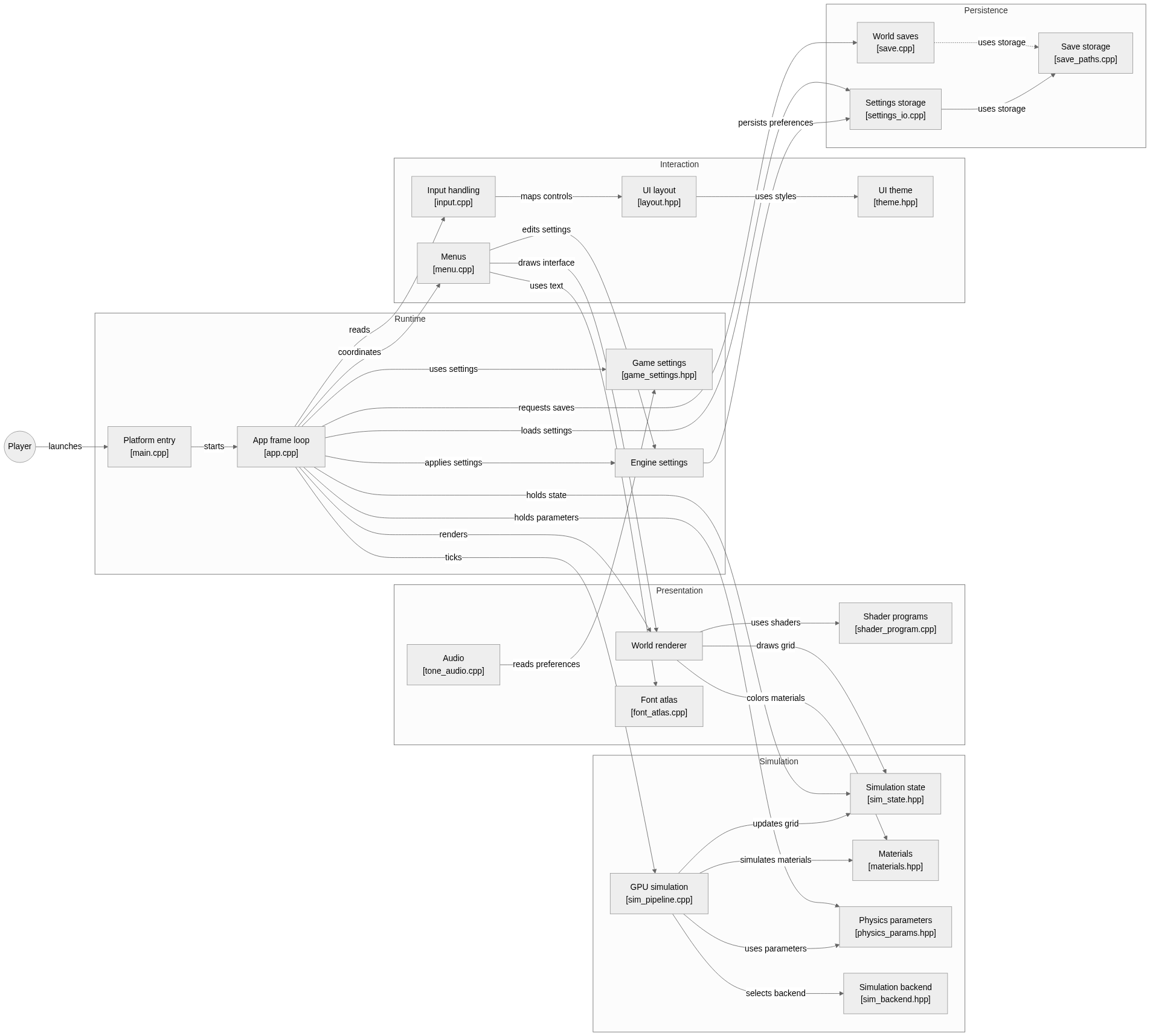
flowchart LR

subgraph group_runtime["Runtime"]
  node_entry["Platform entry<br/>[main.cpp]"]
  node_app["App frame loop<br/>[app.cpp]"]
  node_game_settings["Game settings<br/>[game_settings.hpp]"]
  node_engine_settings["Engine settings"]
end

subgraph group_simulation["Simulation"]
  node_sim_state["Simulation state<br/>[sim_state.hpp]"]
  node_materials["Materials<br/>[materials.hpp]"]
  node_physics["Physics parameters<br/>[physics_params.hpp]"]
  node_sim_pipeline["GPU simulation<br/>[sim_pipeline.cpp]"]
  node_sim_backend["Simulation backend<br/>[sim_backend.hpp]"]
end

subgraph group_presentation["Presentation"]
  node_render["World renderer"]
  node_shader_program["Shader programs<br/>[shader_program.cpp]"]
  node_font["Font atlas<br/>[font_atlas.cpp]"]
  node_audio["Audio<br/>[tone_audio.cpp]"]
end

subgraph group_interaction["Interaction"]
  node_input["Input handling<br/>[input.cpp]"]
  node_menu["Menus<br/>[menu.cpp]"]
  node_layout["UI layout<br/>[layout.hpp]"]
  node_theme["UI theme<br/>[theme.hpp]"]
end

subgraph group_persistence["Persistence"]
  node_save["World saves<br/>[save.cpp]"]
  node_save_paths["Save storage<br/>[save_paths.cpp]"]
  node_settings_io["Settings storage<br/>[settings_io.cpp]"]
end

node_player(("Player"))

node_player -->|"launches"| node_entry
node_entry -->|"starts"| node_app
node_app -->|"ticks"| node_sim_pipeline
node_app -->|"renders"| node_render
node_app -->|"reads"| node_input
node_app -->|"coordinates"| node_menu
node_app -->|"requests saves"| node_save
node_app -->|"loads settings"| node_settings_io
node_app -->|"applies settings"| node_engine_settings
node_app -->|"uses settings"| node_game_settings
node_app -->|"holds state"| node_sim_state
node_app -->|"holds parameters"| node_physics
node_sim_pipeline -->|"updates grid"| node_sim_state
node_sim_pipeline -->|"simulates materials"| node_materials
node_sim_pipeline -->|"uses parameters"| node_physics
node_sim_pipeline -->|"selects backend"| node_sim_backend
node_render -->|"uses shaders"| node_shader_program
node_render -->|"draws grid"| node_sim_state
node_render -->|"colors materials"| node_materials
node_menu -->|"edits settings"| node_engine_settings
node_menu -->|"uses text"| node_font
node_menu -->|"draws interface"| node_render
node_layout -->|"uses styles"| node_theme
node_input -->|"maps controls"| node_layout
node_audio -->|"reads preferences"| node_game_settings
node_save -.->|"uses storage"| node_save_paths
node_settings_io -->|"uses storage"| node_save_paths
node_engine_settings -->|"persists preferences"| node_settings_io


class node_entry,node_app,node_game_settings,node_engine_settings toneBlue
class node_sim_state,node_materials,node_physics,node_sim_pipeline,node_sim_backend toneAmber
class node_render,node_shader_program,node_font,node_audio toneMint
class node_input,node_menu,node_layout,node_theme toneRose
class node_save,node_save_paths,node_settings_io,node_player toneIndigo
A Nintendo Switch falling-sand sandbox with desktop builds for iteration. Its frame loop coordinates GPU simulation, rendering, input, menus, persistence and settings around a live material grid.
- Components
- 21
- Connections
- 28
- Links supported by code or README
- 15/28
Text version of the diagram
- Brush commands → Integer material grid
- Integer material grid → Simulation pass
- Simulation pass → Next grid texture
- Next grid texture → Integer material grid
- Next grid texture → Render pipeline
Follow one path through the code
Follow paintDisk into grid modification, then step into the selected backend. readTexture identifies the current grid for rendering. Save readback must also account for OpenGL row orientation rather than copying a displayed screenshot.
Types and file structure
53 declared types, with 12 in the base-relationship overview.
Type diagram
classDiagram
direction TB
class t7ba1fb6b5b9e["SimPassRect"] {
  <<struct>>
}
class t658fbe1e623e["SimPipeline"] {
  SimPipeline()
  init()
  shutdown()
  clearAll()
}
class tb8626ee066b2["SimState"] {
  <<struct>>
}
class tfdb610a7db47["SimCompileAudioGuard"] {
  <<struct>>
  SimCompileAudioGuard()
}
class ta050db13a10c["App"] {
  init()
  shutdown()
  frame()
  setSimGridSize()
}
class tf962c5d4ce57["PerformanceSettings"] {
  <<struct>>
}
class tbdcb989e9dca["VisualSettings"] {
  <<struct>>
}
class tbb5d68fb65da["ControlSettings"] {
  <<struct>>
}
class t480673c07c2c["AudioSettings"] {
  <<struct>>
}
class t28451b24c3ad["AccessibilitySettings"] {
  <<struct>>
}
class t45aedf66edc0["DebugSettings"] {
  <<struct>>
}
class t4b3cad79f762["DisplaySettings"] {
  <<struct>>
}
Unresolved bases remain labelled; full signatures are not reconstructed.
Type index
SimPassRect(struct) ·source/gpu/sim_pipeline.hpp:16SimPipeline(class) ·source/gpu/sim_pipeline.hpp:23Methods in the overview:
SimPipeline, init, shutdown, clearAll.SimState(struct) ·source/sim/sim_state.hpp:34SimCompileAudioGuard(struct) ·source/game/app.cpp:478Methods in the overview:
SimCompileAudioGuard.App(class) ·source/game/app.hpp:33Methods in the overview:
init, shutdown, frame, setSimGridSize.PerformanceSettings(struct) ·source/game/game_settings.hpp:45VisualSettings(struct) ·source/game/game_settings.hpp:56ControlSettings(struct) ·source/game/game_settings.hpp:69AudioSettings(struct) ·source/game/game_settings.hpp:77AccessibilitySettings(struct) ·source/game/game_settings.hpp:86DebugSettings(struct) ·source/game/game_settings.hpp:92DisplaySettings(struct) ·source/game/game_settings.hpp:99
Reference
135 / 135 eligible files read (240 in the tree); 0 oversized, 0 failed reads and 5 syntax diagnostics.
What the scan covers
Known dependency/build folders, credential files and binaries are excluded. The scan covers READMEs, recognized manifests and parser-supported source files.
Linguist statistics cover the whole repository and may include other languages.
File map
flowchart TD
  root["nxsand"]
  f0["Makefile"]
  root --> f0
  f1["source/gpu/sim_pipeline.hpp"]
  root --> f1
  f2["source/sim/sim_state.hpp"]
  root --> f2
  f3["README.md"]
  root --> f3
  f4["scripts/build-desktop-msys.sh"]
  root --> f4
  f5["scripts/build-desktop-wsl.sh"]
  root --> f5
  f6["scripts/crop_icon.py"]
  root --> f6
  f7["scripts/export-nsp.py"]
  root --> f7
  f8["scripts/generate-audio.py"]
  root --> f8
  f9["scripts/package-release.py"]
  root --> f9
  f10["scripts/regenerate-diagrams.py"]
  root --> f10
  f11["scripts/sync-sim-rules-body.py"]
  root --> f11
  f12["tests/gpu_test_gl.cpp"]
  root --> f12
  f13["tests/gpu_test_gl.hpp"]
  root --> f13
  f14["tests/gpu_unit_main.cpp"]
  root --> f14
  f15["tests/test_harness.hpp"]
  root --> f15