NX-Activity-Log: Turning console play records into views
NX-Activity-Log is a fork of a Switch homebrew activity viewer. The application reads console play records and presents per-user and per-title summaries. Those records are inputs from the console rather than events generated by the UI.
Repository languagesC++ 92.17%4
Shares calculated from GitHub Linguist bytes.
| Language | % | Bytes |
|---|---|---|
| C++ | 394,579 | |
| Makefile | 17,822 | |
| C | 14,713 | |
| Assembly | 978 |
Overview
Why it exists
High-precision telemetry parser reading raw Switch playtime event logs without system telemetry bans.
Best fit
Detailed gameplay analytics and playtime tracking for Switch homebrew.
Getting started
These commands come from the repository documentation. They were not run during this review.
Repository references
Excerpts from the repository’s guides, in their original language. Links open the inspected source revision.
Prerequisites and first run
Firmware / CFW requirements
README.md
- HOS 22.0.5 (and 22.x): Atmosphere ≥ 1.11.0 (1.11.2 recommended for 22.5.0). Homebrew launch on 22.0.0+ relies on Atmosphere’s am compatibility patches.
- HOS 21.0.0+: Rebuild with libnx ≥ 4.10.0 (TLS ABI change). This release targets current libnx (4.11.x / latest).
- Older firmwares: The same binary is intended to run under current Atmosphere on earlier HOS versions; use title/hbmenu launch rather than User Page if the forwarder path fails. Curious about what’s next? See the original to-do list on Trello
Features and components 2
- Application lifecycle
- main.cpp creates Main::Application, runs it and releases it afterward. The source tree separates console-facing code under nx from UI and utility modules. Import and export jobs have their own source files.
- Records and presentation
- The documented views organize activity by user, game and time period. That requires keeping record extraction separate from grouping and display. Exported data is another output of the application, not a substitute for the source records.
Architecture
The components and their connections remain available as text. The diagram adds an interactive view.
- Console activity records
- Application record handling
- User and title grouping
- Activity views
- Export job
Links verified in the repository.
Mermaid Interactive diagram (loads on open)
System overview of the components and connections verified in the repository.
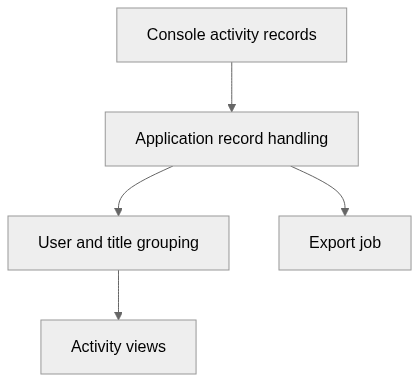
flowchart LR
  n0["Console activity records"]
  n1["Application record handling"]
  n2["User and title grouping"]
  n3["Activity views"]
  n4["Export job"]
  n0 --> n1
  n1 --> n2
  n2 --> n3
  n1 --> n4
Text version of the diagram
- Console activity records → Application record handling
- Application record handling → User and title grouping
- User and title grouping → Activity views
- Application record handling → Export job
Follow one path through the code
Begin with Main::Application and follow the console-facing nx modules before the views. This distinguishes a change in aggregation from a change in which records are available on the device.
Types and file structure
39 declared types, with 12 in the base-relationship overview.
Type diagram
classDiagram
direction TB
class t4e1a8b16b16a["ExportJob"] {
  work()
}
class t096aa39364ca["ImportJob"] {
  work()
}
class t8e8298b1a9b7["Application"] {
  createScreens()
  deleteScreens()
  checkForUpdate()
  initThreadFunc()
}
class t041c3287dd04["AdjustmentValue"] {
  <<struct>>
}
class t43e8dd03878e["Config"] {
  readConfig()
  writeConfig()
  adjustmentValues()
  hiddenTitles()
}
class t00560be273e6["PlayEvent"] {
  <<struct>>
}
class t9b5b3b925b3c["PlaySession"] {
  <<struct>>
}
class t54fded939917["PlayStatistics"] {
  <<struct>>
}
class t5d5e193ce052["RecentPlayStatistics"] {
  <<struct>>
}
class t7381507fcce0["PD_Session"] {
  <<struct>>
}
class tecf3b954f1c7["PlayData"] {
  getPDSessions()
  readPlayDataFromPdm()
  readPlayDataFromImport()
  setProgressCallback()
}
class teaa6245a0ea3["Title"] {
  titleID()
  isInstalled()
  name()
  imgSize()
}
class b7eaf7d3050ac["Aether::ThreadPool::Job"] {
  <<unresolved_base>>
}
b7eaf7d3050ac <|-- t4e1a8b16b16a
class bea58313e0e40["Aether::ThreadPool::Job"] {
  <<unresolved_base>>
}
bea58313e0e40 <|-- t096aa39364ca
Unresolved bases remain labelled; full signatures are not reconstructed.
Type index
ExportJob(class) ·Application/include/Application.ExportJob.hpp:10Methods in the overview:
work.Declared bases:
Aether::ThreadPool::Job.ImportJob(class) ·Application/include/Application.ImportJob.hpp:10Methods in the overview:
work.Declared bases:
Aether::ThreadPool::Job.Application(class) ·Application/include/Application.hpp:35Methods in the overview:
createScreens, deleteScreens, checkForUpdate, initThreadFunc.AdjustmentValue(struct) ·Application/include/Config.hpp:8Config(class) ·Application/include/Config.hpp:16Methods in the overview:
readConfig, writeConfig, adjustmentValues, hiddenTitles.PlayEvent(struct) ·Application/include/nx/PlayData.hpp:32PlaySession(struct) ·Application/include/nx/PlayData.hpp:44PlayStatistics(struct) ·Application/include/nx/PlayData.hpp:51RecentPlayStatistics(struct) ·Application/include/nx/PlayData.hpp:62PD_Session(struct) ·Application/include/nx/PlayData.hpp:69PlayData(class) ·Application/include/nx/PlayData.hpp:80Methods in the overview:
getPDSessions, readPlayDataFromPdm, readPlayDataFromImport, setProgressCallback.Title(class) ·Application/include/nx/Title.hpp:7Methods in the overview:
titleID, isInstalled, name, imgSize.
Reference
90 / 90 eligible files read (106 in the tree); 0 oversized, 0 failed reads and 3 syntax diagnostics.
What the scan covers
Known dependency/build folders, credential files and binaries are excluded. The scan covers READMEs, recognized manifests and parser-supported source files.
Linguist statistics cover the whole repository and may include other languages.
File map
flowchart TD
  root["NX-Activity-Log"]
  f0["Application/source/Application.ExportJob.cpp"]
  root --> f0
  f1["Application/source/Application.cpp"]
  root --> f1
  f2["Application/source/main.cpp"]
  root --> f2
  f3["Makefile"]
  root --> f3
  f4["README.md"]
  root --> f4
  f5["Application/Makefile"]
  root --> f5
  f6["Forwarder/Makefile"]
  root --> f6
  f7["Forwarder/README.md"]
  root --> f7
  f8["Application/include/Application.ExportJob.hpp"]
  root --> f8
  f9["Application/include/Application.ImportJob.hpp"]
  root --> f9
  f10["Application/include/Application.hpp"]
  root --> f10
  f11["Application/include/Config.hpp"]
  root --> f11
  f12["Application/include/Types.hpp"]
  root --> f12
  f13["Application/source/Application.ImportJob.cpp"]
  root --> f13
  f14["Application/source/Config.cpp"]
  root --> f14
  f15["Application/source/Types.cpp"]
  root --> f15