MediaBoxDockerCompose: A media stack connected by volumes and networks
MediaBoxDockerCompose brings several homelab services together in Docker Compose. Its architecture lives mainly in service definitions, shared filesystem paths and network reachability, rather than in one application’s source code.
Repository languages
Shares calculated from GitHub Linguist bytes.
GitHub reports no language bytes for this repository.
Overview
Why it exists
Comprehensive GitOps container stack combining WireGuard VPN tunnel networking with 15+ homelab automation services.
Best fit
Automated, isolated private cloud media server with remote access and encrypted traffic routing.
Getting started
These commands come from the repository documentation. They were not run during this review.
docker-compose up -dRepository references
Excerpts from the repository’s guides, in their original language. Links open the inspected source revision.
Prerequisites and first run
Installation
README.md
- Install Docker and Docker Compose on your system.
- Clone or download this repository to your system.
Configuration and usage
Usage
README.md
- Navigate to the cloned/downloaded directory.
- Customize the configuration files in the config directory to your needs.
- Run the following command to start the containers:
- Access the web interfaces for the services by navigating to the URLs mentioned below.
Development and contributions
Contributing
README.md
Features and components 2
- Service roles
- The compose file includes download clients and media-management services such as Deluge, Jackett, Sonarr and Radarr. Each container has its own image and configuration. README service links should be distinguished from services actually enabled in Compose.
- Persistent paths
- Volume mappings connect container paths to host storage. A path used by one service must agree with the path seen by another when files move between them. Networking and persistence solve different integration problems.
Architecture
The components and their connections remain available as text. The diagram adds an interactive view.
- Compose service definitions
- Download containers
- Media-management containers
- Shared host storage
Links verified in the repository.
Mermaid Interactive diagram (loads on open)
System overview of the components and connections verified in the repository.
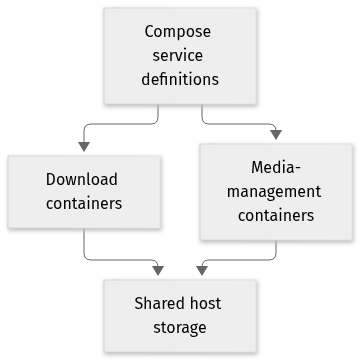
flowchart LR
  n0["Compose service definitions"]
  n1["Download containers"]
  n2["Media-management containers"]
  n3["Shared host storage"]
  n0 --> n1
  n0 --> n2
  n1 --> n3
  n2 --> n3
Text version of the diagram
- Compose service definitions → Download containers
- Compose service definitions → Media-management containers
- Download containers → Shared host storage
- Media-management containers → Shared host storage
Follow one path through the code
Choose one service and compare its mounted download and library paths with the service that consumes them. Then check its network and port settings. Two healthy containers can still disagree about where a file exists.
Deployment and operations
The ports, storage, and startup relationships below come from the repository configuration. depends_on records startup order, not service readiness.
Network. Isolated Docker bridge network routed through WireGuard VPN gateway.
Deployment map
Compose topology of documented services, ports, and startup dependencies.
flowchart LR
  classDef svc fill:#1b3040,stroke:#6fdbd0,color:#edf4fb
  plex["plex<br/>32400:32400"]:::svc
  wireguard["wireguard<br/>51820:51820/udp"]:::svc
  whisper["whisper<br/>9000:9000"]:::svc
  portainer["portainer<br/>9443:9443"]:::svc
  samba["samba<br/>139:139, 445:445"]:::svc
Text version of the diagram
- plex — plexinc/pms-docker · 32400:32400
- wireguard — linuxserver/wireguard · 51820:51820/udp
- whisper — local build / compose · 9000:9000
- portainer — portainer/portainer-ce · 9443:9443
- samba — dperson/samba · 139:139, 445:445
| Service | Image or build | Published ports | Startup | Storage |
|---|---|---|---|---|
| plex | plexinc/pms-docker | 32400:32400 | /media -> /data/movies | |
| wireguard | linuxserver/wireguard | 51820:51820/udp | /config bind mount | |
| whisper | local build / compose | 9000:9000 | Audio buffer volume | |
| portainer | portainer/portainer-ce | 9443:9443 | /var/run/docker.sock | |
| samba | dperson/samba | 139:139, 445:445 | Shared ZFS pool |
File structure
The map shows the inspected files and their organization.
Reference
6 / 6 eligible files read (22 in the tree); 0 oversized, 0 failed reads and 0 syntax diagnostics.
What the scan covers
Known dependency/build folders, credential files and binaries are excluded. The scan covers READMEs, recognized manifests and parser-supported source files.
Linguist statistics cover the whole repository and may include other languages.
File map
flowchart TD
  root["MediaBoxDockerCompose"]
  f0["README.md"]
  root --> f0
  f1["docker-compose.yml"]
  root --> f1
  f2["whisper/docker-compose.yml"]
  root --> f2
  f3["extra/portainer/docker-compose.yml"]
  root --> f3
  f4["extra/samba/docker-compose.yml"]
  root --> f4
  f5["extra/wireguard-access-server/docker-compose.yml"]
  root --> f5
Files to read 2
References
- GitHubSource repository
- READMERepository documentation
- Networking evolution — building a home network labBlog article
- MediaBox homelab — what I run in Docker (and what stayed a bookmark)Blog article