Maestro: Sheet music through an external conversion pipeline
This Maestro fork connects a React upload interface to a Spring backend and external music-conversion tools. Turning a score image into MIDI passes through an optical-recognition stage and an intermediate score representation.
Repository languagesJava 47.34%6
Shares calculated from GitHub Linguist bytes.
| Language | % | Bytes |
|---|---|---|
| Java | 33,471 | |
| TypeScript | 22,838 | |
| Python | 11,324 | |
| Dockerfile | 2,222 | |
| HTML | 710 | |
| Shell | 138 |
Overview
Why it exists
Optical Music Recognition (OMR) pipeline translating sheet music scans into MIDI score sequences.
Best fit
Digitization of physical sheet music for playback and editing.
Getting started
These commands come from the repository documentation. They were not run during this review.
git clone https://github.com/PrimePhil/PFE008 cd maestro-app npm install npm run startgradle testTasks declared in manifests
maestro-app/package.json
startreact-scripts startbuildreact-scripts buildtestreact-scripts test
Repository references
Excerpts from the repository’s guides, in their original language. Links open the inspected source revision.
Prerequisites and first run
Requirements
README.md
- Audiveris
- Java 22.0.2
- Python 3.12
- npm 8.19.4
- Nodejs 18.13.0
Getting Started
README.md
Prerequisites
backend/README.md
- Java Installation:
- Ensure you have Java installed. The version used for this project is:
- Gradle:
- The project includes a Gradle wrapper, so you don’t need to install Gradle manually. If needed, you can download Gradle here. The project uses Gradle v8.8.
- OCR Language Data:
- Audiveris relies on Tesseract for Optical Character Recognition (OCR). You’ll need to install language data files. Refer to the Audiveris guide for setup instructions.
- Audiveris Setup:
- The Audiveris distribution is not included in the repository. You need to download it manually and place it in the backend/audiveris/dist directory.
- Download the Audiveris distribution (Windows installer) from here.
- After installation, copy the bin and lib directories from the Audiveris installation directory to backend/audiveris/dist/. Your project structure should look like this:
API and integration
Endpoint Overview
backend/README.md
Operations and troubleshooting
Deployment
README.md
Development and contributions
Tests
README.md
`npm test`
maestro-app/README.md
Source documentation
3 documents read from 3 candidates.
Features and components 2
- Upload boundary
- ConvertController accepts multipart uploads at /convert. It rejects empty files, checks the 10 MiB size limit and calls a file-signature validator before saving the input. Optional tempo input travels with the conversion request.
- External processes
- AudiverisController builds an OS-dependent command and waits for the Audiveris process. The backend also includes MxlToMidi.py. Process startup, intermediate files and the returned download are separate failure points.
Architecture
The components and their connections remain available as text. The diagram adds an interactive view.
- React file upload
- Spring validation
- Audiveris recognition
- MusicXML conversion stage
- MIDI download
Links verified in the repository.
Mermaid Interactive diagram (loads on open)
System overview of the components and connections verified in the repository.
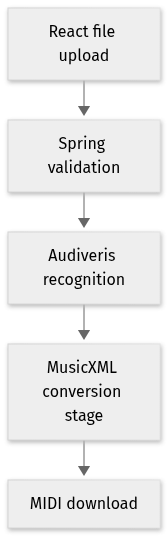
flowchart LR
  n0["React file upload"]
  n1["Spring validation"]
  n2["Audiveris recognition"]
  n3["MusicXML conversion stage"]
  n4["MIDI download"]
  n0 --> n1
  n1 --> n2
  n2 --> n3
  n3 --> n4
Text version of the diagram
- React file upload → Spring validation
- Spring validation → Audiveris recognition
- Audiveris recognition → MusicXML conversion stage
- MusicXML conversion stage → MIDI download
Follow one path through the code
Follow /convert into the file checks, then inspect how AudiverisController chooses its executable and output directory. A successful HTTP upload is only the start; conversion also depends on the external tool and generated files.
Types and file structure
12 declared types, with 12 in the base-relationship overview.
Type diagram
classDiagram
direction TB
class t0fc2da07ca26["AudiverisController"] {
  AudiverisController()
  convert()
  convertMxlToMidi()
}
class te09535b4ea27["ConvertController"] {
  convert()
  healthCheck()
}
class t5b329a34a4e0["BackendApplication"] {
  main()
}
class t5026bc97d4a6["ConversionResponse"] {
  getFileName()
  setFileName()
  getDownloadUri()
  setDownloadUri()
}
class ta28a28fad99c["FileUtil"] {
  saveFile()
  getFileAsResource()
  isValidFile()
  cleanupDirectories()
}
class t3a8c9a5b3e47["AudiverisController_tests"] {
  setup()
  testConvertSuccess()
  testConvertWrongFile()
  testConvertFileOutput()
}
class tc9ddabb9fef2["ConvertControllerTest"] {
  setup()
  testConvertSuccess()
  testConvertFail()
  testConvertFileNotFound()
}
class tf78cdd633a9f["FileUtil_tests"] {
  setup()
  testSaveFile()
  testGetFileAsResource()
  testSaveFileThrowsIOException()
}
class t306c8eab2abe["TestMxlToMidi"] {
  setUp()
  test_apply_dynamics_to_notes()
  test_print_note_details()
  test_print_part_details()
}
class t5c7dff211126["MusicSheetUploaderProps"] {
  <<interface>>
}
class t28f92fc28615["UseMaestroClientResult"] {
  <<interface>>
}
class td89584c9e8be["MusicSheetUploadFormFooterProps"] {
  <<interface>>
}
class b385cfa4f4c5b["unittest.TestCase"] {
  <<unresolved_base>>
}
b385cfa4f4c5b <|-- t306c8eab2abe
Unresolved bases remain labelled; full signatures are not reconstructed.
Type index
AudiverisController(class) ·backend/src/main/java/PFE008/backend/AudiverisController.java:9Methods in the overview:
AudiverisController, convert, convertMxlToMidi.ConvertController(class) ·backend/src/main/java/PFE008/backend/ConvertController.java:37Methods in the overview:
convert, healthCheck.BackendApplication(class) ·backend/src/main/java/PFE008/backend/BackendApplication.java:10Methods in the overview:
main.ConversionResponse(class) ·backend/src/main/java/PFE008/backend/ConversionResponse.java:12Methods in the overview:
getFileName, setFileName, getDownloadUri, setDownloadUri.FileUtil(class) ·backend/src/main/java/PFE008/backend/FileUtil.java:25Methods in the overview:
saveFile, getFileAsResource, isValidFile, cleanupDirectories.AudiverisController_tests(class) ·backend/src/test/java/PFE008/backend/AudiverisController_tests.java:32Methods in the overview:
setup, testConvertSuccess, testConvertWrongFile, testConvertFileOutput.ConvertControllerTest(class) ·backend/src/test/java/PFE008/backend/ConvertControllerTest.java:34Methods in the overview:
setup, testConvertSuccess, testConvertFail, testConvertFileNotFound.FileUtil_tests(class) ·backend/src/test/java/PFE008/backend/FileUtil_tests.java:23Methods in the overview:
setup, testSaveFile, testGetFileAsResource, testSaveFileThrowsIOException.TestMxlToMidi(class) ·backend/src/test/java/PFE008/backend/MxlToMidi_tests.py:16Methods in the overview:
setUp, test_apply_dynamics_to_notes, test_print_note_details, test_print_part_details.Declared bases:
unittest.TestCase.MusicSheetUploaderProps(interface) ·maestro-app/src/components/musicSheetUploader/MusicSheetUploader.tsx:13UseMaestroClientResult(interface) ·maestro-app/src/hooks/useMaestroClient.ts:3MusicSheetUploadFormFooterProps(interface) ·maestro-app/src/pages/MusicSheetUploadForm/MusicSheetUploadFormFooter.tsx:6
Reference
32 / 32 eligible files read (128 in the tree); 0 oversized, 0 failed reads and 0 syntax diagnostics.
What the scan covers
Known dependency/build folders, credential files and binaries are excluded. The scan covers READMEs, recognized manifests and parser-supported source files.
Linguist statistics cover the whole repository and may include other languages.
File map
flowchart TD
  root["Maestro"]
  f0["maestro-app/package.json"]
  root --> f0
  f1["backend/src/main/MxlToMidi.py"]
  root --> f1
  f2["backend/src/main/java/PFE008/backend/AudiverisController.java"]
  root --> f2
  f3["backend/src/main/java/PFE008/backend/ConvertController.java"]
  root --> f3
  f4["README.md"]
  root --> f4
  f5["docker-compose.yml"]
  root --> f5
  f6["entrypoint.sh"]
  root --> f6
  f7["backend/README.md"]
  root --> f7
  f8["maestro-app/README.md"]
  root --> f8
  f9["maestro-app/src/App.test.tsx"]
  root --> f9
  f10["maestro-app/src/App.tsx"]
  root --> f10
  f11["maestro-app/src/index.tsx"]
  root --> f11
  f12["maestro-app/src/setupTests.ts"]
  root --> f12
  f13["maestro-app/src/hooks/useMaestroClient.ts"]
  root --> f13
  f14["maestro-app/src/i18n/i18n.tsx"]
  root --> f14
  f15["maestro-app/src/mocks/convertToMidiMock.tsx"]
  root --> f15