kroki-playground: An editor, an API and a renderer
kroki-playground is a Next.js interface for editing text diagrams and previewing their output. Its server route validates the requested diagram type and format, encodes the source and fetches the rendered result from Kroki.
Repository languagesTypeScript 98.19%3
Shares calculated from GitHub Linguist bytes.
| Language | % | Bytes |
|---|---|---|
| TypeScript | 33,686 | |
| JavaScript | 340 | |
| CSS | 282 |
Overview
Why it exists
Serverless diagram experimentation suite in TypeScript running on Vercel with instant preview.
Best fit
Rapid prototyping of PlantUML, Mermaid, GraphViz, and C4 architecture diagrams.
Getting started
These commands come from the repository documentation. They were not run during this review.
Tasks declared in manifests
package.json
devnext devbuildnext buildstartnext startlinteslint .testvitest run
Repository references
Excerpts from the repository’s guides, in their original language. Links open the inspected source revision.
Prerequisites and first run
Requirements
README.md
- Node.js ≥ 22 (see .nvmrc and engines in package.json). Match your Vercel project Node version to your environment.
Prerequisites
CONTRIBUTING.md
- Node.js 22.x (see .nvmrc and package.json engines).
- Optional: Dev Containers or GitHub Codespaces using .devcontainer/devcontainer.json for a consistent environment (Node 22, npm install on container create).
Configuration and usage
Environment variables
README.md
| Variable | Where | Description |
|---|
Environment variables
CONTRIBUTING.md
| Variable | Where | Description |
|---|---|---|
| Create a .env file locally when you need non-default Kroki URLs or other local-only settings. Never commit secrets; .env is gitignored. |
Operations and troubleshooting
Deployment (Vercel)
README.md
Development and contributions
Contributing
README.md
Contributing
CONTRIBUTING.md
Features and components 2
- Validation before rendering
- app/api/generate-diagram/route.ts accepts GET and POST inputs through a shared validator. encodeDiagramPayload prepares the source for the Kroki URL. KROKI_BASE_URL selects the server-side rendering endpoint.
- Response and failure states
- The route reads the returned bytes and responds with diagramUrl, base64 diagramData and mimeType. A non-success response from Kroki becomes a 502 with an upstream error code, distinct from invalid input.
Architecture
The components and their connections remain available as text. The diagram adds an interactive view.
- Text editor
- Next.js API route
- Validate and encode
- Configured Kroki service
- Base64 result and preview
Links verified in the repository.
Mermaid Interactive diagram (loads on open)
System overview of the components and connections verified in the repository.
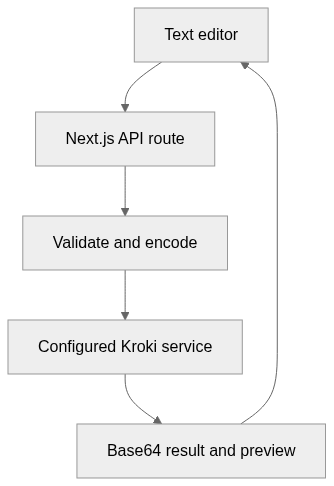
flowchart LR
  n0["Text editor"]
  n1["Next.js API route"]
  n2["Validate and encode"]
  n3["Configured Kroki service"]
  n4["Base64 result and preview"]
  n0 --> n1
  n1 --> n2
  n2 --> n3
  n3 --> n4
  n4 --> n0
Text version of the diagram
- Text editor → Next.js API route
- Next.js API route → Validate and encode
- Validate and encode → Configured Kroki service
- Configured Kroki service → Base64 result and preview
- Base64 result and preview → Text editor
Follow one path through the code
Follow POST from req.json to validation and the upstream fetch. The response contains encoded image bytes, not raw SVG as the entire HTTP body. A consumer must use the returned MIME type when displaying those bytes.
Diagram HTTP API
The route file defines GET and POST /api/generate-diagram. POST reads JSON; GET reads the same fields from query parameters. The handler validates the diagram type and format, compresses UTF-8 source with DEFLATE, encodes it for a URL and fetches the selected Kroki renderer.
POST /api/generate-diagram
Content-Type: application/json

{
  "selectedDiagram": "mermaid",
  "diagramSource": "flowchart LR\n  Client --> Server",
  "outputFormat": "svg"
}
Response and errors
Authentication, limits and pagination
The inspected route has no authentication, pagination or rate limiter. A deployment proxy may impose its own rules. The source limit is 512,000 characters. KROKI_BASE_URL configures server requests; NEXT_PUBLIC_KROKI_BASE_URL configures browser previews. The README mentions /api/generateDiagram, while this source file defines the hyphenated route.
File structure
The map shows the inspected files and their organization.
Reference
21 / 21 eligible files read (38 in the tree); 0 oversized, 0 failed reads and 0 syntax diagnostics.
What the scan covers
Known dependency/build folders, credential files and binaries are excluded. The scan covers READMEs, recognized manifests and parser-supported source files.
Linguist statistics cover the whole repository and may include other languages.
File map
flowchart TD
  root["kroki-playground"]
  f0["package.json"]
  root --> f0
  f1["lib/kroki/encode.ts"]
  root --> f1
  f2["lib/kroki/validate.ts"]
  root --> f2
  f3["app/api/generate-diagram/route.ts"]
  root --> f3
  f4["README.md"]
  root --> f4
  f5["eslint.config.mjs"]
  root --> f5
  f6["next.config.ts"]
  root --> f6
  f7["postcss.config.mjs"]
  root --> f7
  f8["vitest.config.ts"]
  root --> f8
  f9["app/layout.tsx"]
  root --> f9
  f10["app/page.tsx"]
  root --> f10
  f11["components/DiagramGenerator.tsx"]
  root --> f11
  f12["app/api-docs/page.tsx"]
  root --> f12
  f13["lib/kroki/diagramLabels.test.ts"]
  root --> f13
  f14["lib/kroki/diagramLabels.ts"]
  root --> f14
  f15["lib/kroki/diagramTypes.test.ts"]
  root --> f15