jsonresume-theme-kendall: A JSON document into a resume template
This fork of the Kendall JSON Resume theme turns structured resume data into HTML. The renderer prepares presentation fields before handing the result to a Mustache template and the accompanying screen and print styles.
Repository languagesJavaScript 55.76%2
Shares calculated from GitHub Linguist bytes.
| Language | % | Bytes |
|---|---|---|
| JavaScript | 8,126 | |
| CSS | 6,448 |
Overview
Why it exists
Minimalist, print-perfect resume theme supporting schema.org semantic markup and clean layout.
Best fit
Automated resume compilation from structured JSON data.
Getting started
These commands come from the repository documentation. They were not run during this review.
sudo npm install -g resume-clisudo npm installresume serve --theme .Preview: http://localhost:4000
Press ctrl-c to stopRepository references
Excerpts from the repository’s guides, in their original language. Links open the inspected source revision.
Prerequisites and first run
Install the command line
README.md
Install npm packages
README.md
Configuration and usage
Usage
README.md
Features and components 2
- Presentation mapping
- index.js maps network names to icon classes, formats work dates and derives flags for optional sections. It also chooses an explicit image or a Gravatar URL. This logic adapts data for the template.
- Template and styles
- resume.template contains the HTML layout, while style.css and print.css separate screen and print appearance. The data transformation and document layout can be inspected independently.
Architecture
The components and their connections remain available as text. The diagram adds an interactive view.
- Resume JSON
- render data mapping
- Mustache template
- HTML with screen or print CSS
Links verified in the repository.
Mermaid Interactive diagram (loads on open)
System overview of the components and connections verified in the repository.
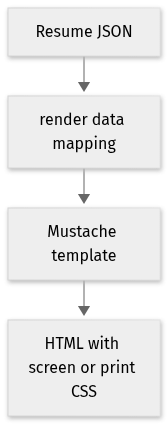
flowchart LR
  n0["Resume JSON"]
  n1["render data mapping"]
  n2["Mustache template"]
  n3["HTML with screen or print CSS"]
  n0 --> n1
  n1 --> n2
  n2 --> n3
Text version of the diagram
- Resume JSON → render data mapping
- render data mapping → Mustache template
- Mustache template → HTML with screen or print CSS
Follow one path through the code
Follow a work startDate into the derived month and year fields. The renderer mutates fields on the supplied object, so callers reusing that object should account for the added presentation data.
File structure
The map shows the inspected files and their organization.
Reference
3 / 3 eligible files read (9 in the tree); 0 oversized, 0 failed reads and 0 syntax diagnostics.
What the scan covers
Known dependency/build folders, credential files and binaries are excluded. The scan covers READMEs, recognized manifests and parser-supported source files.
Linguist statistics cover the whole repository and may include other languages.
File map
flowchart TD
  root["jsonresume-theme-kendall"]
  f0["index.js"]
  root --> f0
  f1["README.md"]
  root --> f1
  f2["package.json"]
  root --> f2