HDR-10bpp-Display-Test: Packing ten-bit channels for a Cairo surface
This display experiment loads image data into a GTK drawing area through Cairo. Viewer3.py makes the pixel representation explicit: channel samples are masked and packed into a uint32 buffer before creating an RGB30 surface.
Repository languagesPython 98.43%2
Shares calculated from GitHub Linguist bytes.
| Language | % | Bytes |
|---|---|---|
| Python | 8,200 | |
| Shell | 131 |
Overview
Why it exists
10-bit HDR pipeline testing color banding and luminance curves on Linux display servers.
Best fit
Calibration and verification of 4K 10-bit HDR displays on Linux workstations.
Getting started
These commands come from the repository documentation. They were not run during this review.
sudo apt-get install xserver-xorg python3 python3-gi python3-gi-cairo gir1.2-gtk-3.0 imagejpip3 install imageiogit clone https://github.com/yourusername/HDR-10bpp-Display-Test.gitcd HDR-10bpp-Display-Testsudo systemctl stop lightdm || sudo systemctl stop gdm
sudo pkill XorgRepository references
Excerpts from the repository’s guides, in their original language. Links open the inspected source revision.
Prerequisites and first run
Prerequisites
README.md
To run the test, you will need the following software installed on your system:
- X server
- Python 3
- GTK 3
- ImageJ (for displaying images with a 10-bit color depth)
- ImageIO (for reading image files) You can install these packages on Ubuntu or Debian-based systems by running the following command:
Installing
README.md
Operations and troubleshooting
Troubleshooting
README.md
Development and contributions
HDR-10bpp-Display-Test
README.md
Running the test
README.md
To run the test, follow these steps:
- Clone the repository:
- Navigate to the project directory:
- Stop the display manager and X server:
- Start the X server with a color depth of 30:
- If the X server was started successfully, the output of the following command should indicate a depth of 30:
- Launch the viewer application:
- The viewer window will open. To display an image, run the following command:
- The image should be displayed in the viewer window. Verify that the image is displayed correctly and that the colors are accurate.
Features and components 2
- Pixels and drawing
- imageio reads the source array. _draw_on allocates a packed buffer and shifts each channel according to the selected depth, then passes it to cairo.ImageSurface.create_for_data. The GTK draw callback paints that surface.
- Video path
- A worker reads video frames and updates the current image at a requested cadence. Drawing also manually processes pending GTK events. This older approach deserves particular attention to UI-thread ownership when maintained.
Architecture
The components and their connections remain available as text. The diagram adds an interactive view.
- Image or video input
- imageio array
- Channel masking and packing
- Cairo RGB30 surface
- GTK drawing area
Links verified in the repository.
Mermaid Interactive diagram (loads on open)
System overview of the components and connections verified in the repository.
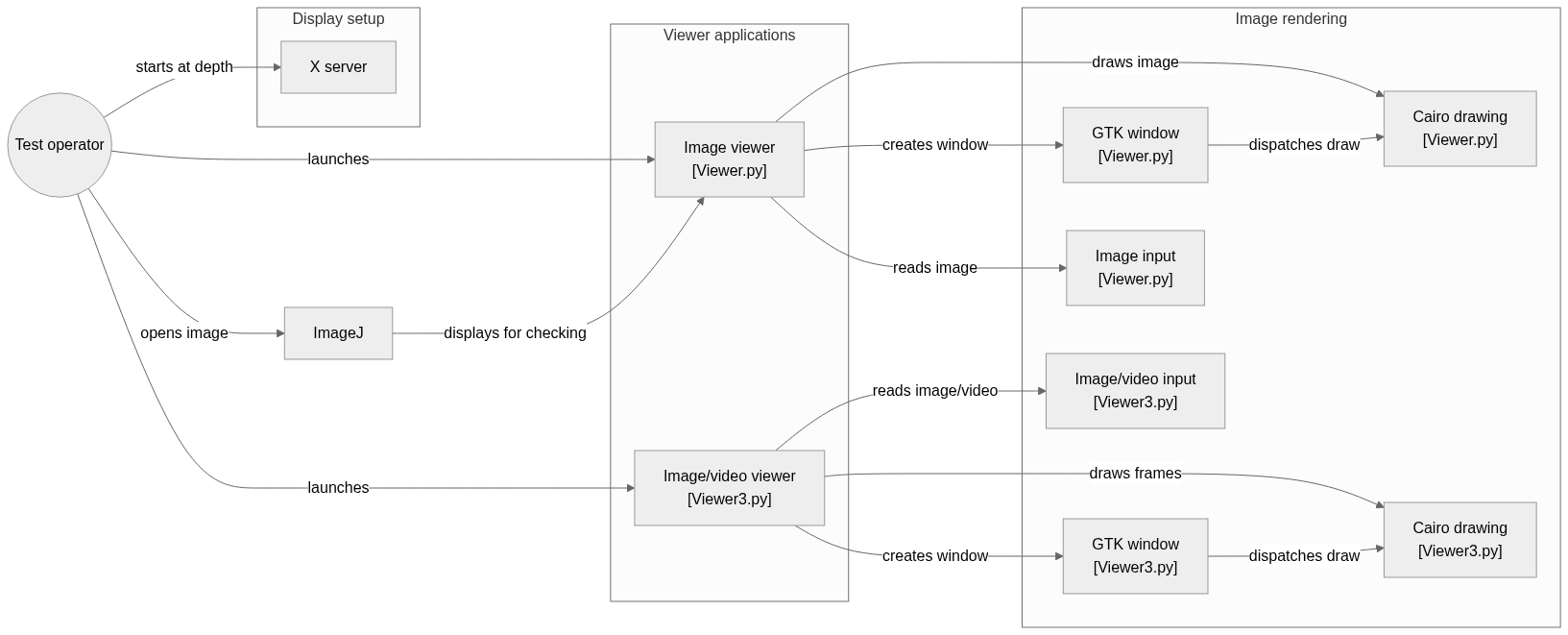
flowchart LR

subgraph group_setup["Display setup"]
  node_xserver["X server"]
end

subgraph group_viewers["Viewer applications"]
  node_viewer1["Image viewer<br/>[Viewer.py]"]
  node_viewer3["Image/video viewer<br/>[Viewer3.py]"]
end

subgraph group_render["Image rendering"]
  node_gtk1["GTK window<br/>[Viewer.py]"]
  node_gtk3["GTK window<br/>[Viewer3.py]"]
  node_imageio1["Image input<br/>[Viewer.py]"]
  node_imageio3["Image/video input<br/>[Viewer3.py]"]
  node_cairo1["Cairo drawing<br/>[Viewer.py]"]
  node_cairo3["Cairo drawing<br/>[Viewer3.py]"]
end

node_user(("Test operator"))
node_imagej["ImageJ"]

node_user -->|"starts at depth"| node_xserver
node_user -->|"launches"| node_viewer1
node_user -->|"launches"| node_viewer3
node_viewer1 -->|"creates window"| node_gtk1
node_viewer1 -->|"reads image"| node_imageio1
node_viewer1 -->|"draws image"| node_cairo1
node_gtk1 -->|"dispatches draw"| node_cairo1
node_viewer3 -->|"creates window"| node_gtk3
node_viewer3 -->|"reads image/video"| node_imageio3
node_viewer3 -->|"draws frames"| node_cairo3
node_gtk3 -->|"dispatches draw"| node_cairo3
node_user -->|"opens image"| node_imagej
node_imagej -->|"displays for checking"| node_viewer1


class node_xserver toneBlue
class node_viewer1,node_viewer3 toneAmber
class node_gtk1,node_gtk3,node_imageio1,node_imageio3,node_cairo1,node_cairo3 toneMint
class node_user,node_imagej toneIndigo
A Linux HDR and 10-bit display test. The workflow starts an X server at the requested depth, opens an image or video viewer, and draws frames through GTK and Cairo for visual checking.
- Components
- 11
- Connections
- 13
- Links supported by code or README
- 13/13
Text version of the diagram
- Image or video input → imageio array
- imageio array → Channel masking and packing
- Channel masking and packing → Cairo RGB30 surface
- Cairo RGB30 surface → GTK drawing area
Follow one path through the code
Inspect _draw_on to see exactly where bit depth affects shifts and surface selection. Ten-bit storage concerns numeric precision; HDR transfer functions, metadata and display calibration require additional work outside this packing step.
Types and file structure
2 declared types, with 2 in the base-relationship overview.
Type diagram
classDiagram
direction TB
class td926548d9d56["Viewer"] {
  __init__()
  _initUI()
  _window_state()
  size()
}
class t015018d2192b["Viewer"] {
  __init__()
  _initUI()
  _window_state()
  size()
}
class bb574778f1f7f["object"] {
  <<unresolved_base>>
}
bb574778f1f7f <|-- td926548d9d56
class ba71980200e35["object"] {
  <<unresolved_base>>
}
ba71980200e35 <|-- t015018d2192b
Unresolved bases remain labelled; full signatures are not reconstructed.
Type index
Viewer(class) ·Viewer3.py:27Methods in the overview:
__init__, _initUI, _window_state, size.Declared bases:
object.Viewer(class) ·Viewer.py:24Methods in the overview:
__init__, _initUI, _window_state, size.Declared bases:
object.
Reference
4 / 4 eligible files read (7 in the tree); 0 oversized, 0 failed reads and 0 syntax diagnostics.
What the scan covers
Known dependency/build folders, credential files and binaries are excluded. The scan covers READMEs, recognized manifests and parser-supported source files.
Linguist statistics cover the whole repository and may include other languages.
File map
flowchart TD
  root["HDR-10bpp-Display-Test"]
  f0["Viewer3.py"]
  root --> f0
  f1["Xdepth.sh"]
  root --> f1
  f2["README.md"]
  root --> f2
  f3["Viewer.py"]
  root --> f3