hass_renpho: Polling a cloud API into Home Assistant sensors
hass_renpho is a fork of a Home Assistant integration for Renpho measurements. A shared coordinator refreshes cloud data and sensor entities expose that state. The repository warns that its old-app API path is no longer reliably working.
Repository languagesPython 99.51%2
Shares calculated from GitHub Linguist bytes.
| Language | % | Bytes |
|---|---|---|
| Python | 144,406 | |
| Dockerfile | 711 |
Overview
Why it exists
Custom Home Assistant integration decoding Renpho Bluetooth & Cloud API biometric telemetry.
Best fit
Self-hosted health metric tracking and smart home automation triggers.
Getting started
These commands come from the repository documentation. They were not run during this review.
Stable
Use the latest release
Not stable
git clone https://github.com/antoinebou12/hass_renpho
Repository references
Excerpts from the repository’s guides, in their original language. Links open the inspected source revision.
Prerequisites and first run
Prerequisites
README.md
- You must have a Renpho scale. If you don’t have one, you can purchase one here.
- You must have the Renpho app installed on your mobile device. You can download it here for Android and here for iOS.
- You must have the Home Assistant Community Store (HACS) installed and running.
Installation
README.md
Prerequisites
docs/README.md
- You must have a Renpho account. If you don’t have one, you can create one here.
- You must have a Renpho scale. If you don’t have one, you can purchase one here.
- You must have the Renpho app installed on your mobile device. You can download it here for Android and here for iOS.
- You must have Home Assistant installed and running.
- You must have the Home Assistant Community Store (HACS) installed and running.
- Visual Studio Code is recommended for editing the files.
Installation
docs/README.md
- Copy this folder to /custom_components/hass_renpho/.
- Add the necessary configuration to your configuration.yaml file.
Configuration and usage
Configuration
README.md
Add the following entry in your configuration.yaml: And then add the sensor platform:
:warning: Note: Refresh is the time in seconds to check for updates. Keep in mind that logging in will log you out of the app. Restart home assistant and you should see the sensors:
Configuration
docs/README.md
Parameters
docs/README.md
Parameters
docs/README.md
Parameters
docs/README.md
API and integration
API Documentation
docs/README.md
API endpoints
docs/README.md
This document describes the API endpoints and methods utilized by the RenphoWeight class in the Home Assistant custom component for Renpho weight scales. It outlines the endpoints, expected parameters, and returned data.
API Documentation
docs/README.md
Endpoint: /api/v3/users/sign_in.json Method: POST Parameters:
- app_id: Application identifier.
- secure_flag: Indicates secure login.
- email: User’s email address.
- password: User’s password.
Operations and troubleshooting
Troubleshooting
README.md
- Legacy Renpho app vs Renpho Health This integration uses the legacy Renpho cloud API (renpho.qnclouds.com) and the same account type as the older Renpho mobile app (not Renpho Health). Credentials and APIs differ; Renpho Health is not supported here.
- “No users found” / empty scale_users Renpho sometimes returns an empty list_scale_user list while sign-in and measurements still work. The integration now falls back to the account user id from the sign-in response. The hosted API explorer behaves the same: if the list is empty but you are logged in, /users returns a single synthetic user built from that account id.
- Rate limiting and IP blocks Polling too often can trigger blocks from Renpho’s servers. Prefer a moderate refresh interval (for example several minutes or more). Some home or ISP egress IPs are also blocked or throttled; see Network access (VPN / proxy). If you configure a…
Step by Step debugging
.devcontainer/README.md
Development and contributions
List Latest Device Model
docs/README.md
Endpoint: /api/v3/devices/list_lastest_model.json Method: GET (attempted but failed due to parameter issues) and POST Parameters:
- user_id: The user’s identifier.
- last_updated_at: Timestamp for last update.
- locale: Locale setting.
- app_id: Application identifier.
- terminal_user_session_key: Session key obtained from signing in.
- internal_model_json: An array of model identifiers.
Developing with Visual Studio Code + devcontainer
.devcontainer/README.md
The easiest way to get started with custom integration development is to use Visual Studio Code with devcontainers. This approach will create a preconfigured development environment with all the tools you need. In the container you will have a dedicated Home Assistant core instance running with your custom component code. You can configure this instance by updating the ./devcontainer/configuration.yaml file. Prerequisites
- git
- Docker
- For Linux, macOS, or Windows 10 Pro/Enterprise/Education use the current release version of Docker
- Windows 10 Home requires WSL 2 and the current Edge version of Docker Desktop (see instructions here). This can also be used for Windows Pro/Enterprise/Education.
- Visual Studio code
- [Remote - Containers (VSC Extension)][extension-link] More info about requirements and devcontainer in general Getting started:
- Fork the repository.
- Clone the…
Source documentation
3 documents read from 3 candidates.
Features and components 2
- Coordinated refresh
- RenphoWeightCoordinator extends DataUpdateCoordinator with a configurable refresh interval. One update calls get_measurements, list_girth and list_girth_goal, then records the last-update time.
- Errors and sensor state
- The coordinator converts timeouts and API failures into UpdateFailed. Cancellation is treated separately during shutdown. Sensor definitions and the API wrapper remain outside the polling class.
Architecture
The components and their connections remain available as text. The diagram adds an interactive view.
- Home Assistant coordinator
- Renpho API wrapper
- Cloud measurements
- Shared refreshed state
- Sensor entities
Links verified in the repository.
Mermaid Interactive diagram (loads on open)
System overview of the components and connections verified in the repository.
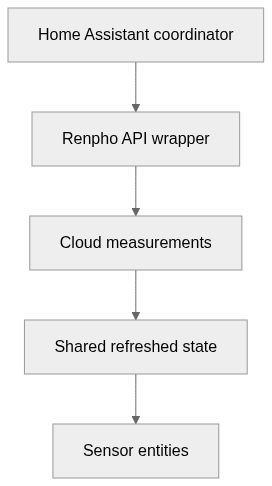
flowchart LR
  n0["Home Assistant coordinator"]
  n1["Renpho API wrapper"]
  n2["Cloud measurements"]
  n3["Shared refreshed state"]
  n4["Sensor entities"]
  n0 --> n1
  n1 --> n2
  n2 --> n3
  n3 --> n4
Text version of the diagram
- Home Assistant coordinator → Renpho API wrapper
- Renpho API wrapper → Cloud measurements
- Cloud measurements → Shared refreshed state
- Shared refreshed state → Sensor entities
Follow one path through the code
Follow _async_update_data through its three API calls and exception handling. A sensor value may be the last successful reading; the update status and timestamp are needed to distinguish it from fresh data.
Types and file structure
33 declared types, with 12 in the base-relationship overview.
Type diagram
classDiagram
direction TB
class t1c013f7e1614["RenphoWeight"] {
  __init__()
  _json_session_headers()
  get_timestamp()
  prepare_data()
}
class t018fc6091cac["AuthenticationError"] {
}
class tf6d6f400bcb6["APIError"] {
}
class t3f96fd588bea["ClientSSLError"] {
}
class teb0533bd5d5d["RenphoWeightCoordinator"] {
  __init__()
  _async_update_data()
  last_updated()
}
class t16ebe0abcf92["RenphoSensor"] {
  __init__()
  _apply_native_metadata()
  _schedule_update()
  _handle_coordinator_update()
}
class t21aebcf929af["DeviceBind"] {
  get()
}
class ta3053775281d["UserResponse"] {
  get()
}
class t7807df8cb6f0["MeasurementDetail"] {
  get()
}
class ta4f92b147e4f["MeasurementResponse"] {
  get()
}
class td4123c774424["Users"] {
  get()
}
class t9147ce26b037["GirthGoal"] {
  get()
}
class bbff3815f3008["Exception"] {
  <<unresolved_base>>
}
bbff3815f3008 <|-- t018fc6091cac
bbff3815f3008 <|-- tf6d6f400bcb6
bbff3815f3008 <|-- t3f96fd588bea
class b86550088d462["DataUpdateCoordinator"] {
  <<unresolved_base>>
}
b86550088d462 <|-- teb0533bd5d5d
class b861c1788888f["SensorEntity"] {
  <<unresolved_base>>
}
b861c1788888f <|-- t16ebe0abcf92
class bb33e03eb53a5["BaseModel"] {
  <<unresolved_base>>
}
bb33e03eb53a5 <|-- t21aebcf929af
bb33e03eb53a5 <|-- ta3053775281d
bb33e03eb53a5 <|-- t7807df8cb6f0
bb33e03eb53a5 <|-- ta4f92b147e4f
bb33e03eb53a5 <|-- td4123c774424
bb33e03eb53a5 <|-- t9147ce26b037
Unresolved bases remain labelled; full signatures are not reconstructed.
Type index
RenphoWeight(class) ·custom_components/renpho/api_renpho.py:42Methods in the overview:
__init__, _json_session_headers, get_timestamp, prepare_data.AuthenticationError(class) ·custom_components/renpho/api_renpho.py:783Declared bases:
Exception.APIError(class) ·custom_components/renpho/api_renpho.py:787Declared bases:
Exception.ClientSSLError(class) ·custom_components/renpho/api_renpho.py:791Declared bases:
Exception.RenphoWeightCoordinator(class) ·custom_components/renpho/coordinator.py:20Methods in the overview:
__init__, _async_update_data, last_updated.Declared bases:
DataUpdateCoordinator.RenphoSensor(class) ·custom_components/renpho/sensor.py:84Methods in the overview:
__init__, _apply_native_metadata, _schedule_update, _handle_coordinator_update.Declared bases:
SensorEntity.DeviceBind(class) ·api/app.py:59Methods in the overview:
get.Declared bases:
BaseModel.UserResponse(class) ·api/app.py:77Methods in the overview:
get.Declared bases:
BaseModel.MeasurementDetail(class) ·api/app.py:137Methods in the overview:
get.Declared bases:
BaseModel.MeasurementResponse(class) ·api/app.py:224Methods in the overview:
get.Declared bases:
BaseModel.Users(class) ·api/app.py:236Methods in the overview:
get.Declared bases:
BaseModel.GirthGoal(class) ·api/app.py:246Methods in the overview:
get.Declared bases:
BaseModel.
Reference
17 / 17 eligible files read (59 in the tree); 0 oversized, 0 failed reads and 0 syntax diagnostics.
What the scan covers
Known dependency/build folders, credential files and binaries are excluded. The scan covers READMEs, recognized manifests and parser-supported source files.
Linguist statistics cover the whole repository and may include other languages.
File map
flowchart TD
  root["hass_renpho"]
  f0["custom_components/renpho/api_renpho.py"]
  root --> f0
  f1["custom_components/renpho/coordinator.py"]
  root --> f1
  f2["custom_components/renpho/sensor.py"]
  root --> f2
  f3["README.md"]
  root --> f3
  f4["requirements.txt"]
  root --> f4
  f5[".devcontainer/README.md"]
  root --> f5
  f6["api/__init__.py"]
  root --> f6
  f7["api/app.py"]
  root --> f7
  f8["api/docker-compose.yml"]
  root --> f8
  f9["api/http_fingerprint.py"]
  root --> f9
  f10["api/requirements.txt"]
  root --> f10
  f11["custom_components/renpho/__init__.py"]
  root --> f11
  f12["custom_components/renpho/api_object.py"]
  root --> f12
  f13["custom_components/renpho/config_flow.py"]
  root --> f13
  f14["custom_components/renpho/const.py"]
  root --> f14
  f15["custom_components/renpho/http_fingerprint.py"]
  root --> f15
Files to read 3
References
- GitHubSource repository
- READMERepository documentation
- Renpho scale, Home Assistant, and reverse-engineering the APIBlog article