GreenScreenVideotoAlphaPNGs: A transparent-frame production pipeline
GreenScreenVideotoAlphaPNGs separates video acquisition, frame extraction and chroma keying from final encoding. RGBA PNG frames are an intermediate output that can feed either the GIF path or an alpha-capable video codec.
Repository languagesC++ 57.96%5
Shares calculated from GitHub Linguist bytes.
| Language | % | Bytes |
|---|---|---|
| C++ | 41,566 | |
| Python | 23,177 | |
| JavaScript | 5,687 | |
| PowerShell | 673 | |
| Shell | 610 |
Overview
Why it exists
OpenCV color-keying pipeline converting chroma-key green videos to RGBA alpha PNG sequences.
Best fit
Asset preparation for augmented reality (Snapchat Lens Studio, Spark AR).
Getting started
These commands come from the repository documentation. They were not run during this review.
.\install.ps1
uv run greenscreen --helpbash install.sh
uv run greenscreen --help$env:SKIP_APNGLIB='1'; uv sync --extra dev$env:SKIP_APNGLIB='0'; uv sync --extra devRepository references
Excerpts from the repository’s guides, in their original language. Links open the inspected source revision.
Prerequisites and first run
Quick start (uv)
README.md
Prerequisites
README.md
- Python 3.12+ (repo pins .python-version to 3.12 for uv).
- ffmpeg on PATH for fast frame extract and for gif –fast-ffmpeg / video. A fallback binary can come from imageio-ffmpeg if PATH has no ffmpeg.
Configuration and usage
CLI
README.md
Legacy entry points still work and forward to the same CLI:
- python GreenVideotoAlphaPNGs.py → greenscreen convert
- python GIFGenerator.py → greenscreen gif
- python VideoGenerator.py → greenscreen video
Features and components 2
- Conversion stage
- The Typer convert command delegates to run_convert. It accepts a local video or URL and can prefer FFmpeg or force OpenCV extraction. The chroma module handles pixel transparency separately from acquisition.
- Encoding choices
- gif and video take a directory of PNG frames. The GIF path offers an FFmpeg palette option; video accepts qtrle or prores_4444. Encoding is a new stage, so frame rate and format can change without repeating acquisition.
Architecture
The components and their connections remain available as text. The diagram adds an interactive view.
- Video file or URL
- Frame extraction
- Chroma key
- RGBA PNG sequence
- GIF encoder
- Alpha video encoder
Links verified in the repository.
Mermaid Interactive diagram (loads on open)
System overview of the components and connections verified in the repository.
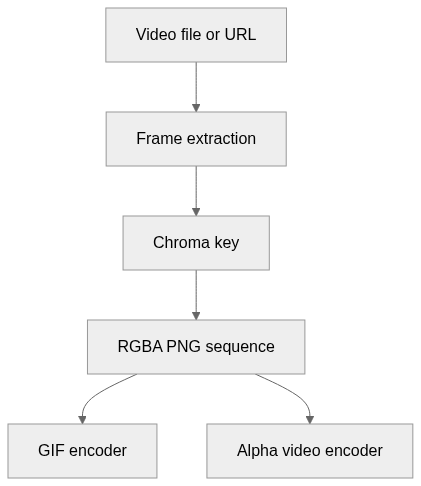
flowchart LR
  n0["Video file or URL"]
  n1["Frame extraction"]
  n2["Chroma key"]
  n3["RGBA PNG sequence"]
  n4["GIF encoder"]
  n5["Alpha video encoder"]
  n0 --> n1
  n1 --> n2
  n2 --> n3
  n3 --> n4
  n3 --> n5
Text version of the diagram
- Video file or URL → Frame extraction
- Frame extraction → Chroma key
- Chroma key → RGBA PNG sequence
- RGBA PNG sequence → GIF encoder
- RGBA PNG sequence → Alpha video encoder
Follow one path through the code
Follow cmd_convert into run_convert, then reuse its PNG output for cmd_video. Preserving the intermediate frames makes it easier to inspect matte edges before compression obscures them.
Types and file structure
2 declared types, with 2 in the base-relationship overview.
Type diagram
classDiagram
direction TB
class t6f7d26235a07["CHUNK"] {
  <<struct>>
}
class t05c53bd05b93["APNGFrame"] {
  <<struct>>
}
Unresolved bases remain labelled; full signatures are not reconstructed.
Type index
CHUNK(struct) ·lib/APNGLib_fix/APNGLib/APNGLib.cpp:78APNGFrame(struct) ·lib/APNGLib_fix/APNGLib/APNGLib.cpp:79
Reference
21 / 21 eligible files read (45 in the tree); 0 oversized, 0 failed reads and 0 syntax diagnostics.
What the scan covers
Known dependency/build folders, credential files and binaries are excluded. The scan covers READMEs, recognized manifests and parser-supported source files.
Linguist statistics cover the whole repository and may include other languages.
File map
flowchart TD
  root["GreenScreenVideotoAlphaPNGs"]
  f0["src/greenscreen/chroma.py"]
  root --> f0
  f1["src/greenscreen/cli.py"]
  root --> f1
  f2["src/greenscreen/video_pipeline.py"]
  root --> f2
  f3["GIFGenerator.py"]
  root --> f3
  f4["GreenVideotoAlphaPNGs.py"]
  root --> f4
  f5["README.md"]
  root --> f5
  f6["VideoGenerator.py"]
  root --> f6
  f7["install.sh"]
  root --> f7
  f8["pyproject.toml"]
  root --> f8
  f9["requirements.txt"]
  root --> f9
  f10["setup.py"]
  root --> f10
  f11["tests/test_chroma.py"]
  root --> f11
  f12["tests/test_cli_smoke.py"]
  root --> f12
  f13["lib/APNGLib_fix/setup.py"]
  root --> f13
  f14["src/greenscreen/__init__.py"]
  root --> f14
  f15["src/greenscreen/convert.py"]
  root --> f15