GithubSimpleFileDownloader: A browser extension tied to page structure
This archived extension attempted to add individual-file download controls to repository browsers. Its GitHub implementation shows the fragility of building an integration around another website’s DOM rather than a stable application interface.
Repository languagesJavaScript 97.74%2
Shares calculated from GitHub Linguist bytes.
| Language | % | Bytes |
|---|---|---|
| JavaScript | 12,092 | |
| CSS | 279 |
Overview
Why it exists
Browser extension injecting one-click raw file download buttons into GitHub & GitLab interfaces.
Best fit
Quick single-file extraction without cloning large repositories.
Getting started
These commands come from the repository documentation. They were not run during this review.
Tasks declared in manifests
Repository references
The repository does not provide a detailed guide for these steps. Start with its README and the source walkthrough above.
Features and components 2
- Content-script injection
- The GitHub script waits for document readiness, locates td.content cells and inserts icons, links and size labels. Separate scripts target GitLab and Bitbucket. Each adapter depends on that site’s markup.
- Raw-file download
- The script converts a repository file link to a raw URL, fetches text and creates a Blob download link. Its text-based path should not be assumed to preserve arbitrary binary files.
Architecture
The components and their connections remain available as text. The diagram adds an interactive view.
- Repository web page
- Injected content script
- DOM link extraction
- Raw file request
- Blob download link
Links verified in the repository.
Mermaid Interactive diagram (loads on open)
System overview of the components and connections verified in the repository.
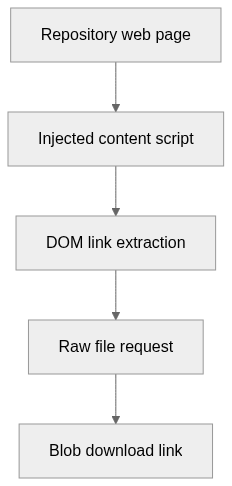
flowchart LR
  n0["Repository web page"]
  n1["Injected content script"]
  n2["DOM link extraction"]
  n3["Raw file request"]
  n4["Blob download link"]
  n0 --> n1
  n1 --> n2
  n2 --> n3
  n3 --> n4
Text version of the diagram
- Repository web page → Injected content script
- Injected content script → DOM link extraction
- DOM link extraction → Raw file request
- Raw file request → Blob download link
Follow one path through the code
Start at querySelectorAll('td.content') and inspect how child-node positions select the original link. A changed table layout can break this path before the network request is even made.
File structure
The map shows the inspected files and their organization.
Reference
8 / 8 eligible files read (42 in the tree); 0 oversized, 0 failed reads and 0 syntax diagnostics.
What the scan covers
Known dependency/build folders, credential files and binaries are excluded. The scan covers READMEs, recognized manifests and parser-supported source files.
Linguist statistics cover the whole repository and may include other languages.
File map
flowchart TD
  root["GithubSimpleFileDownloader"]
  f0["src/inject/inject_github.js"]
  root --> f0
  f1["src/inject/inject_gitlab.js"]
  root --> f1
  f2["README.md"]
  root --> f2
  f3["src/inject/inject_bitbucket.js"]
  root --> f3
  f4["src/assets/js/jquery/README.md"]
  root --> f4
  f5["src/assets/js/jquery/composer.json"]
  root --> f5
  f6["src/assets/js/jquery/jquery.js"]
  root --> f6
  f7["src/assets/js/jquery/package.json"]
  root --> f7