FlashGames: A static shell around a Flash runtime
FlashGames preserves small Flash games in a browser-facing collection. The page selects a SWF and hosts the Ruffle player. The game binary and the surrounding HTML interface remain separate pieces.
Repository languagesHTML 100%1
Shares calculated from GitHub Linguist bytes.
| Language | % | Bytes |
|---|---|---|
| HTML | 12,166 |
Overview
Why it exists
Preservation archive of early 2010s ActionScript/Flash game creations with self-contained assets.
Best fit
Digital preservation and retro gaming nostalgia.
Getting started
These commands come from the repository documentation. They were not run during this review.
Repository references
Excerpts from the repository’s guides, in their original language. Links open the inspected source revision.
Development and contributions
🤝 Contributing
README.md
Contributions to this project are welcome! Here’s how you can help:
- Add More Games: If you have preserved Flash games that you’d like to add to this collection, please submit a pull request.
- Improve the Interface: Enhancements to the game selection UI are always appreciated.
- Documentation: Help improve this README or add game-specific instructions.
- Report Issues: If you encounter any problems with the games or the Ruffle integration, please open an issue.
Features and components 2
- Selection and runtime
- index.html includes the Ruffle script, a game selector and a player container. Selection updates the page state before loading the chosen SWF. Styles and icons come from CDN assets rather than a local frontend build.
- Preserved game files
- The repository stores the SWF files alongside the page. Ruffle supplies the browser-compatible execution layer; the page does not rewrite the games into JavaScript source.
Architecture
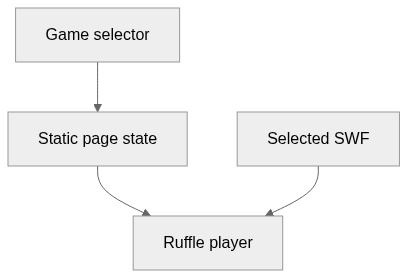
The components and their connections remain available as text. The diagram adds an interactive view.
- Game selector
- Static page state
- Ruffle player
- Selected SWF
Links verified in the repository.
Mermaid Interactive diagram (loads on open)
System overview of the components and connections verified in the repository.
flowchart LR
  n0["Game selector"]
  n1["Static page state"]
  n2["Ruffle player"]
  n3["Selected SWF"]
  n0 --> n1
  n1 --> n2
  n3 --> n2
Text version of the diagram
- Game selector → Static page state
- Static page state → Ruffle player
- Selected SWF → Ruffle player
Follow one path through the code
Trace the selector’s updateHash handler toward the player container. This is a useful distinction when debugging: a selector problem belongs to the page, while unsupported game behavior may belong to the runtime.
File structure
The map shows the inspected files and their organization.
Reference
1 / 1 eligible files read (6 in the tree); 0 oversized, 0 failed reads and 0 syntax diagnostics.
What the scan covers
Known dependency/build folders, credential files and binaries are excluded. The scan covers READMEs, recognized manifests and parser-supported source files.
Linguist statistics cover the whole repository and may include other languages.
File map
flowchart TD
  root["FlashGames"]
  f0["README.md"]
  root --> f0