ESP32-7SEG: An embedded clock with network setup
ESP32-7SEG connects an ESP32 clock display to network configuration and an HTTP interface. The firmware startup decides whether saved Wi-Fi settings can be reused or whether the device needs its setup path.
Repository languagesKotlin 58.26%3
Shares calculated from GitHub Linguist bytes.
| Language | % | Bytes |
|---|---|---|
| Kotlin | 62,877 | |
| C++ | 42,693 | |
| C | 2,350 |
Overview
Why it exists
Embedded microcontroller firmware and mobile controller for driving multi-digit 7-segment displays.
Best fit
Physical computing status dashboards and hardware displays.
Getting started
These commands come from the repository documentation. They were not run during this review.
Repository references
Excerpts from the repository’s guides, in their original language. Links open the inspected source revision.
Prerequisites and first run
Prerequisites
README.md
- Hardware: ESP32 FireBeetle board (v1.0), Adafruit 7-segment display (I2C backpack), breadboard, and jumper wires.
- Software: Git, PlatformIO or Arduino IDE, and necessary ESP32 libraries.
Software Installation
README.md
- Clone the Repository:
- Open and Configure the Project: Load the project into PlatformIO or the Arduino IDE. Install any required libraries as specified in platformio.ini or the project documentation.
- Upload to the ESP32: Compile and upload the code to your ESP32 board to start the project.
Prerequisites
readme.md
Software Installation
readme.md
- Clone the repository to your local machine.
- Open the project with your preferred IDE or editor that supports PlatformIO or the Arduino IDE.
- Install the necessary libraries mentioned in the platformio.ini file or the Arduino project.
- Upload the code to your ESP32 FireBeetle board.
Configuration and usage
Hardware Setup
README.md
- Display Connections: Connect the Adafruit 7-segment display to the ESP32 using the I2C interface. Make sure to connect the SCL and SDA pins correctly, along with VCC and GND for power.
- Power Supply: Power the ESP32 board through USB or an external power supply to ensure stable operation.
Usage
README.md
- Access the Web Server: After booting, the ESP32 launches a web server. Find its IP address in the serial monitor and navigate to it using a web browser.
- Update Display via Web Interface: Use the web interface to input and submit the content you want to be displayed. The ESP32 will update the 7-segment display in real-time.
Hardware Setup
readme.md
- Connect the 7-segment display to the ESP32 according to the provided wiring diagram.
- Ensure a stable power supply for the ESP32 board.
Usage
readme.md
After uploading the code to your ESP32 board:
- Connect the ESP32 to a power source.
- The ESP32 starts a web server accessible within your local network.
- Find the ESP32’s IP address from your serial monitor and visit the provided IP using a web browser.
- Use the web interface to update the 7-segment display’s content.
Development and contributions
Contributing
README.md
Contributing
readme.md
Features and components 2
- Boot and connectivity
- setup initializes NVS and checks its result. It loads saved credentials, attempts a connection and falls back to setupWiFi if needed. The same fallback runs when no saved credentials exist.
- Display and web modules
- After connectivity setup, main.cpp calls startClockDisplay and setupWebServer. display.cpp, wifi.cpp and web_server.cpp keep hardware display, connection management and HTTP handling in separate modules.
Architecture
The components and their connections remain available as text. The diagram adds an interactive view.
- ESP32 boot
- NVS saved settings
- Connect or setup Wi-Fi
- Clock display
- HTTP interface
Links verified in the repository.
Mermaid Interactive diagram (loads on open)
System overview of the components and connections verified in the repository.
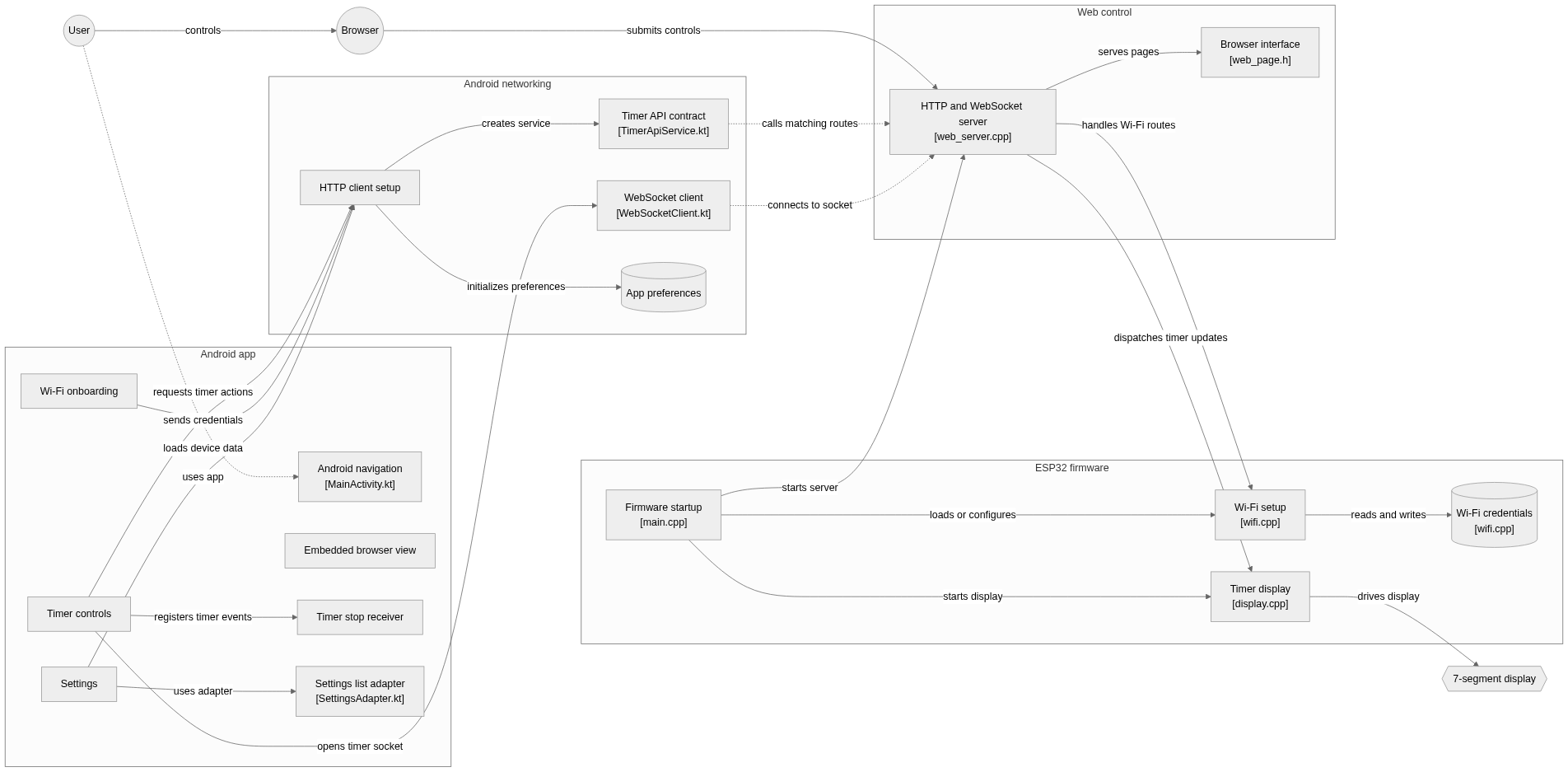
flowchart LR

subgraph group_firmware["ESP32 firmware"]
  node_boot["Firmware startup<br/>[main.cpp]"]
  node_wifi["Wi-Fi setup<br/>[wifi.cpp]"]
  node_credentials[("Wi-Fi credentials<br/>[wifi.cpp]")]
  node_timer_display["Timer display<br/>[display.cpp]"]
end

subgraph group_web["Web control"]
  node_http_server["HTTP and WebSocket server<br/>[web_server.cpp]"]
  node_web_pages["Browser interface<br/>[web_page.h]"]
end

subgraph group_android["Android app"]
  node_android_entry["Android navigation<br/>[MainActivity.kt]"]
  node_timer_ui["Timer controls"]
  node_wifi_ui["Wi-Fi onboarding"]
  node_settings_ui["Settings"]
  node_browser_ui["Embedded browser view"]
  node_stop_receiver["Timer stop receiver"]
  node_settings_adapter["Settings list adapter<br/>[SettingsAdapter.kt]"]
end

subgraph group_android_net["Android networking"]
  node_timer_api["Timer API contract<br/>[TimerApiService.kt]"]
  node_retrofit["HTTP client setup"]
  node_ws_client["WebSocket client<br/>[WebSocketClient.kt]"]
  node_preferences[("App preferences")]
end

node_operator(("User"))
node_browser(("Browser"))
node_display_hw{{"7-segment display"}}

node_operator -->|"controls"| node_browser
node_browser -->|"submits controls"| node_http_server
node_boot -->|"loads or configures"| node_wifi
node_boot -->|"starts display"| node_timer_display
node_boot -->|"starts server"| node_http_server
node_wifi -->|"reads and writes"| node_credentials
node_http_server -->|"handles Wi-Fi routes"| node_wifi
node_http_server -->|"dispatches timer updates"| node_timer_display
node_http_server -->|"serves pages"| node_web_pages
node_timer_display -->|"drives display"| node_display_hw
node_operator -.->|"uses app"| node_android_entry
node_timer_ui -->|"requests timer actions"| node_retrofit
node_timer_ui -->|"opens timer socket"| node_ws_client
node_wifi_ui -->|"sends credentials"| node_retrofit
node_settings_ui -->|"uses adapter"| node_settings_adapter
node_settings_ui -->|"loads device data"| node_retrofit
node_retrofit -->|"creates service"| node_timer_api
node_retrofit -->|"initializes preferences"| node_preferences
node_timer_ui -->|"registers timer events"| node_stop_receiver
node_timer_api -.->|"calls matching routes"| node_http_server
node_ws_client -.->|"connects to socket"| node_http_server


class node_boot,node_wifi,node_credentials,node_timer_display,node_operator,node_browser toneBlue
class node_http_server,node_web_pages toneAmber
class node_android_entry,node_timer_ui,node_wifi_ui,node_settings_ui,node_browser_ui,node_stop_receiver,node_settings_adapter toneMint
class node_timer_api,node_retrofit,node_ws_client,node_preferences toneRose
class node_display_hw toneIndigo
ESP32 firmware for a network-controlled seven-segment timer with an Android companion app. Firmware startup loads Wi-Fi, starts the display and web server, while browser and Android controls send timer and onboarding requests.
- Components
- 20
- Connections
- 21
- Links supported by code or README
- 18/21
Text version of the diagram
- ESP32 boot → NVS saved settings
- NVS saved settings → Connect or setup Wi-Fi
- Connect or setup Wi-Fi → Clock display
- Connect or setup Wi-Fi → HTTP interface
Follow one path through the code
Follow the saved-credentials branch in setup. A stored network is attempted first, but failure still reaches setupWiFi. Only after that branch does the code start the display and web server.
Types and file structure
21 declared types, with 12 in the base-relationship overview.
Type diagram
classDiagram
direction TB
class t0f7089087495["Callbacks"] {
  <<struct>>
}
class tc0b1722c8a7f["ExampleInstrumentedTest"] {
  useAppContext()
}
class taaaa0937cb8a["ExampleInstrumentedTest"] {
  useAppContext()
}
class t0fd594821bdd["MainActivity"] {
  onCreate()
  setupNavigationUI()
  hasPermissions()
  onRequestPermissionsResult()
}
class tf36f30cd8e65["SettingsAdapter"] {
  onCreateViewHolder()
  onBindViewHolder()
  getItemCount()
}
class tb59d4cfbe0b1["SettingsViewHolder"] {
}
class tc5d344b351ed["SettingItem"] {
}
class tce24fcf8fc6e["TimerApiService"] {
  performTimerAction()
  resetWifiCredentials()
  connectToWiFi()
  scanForNetworks()
}
class t64725d5d3582["WebSocketClient"] {
  connect()
  send()
  close()
}
class t181736c31b5e["WebSocketEventListener"] {
  onOpen()
  onMessage()
  onClosing()
  onFailure()
}
class tf5e33f3603df["PreferencesHelper"] {
}
class t1902f7090575["SettingsFragment"] {
  onCreateView()
  onViewCreated()
  fetchDeviceInfo()
  checkWifiPermissionAndFetchSSID()
}
class b4be9ca085545["AppCompatActivity"] {
  <<unresolved_base>>
}
t0fd594821bdd ..> b4be9ca085545 : declared base
class bc58b80af594e["RecyclerView"] {
  <<unresolved_base>>
}
tf36f30cd8e65 ..> bc58b80af594e : declared base
tb59d4cfbe0b1 ..> bc58b80af594e : declared base
class b995bb1f4b9f4["Fragment"] {
  <<unresolved_base>>
}
t1902f7090575 ..> b995bb1f4b9f4 : declared base
Unresolved bases remain labelled; full signatures are not reconstructed.
Type index
Callbacks(struct) ·src/display.cpp:17ExampleInstrumentedTest(class) ·android/app/src/androidTest/java/com/esptimer/ExampleInstrumentedTest.kt:16Methods in the overview:
useAppContext.ExampleInstrumentedTest(class) ·android/app/src/androidTest/java/com/example/esptimer/ExampleInstrumentedTest.kt:16Methods in the overview:
useAppContext.MainActivity(class) ·android/app/src/main/java/com/esptimer/MainActivity.kt:16Methods in the overview:
onCreate, setupNavigationUI, hasPermissions, onRequestPermissionsResult.Declared bases:
AppCompatActivity.SettingsAdapter(class) ·android/app/src/main/java/com/esptimer/adapter/SettingsAdapter.kt:10Methods in the overview:
onCreateViewHolder, onBindViewHolder, getItemCount.Declared bases:
RecyclerView.SettingsViewHolder(class) ·android/app/src/main/java/com/esptimer/adapter/SettingsAdapter.kt:13Declared bases:
RecyclerView.SettingItem(class) ·android/app/src/main/java/com/esptimer/adapter/SettingsAdapter.kt:40TimerApiService(class) ·android/app/src/main/java/com/esptimer/api/TimerApiService.kt:6Methods in the overview:
performTimerAction, resetWifiCredentials, connectToWiFi, scanForNetworks.WebSocketClient(class) ·android/app/src/main/java/com/esptimer/api/WebSocketClient.kt:8Methods in the overview:
connect, send, close.WebSocketEventListener(class) ·android/app/src/main/java/com/esptimer/api/WebSocketClient.kt:45Methods in the overview:
onOpen, onMessage, onClosing, onFailure.PreferencesHelper(class) ·android/app/src/main/java/com/esptimer/config/PreferencesHelper.kt:5SettingsFragment(class) ·android/app/src/main/java/com/esptimer/fragment/SettingsFragment.kt:24Methods in the overview:
onCreateView, onViewCreated, fetchDeviceInfo, checkWifiPermissionAndFetchSSID.Declared bases:
Fragment.
Reference
36 / 36 eligible files read (113 in the tree); 0 oversized, 0 failed reads and 1 syntax diagnostics.
What the scan covers
Known dependency/build folders, credential files and binaries are excluded. The scan covers READMEs, recognized manifests and parser-supported source files.
Linguist statistics cover the whole repository and may include other languages.
File map
flowchart TD
  root["ESP32-7SEG"]
  f0["platformio.ini"]
  root --> f0
  f1["src/display.cpp"]
  root --> f1
  f2["src/main.cpp"]
  root --> f2
  f3["src/web_server.cpp"]
  root --> f3
  f4["README.md"]
  root --> f4
  f5["readme.md"]
  root --> f5
  f6["android/build.gradle.kts"]
  root --> f6
  f7["include/README"]
  root --> f7
  f8["include/ble.h"]
  root --> f8
  f9["include/config.h"]
  root --> f9
  f10["include/display.h"]
  root --> f10
  f11["include/web_page.h"]
  root --> f11
  f12["include/web_server.h"]
  root --> f12
  f13["include/wifi.h"]
  root --> f13
  f14["lib/README"]
  root --> f14
  f15["src/ble.cpp"]
  root --> f15