donneesqc-mcp: An MCP gateway to public data
donneesqc-mcp is a fork exposing Québec and Montréal open-data operations through MCP tools. Its entry point registers the tool collection and starts an HTTP transport, leaving dataset access and geographic helpers in separate modules.
Repository languagesPython 98.28%3
Shares calculated from GitHub Linguist bytes.
| Language | % | Bytes |
|---|---|---|
| Python | 157,778 | |
| Shell | 2,183 | |
| Dockerfile | 574 |
Overview
Why it exists
Production MCP server connecting AI assistants to Quebec & Montreal open data APIs with strict schema validation.
Best fit
Natural language querying of public municipal and provincial datasets across transportation, demographics, and municipal services.
Getting started
These commands come from the repository documentation. They were not run during this review.
git clone https://github.com/Stefen-Taime/donneesqc-mcp.git
cd donneesqc-mcp
uv sync
cp .env.example .env
set -a && source .env && set +a
uv run python main.pygit clone https://github.com/Stefen-Taime/donneesqc-mcp.git
cd donneesqc-mcp
docker compose up -dRepository references
Excerpts from the repository’s guides, in their original language. Links open the inspected source revision.
Prerequisites and first run
Installation manuelle
README.md
Variables d’environnement :
| Variable | Défaut | Description |
|---|---|---|
| MCP_HOST | 0.0.0.0 | Adresse d’écoute. Utilisez 127.0.0.1 en développement local. |
| MCP_PORT | 8000 | Port du serveur HTTP. |
| MCP_ENV | local | Nom de l’environnement (Sentry). |
| HTTP_TIMEOUT | 30.0 | Timeout HTTP en secondes. |
| HTTP_MAX_RETRIES | 3 | Nombre de tentatives en cas d’erreur réseau ou 5xx. |
| DOWNLOAD_MAX_BYTES | 52428800 (50 Mo) | Taille maximale pour le téléchargement de fichiers. |
| LOG_LEVEL | INFO | Niveau de journalisation Python. |
| SENTRY_DSN | (non défini) | DSN Sentry pour le monitoring. |
Configuration and usage
Gemini CLI
README.md
Features and components 2
- Server bootstrap
- main.py configures logging, optionally initializes Sentry, calls register_all_tools and runs the MCP object with streamable-http. Monitoring is optional; it is not the mechanism that serves dataset queries.
- Data-service boundary
- The documented tool groups cover catalog discovery, CKAN DataStore access, resource downloads and geographic enrichment. A catalog result describes a resource; the actual table or file is a separate request and may use a different format.
Architecture
The components and their connections remain available as text. The diagram adds an interactive view.
- MCP client
- Registered HTTP tools
- Catalog search
- Table or file resource
- Structured result
Links verified in the repository.
Mermaid Interactive diagram (loads on open)
System overview of the components and connections verified in the repository.
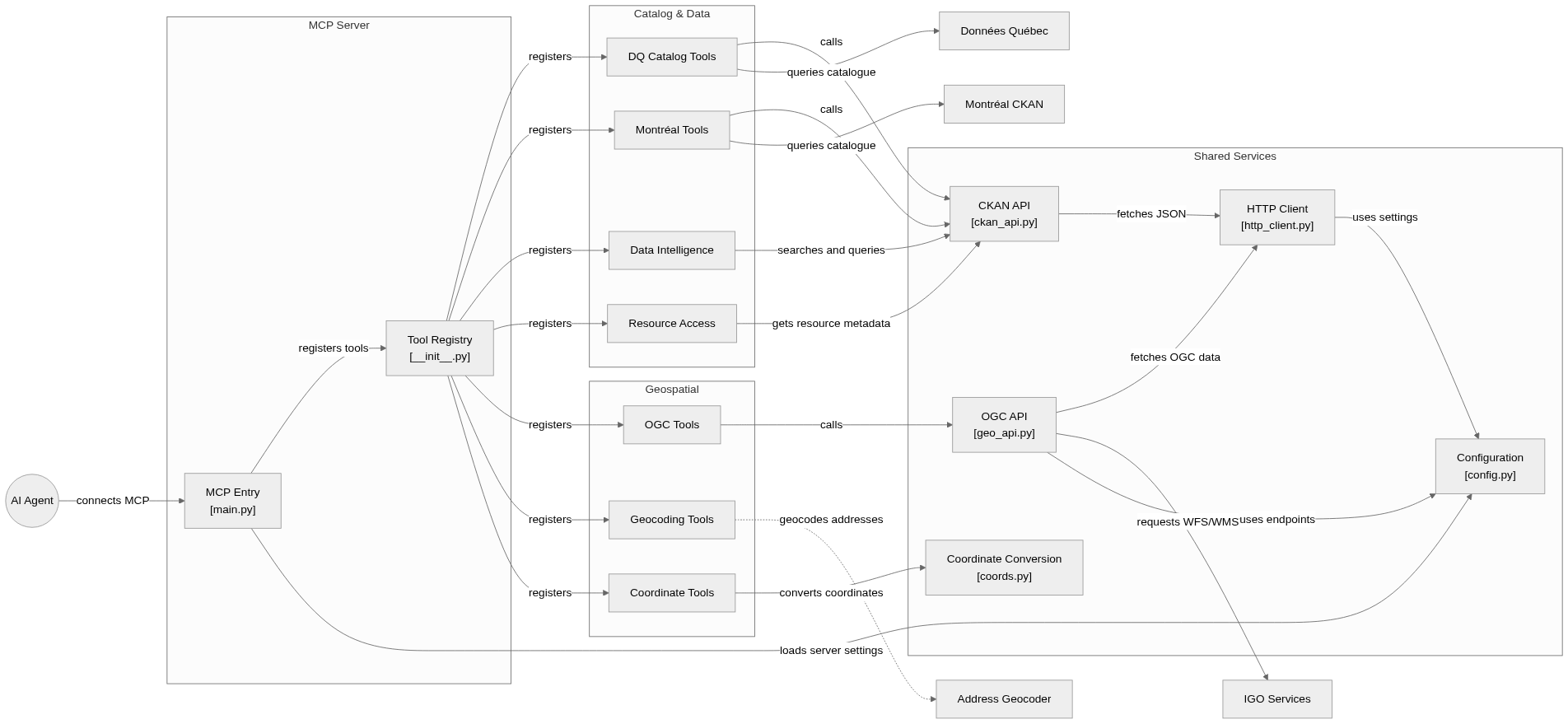
flowchart LR
subgraph group_server["MCP Server"]
node_entry["MCP Entry<br/>[main.py]"]
node_registry["Tool Registry<br/>[__init__.py]"]
end
subgraph group_catalog["Catalog & Data"]
node_dqtools["DQ Catalog Tools"]
node_mtltools["Montréal Tools"]
node_intelligence["Data Intelligence"]
node_downloads["Resource Access"]
end
subgraph group_geo["Geospatial"]
node_geo_tools["OGC Tools"]
node_geocoding["Geocoding Tools"]
node_coordinates["Coordinate Tools"]
end
subgraph group_shared["Shared Services"]
node_ckan["CKAN API<br/>[ckan_api.py]"]
node_geoapi["OGC API<br/>[geo_api.py]"]
node_coords["Coordinate Conversion<br/>[coords.py]"]
node_http["HTTP Client<br/>[http_client.py]"]
node_config["Configuration<br/>[config.py]"]
end
node_agent(("AI Agent"))
node_dqportal["Données Québec"]
node_mtlportal["Montréal CKAN"]
node_geoservice["IGO Services"]
node_geocoder["Address Geocoder"]
node_agent -->|"connects MCP"| node_entry
node_entry -->|"registers tools"| node_registry
node_registry -->|"registers"| node_dqtools
node_registry -->|"registers"| node_mtltools
node_registry -->|"registers"| node_intelligence
node_registry -->|"registers"| node_downloads
node_registry -->|"registers"| node_geo_tools
node_registry -->|"registers"| node_geocoding
node_registry -->|"registers"| node_coordinates
node_dqtools -->|"calls"| node_ckan
node_mtltools -->|"calls"| node_ckan
node_intelligence -->|"searches and queries"| node_ckan
node_downloads -->|"gets resource metadata"| node_ckan
node_ckan -->|"fetches JSON"| node_http
node_dqtools -->|"queries catalogue"| node_dqportal
node_mtltools -->|"queries catalogue"| node_mtlportal
node_geo_tools -->|"calls"| node_geoapi
node_geoapi -->|"fetches OGC data"| node_http
node_geoapi -->|"requests WFS/WMS"| node_geoservice
node_geocoding -.->|"geocodes addresses"| node_geocoder
node_coordinates -->|"converts coordinates"| node_coords
node_http -->|"uses settings"| node_config
node_geoapi -->|"uses endpoints"| node_config
node_entry -->|"loads server settings"| node_config
class node_entry,node_registry toneBlue
class node_dqtools,node_mtltools,node_intelligence,node_downloads toneAmber
class node_geo_tools,node_geocoding,node_coordinates toneMint
class node_ckan,node_geoapi,node_coords,node_http,node_config toneRose
class node_agent,node_dqportal,node_mtlportal,node_geoservice,node_geocoder toneIndigoAn MCP server that gives agents access to Québec open-data catalogues, DataStore queries, geospatial services, geocoding and coordinate conversion through registered tools and shared HTTP helpers.
- Components
- 19
- Connections
- 24
- Links supported by code or README
- 23/24
Text version of the diagram
- MCP client → Registered HTTP tools
- Registered HTTP tools → Catalog search
- Catalog search → Table or file resource
- Table or file resource → Structured result
- Structured result → MCP client
Follow one path through the code
Follow main into register_all_tools, then choose the dataset-access tool behind a catalog result. Resource identifiers, formats and geographic coordinate systems matter more than a dataset title alone.
Deployment and operations
The ports, storage, and startup relationships below come from the repository configuration. depends_on records startup order, not service readiness.
Types and file structure
1 declared types, with 1 in the base-relationship overview.
Type diagram
classDiagram
direction TB
class t5a13289447b1["TestValidateSQL"] {
  test_select_simple()
  test_select_with_where()
  test_select_with_semicolon()
  test_select_with_whitespace()
}
Unresolved bases remain labelled; full signatures are not reconstructed.
Type index
TestValidateSQL(class) ·tests/test_sql_validation.py:8Methods in the overview:
test_select_simple, test_select_with_where, test_select_with_semicolon, test_select_with_whitespace.
Reference
50 / 50 eligible files read (59 in the tree); 0 oversized, 0 failed reads and 0 syntax diagnostics.
What the scan covers
Known dependency/build folders, credential files and binaries are excluded. The scan covers READMEs, recognized manifests and parser-supported source files.
Linguist statistics cover the whole repository and may include other languages.
File map
flowchart TD
  root["donneesqc-mcp"]
  f0["README.md"]
  root --> f0
  f1["main.py"]
  root --> f1
  f2["tools/__init__.py"]
  root --> f2
  f3["docker-compose.yml"]
  root --> f3
  f4["pyproject.toml"]
  root --> f4
  f5["tag_version.sh"]
  root --> f5
  f6["helpers/__init__.py"]
  root --> f6
  f7["helpers/ckan_api.py"]
  root --> f7
  f8["helpers/config.py"]
  root --> f8
  f9["helpers/coords.py"]
  root --> f9
  f10["helpers/geo_api.py"]
  root --> f10
  f11["helpers/http_client.py"]
  root --> f11
  f12["tests/__init__.py"]
  root --> f12
  f13["tests/conftest.py"]
  root --> f13
  f14["tests/test_ckan_api.py"]
  root --> f14
  f15["tests/test_http_client.py"]
  root --> f15