Dimension: From matrix storage to a rendered scene
Dimension is my Rust workspace for mathematics and graphics experiments. mathlib provides numerical building blocks; render uses them for CPU-side transforms and cameras before submitting graphics work through wgpu.
Repository languagesRust 63.95%10
Shares calculated from GitHub Linguist bytes.
| Language | % | Bytes |
|---|---|---|
| Rust | 2,691,477 | |
| JavaScript | 1,340,031 | |
| HTML | 108,173 | |
| Just | 21,784 | |
| CSS | 21,650 | |
| WGSL | 16,946 |
4 more languages
| TypeScript | 0.13% | 5,627 |
| Python | 0.04% | 1,817 |
| Shell | 0.02% | 751 |
| Dockerfile | 0.01% | 389 |
Overview
Why it exists
High-performance wgpu graphics pipeline and linear algebra math engine built entirely in Rust from first principles.
Best fit
Hardware-accelerated 3D heightmap rendering, spatial transformation pipelines, and graphics education.
Getting started
These commands come from the repository documentation. They were not run during this review.
cd kinematics
cargo build
cargo test
cargo bench
cargo run --example forward_kinematics
cargo run --example jacobian_ikjust wasm-build # or just wasm-build-gpu for GPU support
just wasm-servewasm-pack build --target web --features wasmcargo run -p neural --bin download_models -- --allcargo run -p neural --example precompute_demo_embeddings --features precompute -- mathlib/demo/wasm-demo/recommendation/data.jsoncargo run -p render-demo --example render_nativejust render-wasm # build + serve; open http://localhost:3000/wasm-demo/just website-build # Build all WASM demos and populate website/
just website-build-gpu # Same, but with GPU-enabled mathlib (WebGPU init, async matmul, etc.)
just website-build-simd # Same as website-build, but render demo built with SIMD (can improve frame rate)
just website-serve # Serve website/ (e.g. http://localhost:3000)Repository references
Excerpts from the repository’s guides, in their original language. Links open the inspected source revision.
Prerequisites and first run
Getting started
CONTRIBUTING.md
Operations and troubleshooting
Performance / Troubleshooting
render/demo/README.md
- Use a modern browser with WebGPU enabled (Chrome, Edge, or Firefox with dom.webgpu.enabled) for best frame rate; software or limited WebGPU can cause slow FPS.
- For potentially better FPS on CPU-bound work (math, culling), build the render WASM demo with SIMD: just wasm-render-build-simd, then just wasm-render-serve, and open the same URL.
Development and contributions
Contributing to Dimension
CONTRIBUTING.md
Development workflow
CONTRIBUTING.md
- Fork and clone the repository.
- Create a branch for your change (e.g. fix/svd-edge-case, feat/sparse-format).
- Make your changes in mathlib/. Keep formatting and style consistent with the existing codebase.
- Run tests and lints:
- Submit a pull request with a clear description of the change and why it’s needed.
E2E tests (Playwright)
e2e/README.md
What the tests do
e2e/README.md
- Render (tests/render.spec.ts): Opens the render WASM demo at /wasm-demo/, checks the canvas is visible with width/height, ensures the error div is not shown, and takes a screenshot for visual regression.
- Kinematics (tests/kinematics.spec.ts): Opens the kinematics-demo WASM at /wasm-demo/, checks the canvas (800×600) is visible and the error div is not shown, verifies the hint text (orbit / IK / zoom), and that the page title matches the demo.
E2E tests (Playwright)
render/demo/README.md
Source documentation
README.mdCONTRIBUTING.mde2e/README.mdparse/README.mdneural/README.mdrender/README.mdmathlib/README.mdnetwork/README.mdphysics/README.mdwebsite/README.mdkinematics/README.mdrender/demo/README.mdmathlib/demo/README.mdphysics/demo/README.mdgeometry/demo/README.mdneural/models/README.mdkinematics/demo/README.mdwebsite/mathlib/README.mdmathlib/demo/wasm-demo/README.mdmathlib/demo/wasm-demo/pkg/README.mdmathlib/demo/wasm-demo/pkg/pkg/README.md
21 documents read from 21 candidates.
Features and components 2
- Data and numerical operations
- mathlib exports dense and sparse storage, matrix views, vectors and numerical methods. A caller chooses the representation that fits its problem. Optional executor features are separate from the basic storage API.
- Scene and platform boundary
- render exports World, EntityId and Transform, with parent-child scene relationships. Native windowing and WebAssembly canvas support sit around the renderer. The root workspace also contains geometry, collision, kinematics and physics crates.
Architecture
The components and their connections remain available as text. The diagram adds an interactive view.
- Application or demo
- mathlib data and transforms
- Scene hierarchy and camera
- wgpu resources and passes
- Native window or web canvas
Links verified in the repository.
Mermaid Interactive diagram (loads on open)
System overview of the components and connections verified in the repository.
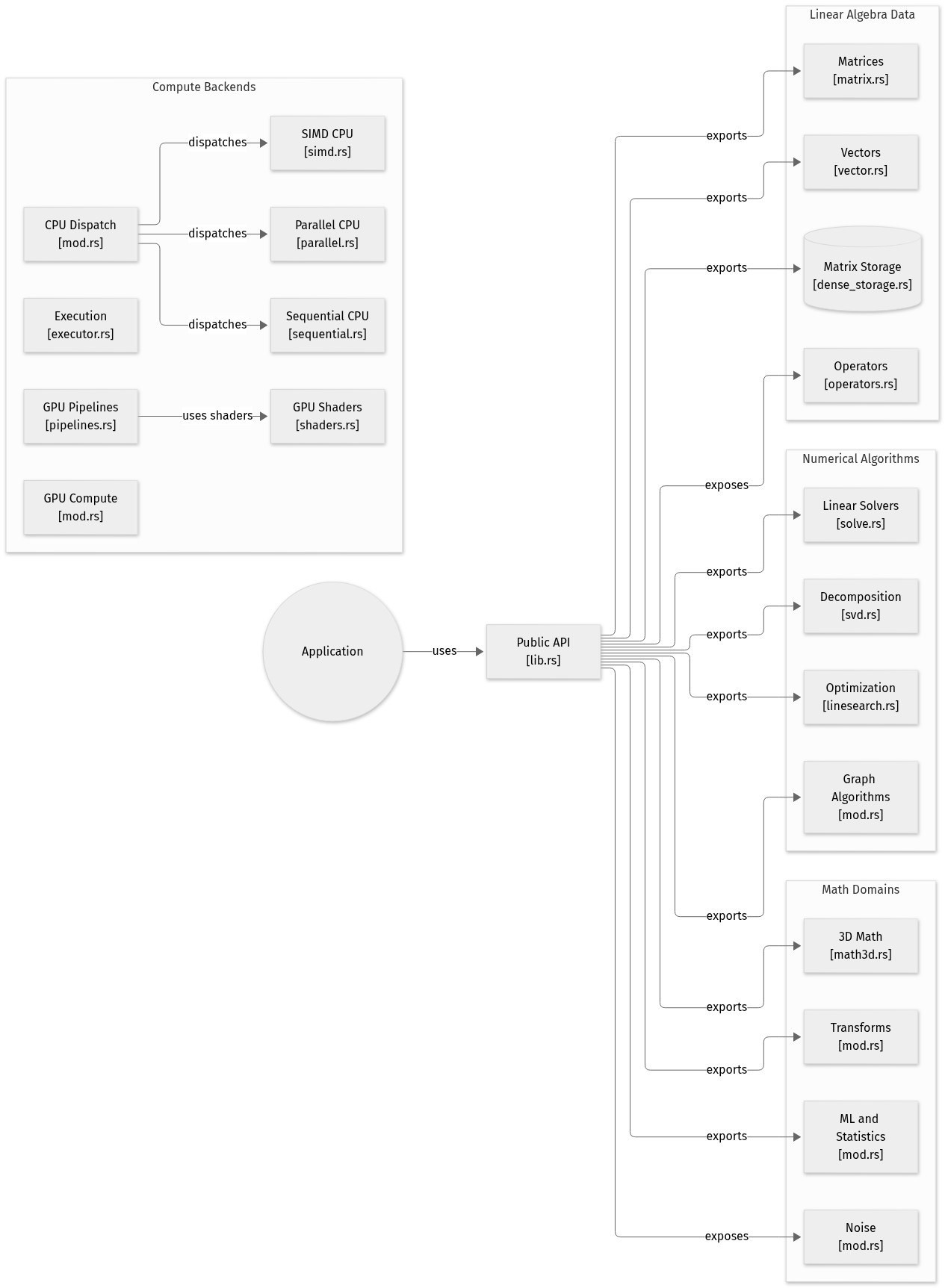
flowchart LR

subgraph group_data["Linear Algebra Data"]
  node_matrix["Matrices<br/>[matrix.rs]"]
  node_vector["Vectors<br/>[vector.rs]"]
  node_storage[("Matrix Storage<br/>[dense_storage.rs]")]
  node_operators["Operators<br/>[operators.rs]"]
end

subgraph group_compute["Compute Backends"]
  node_cpu["CPU Dispatch<br/>[mod.rs]"]
  node_parallel["Parallel CPU<br/>[parallel.rs]"]
  node_sequential["Sequential CPU<br/>[sequential.rs]"]
  node_simd["SIMD CPU<br/>[simd.rs]"]
  node_executor["Execution<br/>[executor.rs]"]
  node_gpu["GPU Compute<br/>[mod.rs]"]
  node_pipelines["GPU Pipelines<br/>[pipelines.rs]"]
  node_shaders["GPU Shaders<br/>[shaders.rs]"]
end

subgraph group_algorithms["Numerical Algorithms"]
  node_linear["Linear Solvers<br/>[solve.rs]"]
  node_decomposition["Decomposition<br/>[svd.rs]"]
  node_optimization["Optimization<br/>[linesearch.rs]"]
  node_graph["Graph Algorithms<br/>[mod.rs]"]
end

subgraph group_domains["Math Domains"]
  node_math3d["3D Math<br/>[math3d.rs]"]
  node_transforms["Transforms<br/>[mod.rs]"]
  node_ml["ML and Statistics<br/>[mod.rs]"]
  node_noise["Noise<br/>[mod.rs]"]
end

node_application(("Application"))
node_api["Public API<br/>[lib.rs]"]

node_application -->|"uses"| node_api
node_api -->|"exports"| node_matrix
node_api -->|"exports"| node_vector
node_api -->|"exports"| node_storage
node_api -->|"exposes"| node_operators
node_api -->|"exports"| node_linear
node_api -->|"exports"| node_decomposition
node_api -->|"exports"| node_optimization
node_api -->|"exports"| node_graph
node_api -->|"exports"| node_math3d
node_api -->|"exports"| node_transforms
node_api -->|"exports"| node_ml
node_api -->|"exposes"| node_noise
node_cpu -->|"dispatches"| node_parallel
node_cpu -->|"dispatches"| node_sequential
node_cpu -->|"dispatches"| node_simd
node_pipelines -->|"uses shaders"| node_shaders


class node_matrix,node_vector,node_storage,node_operators toneBlue
class node_cpu,node_parallel,node_sequential,node_simd,node_executor,node_gpu,node_pipelines,node_shaders toneAmber
class node_linear,node_decomposition,node_optimization,node_graph,node_api toneMint
class node_math3d,node_transforms,node_ml,node_noise toneRose
class node_application toneIndigo
A Rust mathematics workspace centred on mathlib. Applications construct vectors, matrices and cubes, then use numerical, geometric and analytical operations before data reaches the wider rendering workspace.
- Components
- 22
- Connections
- 17
- Links supported by code or README
- 16/17
Text version of the diagram
- Application or demo → mathlib data and transforms
- mathlib data and transforms → Scene hierarchy and camera
- Scene hierarchy and camera → wgpu resources and passes
- wgpu resources and passes → Native window or web canvas
Follow one path through the code
For a scene update, start with a local Transform and its parent relationship. Follow the scene representation toward the renderer rather than assuming a matrix calculation executes on the GPU. wgpu is the graphics backend; mathlib’s optional GPU executor is a different feature.
Types and file structure
430 declared types, with 12 in the base-relationship overview.
Type diagram
classDiagram
direction TB
class t4a5cd93435e6["Aabb"] {
  <<struct>>
  new()
  corners()
  union()
  union_many()
}
class t00c318d02aea["Aabb2"] {
  <<struct>>
  new()
  from_center_half_extents()
  corners()
  intersects()
}
class tdf807751b6f7["BspNode"] {
  <<enum>>
}
class tc84a8c5a51f3["BspTree"] {
  <<struct>>
}
class t03c92090f7e7["BvhBuildStrategy"] {
  <<enum>>
}
class t8b7035050ae2["BvhNode"] {
  <<enum>>
}
class t4cf1ac3511d5["BvhTree"] {
  <<struct>>
}
class t2f72a336b45d["BvhRayIter"] {
  <<struct>>
}
class t0f551e8e9c62["BvhFrustumIter"] {
  <<struct>>
}
class tb5166a8a85e0["Capsule"] {
  <<struct>>
  new()
  aabb()
  ray_intersect()
}
class t39e7bad6e68e["Circle"] {
  <<struct>>
  new()
  aabb()
  contains_point()
  ray_intersect()
}
class ta681312b5c13["Frustum"] {
  <<struct>>
  from_view_proj()
  intersects_aabb()
}
Unresolved bases remain labelled; full signatures are not reconstructed.
Type index
Aabb(struct) ·collision/src/aabb.rs:5Methods in the overview:
new, corners, union, union_many.Aabb2(struct) ·collision/src/aabb2.rs:5Methods in the overview:
new, from_center_half_extents, corners, intersects.BspNode(enum) ·collision/src/bsp.rs:12BspTree(struct) ·collision/src/bsp.rs:36BvhBuildStrategy(enum) ·collision/src/bvh.rs:23BvhNode(enum) ·collision/src/bvh.rs:52BvhTree(struct) ·collision/src/bvh.rs:75BvhRayIter(struct) ·collision/src/bvh.rs:400BvhFrustumIter(struct) ·collision/src/bvh.rs:462Capsule(struct) ·collision/src/capsule.rs:13Methods in the overview:
new, aabb, ray_intersect.Circle(struct) ·collision/src/circle.rs:7Methods in the overview:
new, aabb, contains_point, ray_intersect.Frustum(struct) ·collision/src/frustum.rs:11Methods in the overview:
from_view_proj, intersects_aabb.
Reference
660 / 660 eligible files read (800 in the tree); 0 oversized, 0 failed reads and 0 syntax diagnostics.
What the scan covers
Known dependency/build folders, credential files and binaries are excluded. The scan covers READMEs, recognized manifests and parser-supported source files.
Linguist statistics cover the whole repository and may include other languages.
File map
flowchart TD
  root["Dimension"]
  f0["Cargo.toml"]
  root --> f0
  f1["mathlib/src/lib.rs"]
  root --> f1
  f2["render/src/lib.rs"]
  root --> f2
  f3["README.md"]
  root --> f3
  f4[".devcontainer/post-create.sh"]
  root --> f4
  f5["collision/Cargo.toml"]
  root --> f5
  f6["collision/build.rs"]
  root --> f6
  f7["e2e/README.md"]
  root --> f7
  f8["e2e/package.json"]
  root --> f8
  f9["e2e/playwright.config.ts"]
  root --> f9
  f10["geometry/Cargo.toml"]
  root --> f10
  f11["kinematics/Cargo.toml"]
  root --> f11
  f12["kinematics/README.md"]
  root --> f12
  f13["mathlib/Cargo.toml"]
  root --> f13
  f14["mathlib/README.md"]
  root --> f14
  f15["mathlib/build.rs"]
  root --> f15
Files to read 3
References
- GitHubSource repository
- READMERepository documentation
- Dimension: connecting Rust mathematics to a rendererBlog article