DasherControl: A workspace dashboard across three boundaries
DasherControl brings homelab links and embedded applications into saved workspaces. Vue handles the interface, Rust and Rocket expose the API, and Diesel persists the layout in PostgreSQL. Docker control follows a separate path.
Repository languagesRust 46.84%6
Shares calculated from GitHub Linguist bytes.
| Language | % | Bytes |
|---|---|---|
| Rust | 60,028 | |
| Vue | 55,958 | |
| JavaScript | 5,121 | |
| Shell | 3,267 | |
| Dockerfile | 2,628 | |
| PLpgSQL | 1,145 |
Overview
Why it exists
Decoupled homelab architecture: Rust/Rocket backend managing Docker daemon via Shiplift, paired with a reactive Vue workspace frontend.
Best fit
Centralized command dashboard for homelab containerized services, bookmarks, and layout management.
Getting started
These commands come from the repository documentation. They were not run during this review.
// bash scripts/rust-setup-dev.sh
// bash scripts/js-dev-setup.sh
cd frontend && npm install && npm run build && cd ..
cargo install diesel_cli --no-default-features --features postgres
// go in Rocket.toml and .env and change DATABASE_URL to your postgresql server
diesel migration run
// create admin user
cargo run --bin create_admin
// run web app
cargo run
Tasks declared in manifests
frontend/package.json
linteslint --ext .js,.vue frontend tests/unitbuildnpm run clean && webpack --mode productiontestecho "Error: no test specified" && exit 1
DOCKER_BUILDKIT=1 docker build -t antoinebou13/dashercontrol .
DOCKER_BUILDKIT=1 docker-compose up -d --build && docker-compose logs -fRepository references
The repository does not provide a detailed guide for these steps. Start with its README and the source walkthrough above.
Features and components 2
- Workspace ownership
- Workspace list handlers derive a tenant identifier from a token. The applet retrieval handler checks the workspace’s tenant before returning its contents. A workspace and its applets therefore form a persisted user-owned layout.
- Container operations
- src/containers/docker.rs wraps Shiplift operations for Docker. These calls manage containers and images rather than layout records. Their failure handling matters: a failed list request prints an error and returns an empty vector.
Architecture
The components and their connections remain available as text. The diagram adds an interactive view.
- Vue workspace UI
- Rocket handlers
- Diesel and PostgreSQL
- Shiplift adapter
- Docker daemon
Links verified in the repository.
Mermaid Interactive diagram (loads on open)
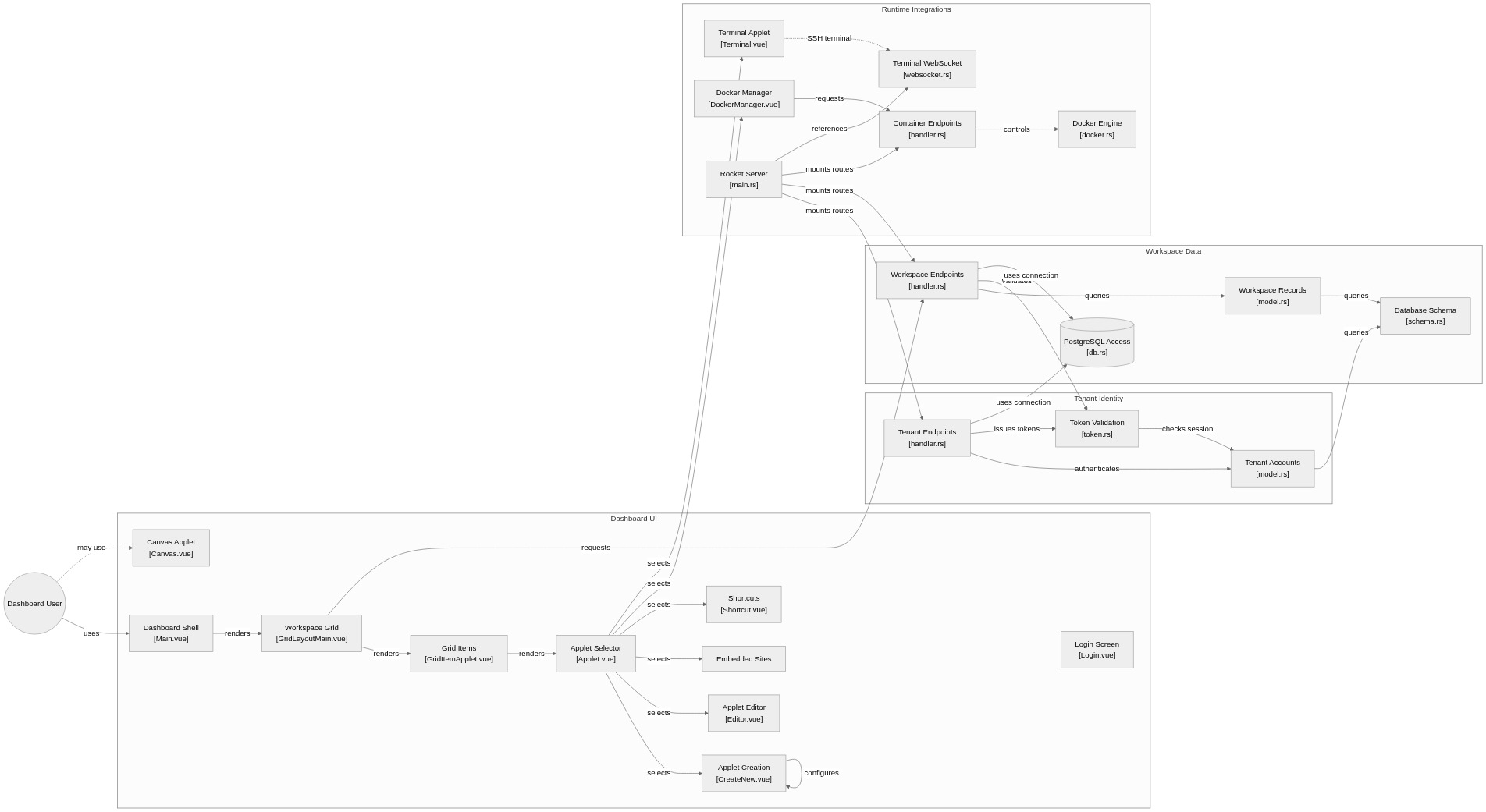
System overview of the components and connections verified in the repository.
flowchart LR

subgraph group_dashboard["Dashboard UI"]
  node_main_ui["Dashboard Shell<br/>[Main.vue]"]
  node_grid["Workspace Grid<br/>[GridLayoutMain.vue]"]
  node_grid_item["Grid Items<br/>[GridItemApplet.vue]"]
  node_applet_router["Applet Selector<br/>[Applet.vue]"]
  node_applet_authoring["Applet Creation<br/>[CreateNew.vue]"]
  node_editor["Applet Editor<br/>[Editor.vue]"]
  node_iframe["Embedded Sites"]
  node_shortcut["Shortcuts<br/>[Shortcut.vue]"]
  node_canvas["Canvas Applet<br/>[Canvas.vue]"]
  node_login_ui["Login Screen<br/>[Login.vue]"]
end

subgraph group_identity["Tenant Identity"]
  node_tenant_api["Tenant Endpoints<br/>[handler.rs]"]
  node_tenant_model["Tenant Accounts<br/>[model.rs]"]
  node_token_auth["Token Validation<br/>[token.rs]"]
end

subgraph group_workspace["Workspace Data"]
  node_workspace_api["Workspace Endpoints<br/>[handler.rs]"]
  node_workspace_model["Workspace Records<br/>[model.rs]"]
  node_database[("PostgreSQL Access<br/>[db.rs]")]
  node_schema["Database Schema<br/>[schema.rs]"]
end

subgraph group_integrations["Runtime Integrations"]
  node_docker_ui["Docker Manager<br/>[DockerManager.vue]"]
  node_container_api["Container Endpoints<br/>[handler.rs]"]
  node_docker_engine["Docker Engine<br/>[docker.rs]"]
  node_terminal_ui["Terminal Applet<br/>[Terminal.vue]"]
  node_terminal_ws["Terminal WebSocket<br/>[websocket.rs]"]
  node_server["Rocket Server<br/>[main.rs]"]
end

node_user(("Dashboard User"))

node_user -->|"uses"| node_main_ui
node_main_ui -->|"renders"| node_grid
node_grid -->|"renders"| node_grid_item
node_grid_item -->|"renders"| node_applet_router
node_applet_router -->|"selects"| node_applet_authoring
node_applet_router -->|"selects"| node_editor
node_applet_router -->|"selects"| node_iframe
node_applet_router -->|"selects"| node_shortcut
node_applet_authoring -->|"configures"| node_applet_authoring
node_grid -->|"requests"| node_workspace_api
node_tenant_api -->|"authenticates"| node_tenant_model
node_tenant_api -->|"issues tokens"| node_token_auth
node_token_auth -->|"checks session"| node_tenant_model
node_workspace_api -->|"queries"| node_workspace_model
node_workspace_api -->|"validates"| node_token_auth
node_tenant_model -->|"queries"| node_schema
node_workspace_model -->|"queries"| node_schema
node_tenant_api -->|"uses connection"| node_database
node_workspace_api -->|"uses connection"| node_database
node_docker_ui -->|"requests"| node_container_api
node_container_api -->|"controls"| node_docker_engine
node_applet_router -->|"selects"| node_docker_ui
node_applet_router -->|"selects"| node_terminal_ui
node_server -->|"mounts routes"| node_tenant_api
node_server -->|"mounts routes"| node_workspace_api
node_server -->|"mounts routes"| node_container_api
node_server -->|"references"| node_terminal_ws
node_user -.->|"may use"| node_canvas
node_terminal_ui -.->|"SSH terminal"| node_terminal_ws


class node_main_ui,node_grid,node_grid_item,node_applet_router,node_applet_authoring,node_editor,node_iframe,node_shortcut,node_canvas,node_login_ui,node_user toneBlue
class node_tenant_api,node_tenant_model,node_token_auth toneAmber
class node_workspace_api,node_workspace_model,node_database,node_schema toneMint
class node_docker_ui,node_container_api,node_docker_engine,node_terminal_ui,node_terminal_ws,node_server toneRose
A configurable homelab dashboard where users arrange workspaces of applets. Vue calls Rocket endpoints for persistence, tenant checks and Docker actions; PostgreSQL stores workspace data and a separate adapter talks to Docker.
- Components
- 24
- Connections
- 29
- Links supported by code or README
- 26/29
Text version of the diagram
- Vue workspace UI → Rocket handlers
- Rocket handlers → Diesel and PostgreSQL
- Rocket handlers → Shiplift adapter
- Shiplift adapter → Docker daemon
Follow one path through the code
Loading a workspace reaches the tenant-aware handlers and then its applet records. Restarting a container goes through the Docker adapter instead. The UI should distinguish an empty workspace, an unavailable Docker service and an iframe blocked by the embedded application.
Deployment and operations
The ports, storage, and startup relationships below come from the repository configuration. depends_on records startup order, not service readiness.
Network. Bridge network dasher-net linking the DasherControl web app with PostgreSQL.
Deployment map
Compose topology of documented services, ports, and startup dependencies.
flowchart LR
  classDef svc fill:#1b3040,stroke:#6fdbd0,color:#edf4fb
  dashercontrol["dashercontrol<br/>8000:8000"]:::svc
  postgres["postgres<br/>5432:5432"]:::svc
  postgres --> dashercontrol
A configurable homelab dashboard where users arrange workspaces of applets. Vue calls Rocket endpoints for persistence, tenant checks and Docker actions; PostgreSQL stores workspace data and a separate adapter talks to Docker.
- Components
- 24
- Connections
- 29
- Links supported by code or README
- 26/29
Text version of the diagram
- dashercontrol — Build from multi-stage Dockerfile · 8000:8000 → postgres, startup healthcheck
- postgres — postgres:14-alpine · 5432:5432
| Service | Image or build | Published ports | Startup | Storage |
|---|---|---|---|---|
| dashercontrol | Build from multi-stage Dockerfile | 8000:8000 | postgres, startup healthcheck | Named volume dasher-data |
| postgres | postgres:14-alpine | 5432:5432 | Named volume pgdata |
Types and file structure
36 declared types, with 12 in the base-relationship overview.
Type diagram
classDiagram
direction TB
class t883aa4939d84["DockerInterface"] {
  <<struct>>
  new()
  init()
  get_containers()
  get_images()
}
class t6c6e876f9471["NewTenant"] {
  <<struct>>
}
class td007a4775b01["NewTenantConfiguration"] {
  <<struct>>
}
class t9d91c22b8e18["DBJsonType"] {
  <<struct>>
  from_sql()
  to_sql()
}
class t11bf41e6278b["Container"] {
  <<struct>>
  create()
  all()
}
class ta9679a334153["NewContainer"] {
  <<struct>>
}
class tdc82d141f21c["DbConn"] {
  <<struct>>
  from_request()
  deref()
}
class t981fd8c93b75["CORS"] {
  <<struct>>
  info()
  on_response()
}
class te127dc44374a["HitCount"] {
  <<struct>>
}
class t6437f975dc23["TemplateContext"] {
  <<struct>>
}
class tb361ddc722e9["JsonMessage"] {
  <<struct>>
}
class t8722c44b4eb9["MyError"] {
  <<enum>>
  from()
  fmt()
}
Unresolved bases remain labelled; full signatures are not reconstructed.
Type index
DockerInterface(struct) ·src/containers/docker.rs:27Methods in the overview:
new, init, get_containers, get_images.NewTenant(struct) ·src/bin/create_admin.rs:48NewTenantConfiguration(struct) ·src/bin/create_admin.rs:60DBJsonType(struct) ·src/bin/create_admin.rs:137Methods in the overview:
from_sql, to_sql.Container(struct) ·src/containers/model.rs:9Methods in the overview:
create, all.NewContainer(struct) ·src/containers/model.rs:18DbConn(struct) ·src/db.rs:26Methods in the overview:
from_request, deref.CORS(struct) ·src/fairing.rs:7Methods in the overview:
info, on_response.HitCount(struct) ·src/router.rs:18TemplateContext(struct) ·src/router.rs:21JsonMessage(struct) ·src/router.rs:27MyError(enum) ·src/tenants/error.rs:6Methods in the overview:
from, fmt.
Reference
49 / 49 eligible files read (139 in the tree); 0 oversized, 0 failed reads and 0 syntax diagnostics.
What the scan covers
Known dependency/build folders, credential files and binaries are excluded. The scan covers READMEs, recognized manifests and parser-supported source files.
Linguist statistics cover the whole repository and may include other languages.
File map
flowchart TD
  root["DasherControl"]
  f0["Cargo.toml"]
  root --> f0
  f1["src/containers/docker.rs"]
  root --> f1
  f2["src/workspaces/handler.rs"]
  root --> f2
  f3["README.md"]
  root --> f3
  f4["docker-compose.yml"]
  root --> f4
  f5["start-server.sh"]
  root --> f5
  f6["certs/create_aes128key.sh"]
  root --> f6
  f7["certs/create_jwt_key.sh"]
  root --> f7
  f8["certs/create_tls.sh"]
  root --> f8
  f9["frontend/main.js"]
  root --> f9
  f10["frontend/package.json"]
  root --> f10
  f11["frontend/utils.js"]
  root --> f11
  f12["frontend/webpack.config.js"]
  root --> f12
  f13["scripts/create_db.sh"]
  root --> f13
  f14["scripts/install-docker-compose.sh"]
  root --> f14
  f15["scripts/js-dev-setup.sh"]
  root --> f15
Files to read 3
References
- GitHubSource repository
- READMERepository documentation
- DasherControl: a homelab dashboard built around workspacesBlog article