CV: One repository, several publishing paths
This website combines hand-edited bilingual CV pages, structured resume data, generated About pages, LaTeX PDFs and a Hugo blog. The build brings those outputs into one static deployment without requiring a public application backend.
Repository languagesJavaScript 36.98%11
Shares calculated from GitHub Linguist bytes.
| Language | % | Bytes |
|---|---|---|
| JavaScript | 584,457 | |
| HTML | 540,538 | |
| Python | 160,751 | |
| TeX | 129,462 | |
| CSS | 121,305 | |
| PowerShell | 15,654 |
5 more languages
| Shell | 0.72% | 11,367 |
| Batchfile | 0.54% | 8,498 |
| Mermaid | 0.39% | 6,088 |
| Go Template | 0.1% | 1,539 |
| Jinja | 0.04% | 600 |
Overview
Why it exists
High-performance, accessible, bilingual static portfolio and CV with AEO schema, automated CI/CD, and zero runtime overhead.
Best fit
Professional software engineering presentation and technical documentation.
Getting started
These commands come from the repository documentation. They were not run during this review.
cd hugo/themes/paper
npm ci
npm run build:css
cd ../..
hugo server -Dpython build_cv.py build --language en
python build_cv.py build --all
python build_cv.py build --all --parallel
python build_cv.py build --language en --output ./output/cv.pdf
python build_cv.py build --language en --clean
python build_cv.py build --language en --verbose
python build_cv.py build --all --cipython build_cv.py build --language enhelm install cv-stack ./helm/cv-stack
helm install cv-stack ./helm/cv-stack -f my-values.yaml
helm install cv-stack ./helm/cv-stack --namespace cv-stack --create-namespacecd tools/medium-mirror
npm install
npx playwright install chromiumTasks declared in manifests
Repository references
Excerpts from the repository’s guides, in their original language. Links open the inspected source revision.
Prerequisites and first run
Prerequisites
README.md
- Python 3.8+ (for build script)
- Docker (for LaTeX compilation)
- Git
Installation
README.md
- Clone the repository
- Install Python dependencies
- Build CV PDFs
- View locally
Local Development
README.md
- Set up environment (see Local Development Guide)
- Make changes to HTML or LaTeX files
- Test locally using a local HTTP server
- Rebuild PDFs if LaTeX files changed
- Commit and push changes
🚀 Quick Start
docs/README.md
- Local Development: See Setup Guide
- Deploy to GitHub Pages: See GitHub Pages Deployment
- Compile CV: See CV Compilation
Prerequisites
docs/setup/README.md
Before starting, ensure you have:
- Python 3.8+ - For the build script
- Docker - For LaTeX compilation (recommended)
- Git - For version control
- Text Editor - For editing files (VS Code, Vim, etc.) Optional but recommended:
- LaTeX Distribution - For local LaTeX compilation (alternative to Docker)
- Node.js - For alternative HTTP server
Configuration and usage
[Setup](./setup/README.md)
docs/README.md
Get started with the project - installation, requirements, and local development setup.
- Local Development - Set up your local environment
- Requirements - System requirements and dependencies
Setup Guide
docs/setup/README.md
Configuration
helm/cv-stack/README.md
The following table lists the configurable parameters and their default values:
| Parameter | Description | Default |
|---|---|---|
| namespace.name | Namespace name | cv-stack |
| namespace.create | Create namespace | true |
| cvSite.enabled | Enable CV site | true |
| cvSite.replicas | Number of CV site replicas | 2 |
| cvSite.image.repository | CV site image repository | nginx |
| cvSite.image.tag | CV site image tag | alpine |
| linktreeSite.enabled | Enable linktree site | true |
| linktreeSite.replicas | Number of linktree site replicas | 2 |
| linktreeSite.image.repository | Linktree site image repository | nginx |
| linktreeSite.image.tag | Linktree site image tag | alpine |
| traefik.enabled | Enable Traefik | true |
| traefik.replicas | Number of Traefik replicas | 1 |
| traefik.image.repository | Traefik image repository | traefik |
| traefik.image.tag… |
Build Script Usage
docs/development/README.md
- ✅ Always test builds locally before pushing
- ✅ Use –verbose flag when debugging
- ✅ Use –clean flag to remove auxiliary files
- ✅ Use –all –parallel for faster builds
- ✅ Check build statistics after compilation
- ✅ Review LaTeX warnings and fix when possible
Operations and troubleshooting
Deployment Issues
README.md
- GitHub Pages not updating: Check GitHub Actions workflow status
- Docker container issues: Check logs with docker-compose logs
- Kubernetes issues: Check pod status with kubectl get pods See Troubleshooting Guide for more details.
Recent Updates
README.md
- ✅ CV index: Conferences section with Graphquon logos (2024 + 2025); moved out of certifications list
- ✅ Added Graphquon 2024 and 2025 conference entries
- ✅ Updated Snapchat Lens statistics (13.97M plays, 20.38M views; blog post refreshed May 2026)
- ✅ Added DasherControl project
- ✅ Updated hass-renpho with dates
- ✅ Improved build script with parallel compilation support
- ✅ Enhanced documentation structure
Built with ❤️ using LaTeX, Docker, and modern web technologies
[Deployment](./deployment/README.md)
docs/README.md
Deploy the CV website to various platforms and environments.
- GitHub Pages - Deploy to GitHub Pages
- Docker - Docker-based deployment
- Kubernetes - Kubernetes deployment
Deployment Issues
docs/README.md
Problem: GitHub Pages not updating
- Solution: Check GitHub Actions workflow status
- Solution: Verify Pages is enabled in repository settings
- Solution: Check workflow logs for errors Problem: Docker container won’t start
- Solution: Check container logs: docker-compose logs
- Solution: Verify ports are not in use
- Solution: Check Docker daemon is running Problem: Kubernetes pods not running
- Solution: Check pod status: kubectl get pods -n cv-stack
- Solution: View logs: kubectl logs -n cv-stack
- Solution: Verify ingress is configured correctly
Deployment Guide
docs/deployment/README.md
Development and contributions
🤝 Contributing
README.md
[Development](./development/README.md)
docs/README.md
Development workflows, processes, and best practices.
- CV Compilation - LaTeX CV compilation process
- GitHub Actions - GitHub Actions workflows
- Hugo blog (Paper theme) - Header, menus, i18n, baseURL, mobile menu, dark mode
Option 1: Simple Local Server (Recommended for Quick Testing)
docs/setup/README.md
2. Test Build Script
docs/setup/README.md
Development Guide
docs/development/README.md
Features and components 2
- Content sources
- data/resume.en.json and resume.fr.json hold the machine-readable resume. The index HTML pages remain canonical for their layout. data/aeo.yaml drives the generated About content, while Hugo owns the Markdown posts and project notes.
- Assembly and verification
- build_docs.py stages the root pages and assets, builds Hugo under the blog path, merges the root sitemap and runs deployment verification before copying the output to docs. Staging keeps a failed build from overwriting that published tree.
Architecture
The components and their connections remain available as text. The diagram adds an interactive view.
- Resume JSON and AEO data
- Generated resume and About
- HTML CV and LaTeX PDF
- Hugo Markdown
- Staged production build
- Static docs website
Links verified in the repository.
Mermaid Interactive diagram (loads on open)
System overview of the components and connections verified in the repository.
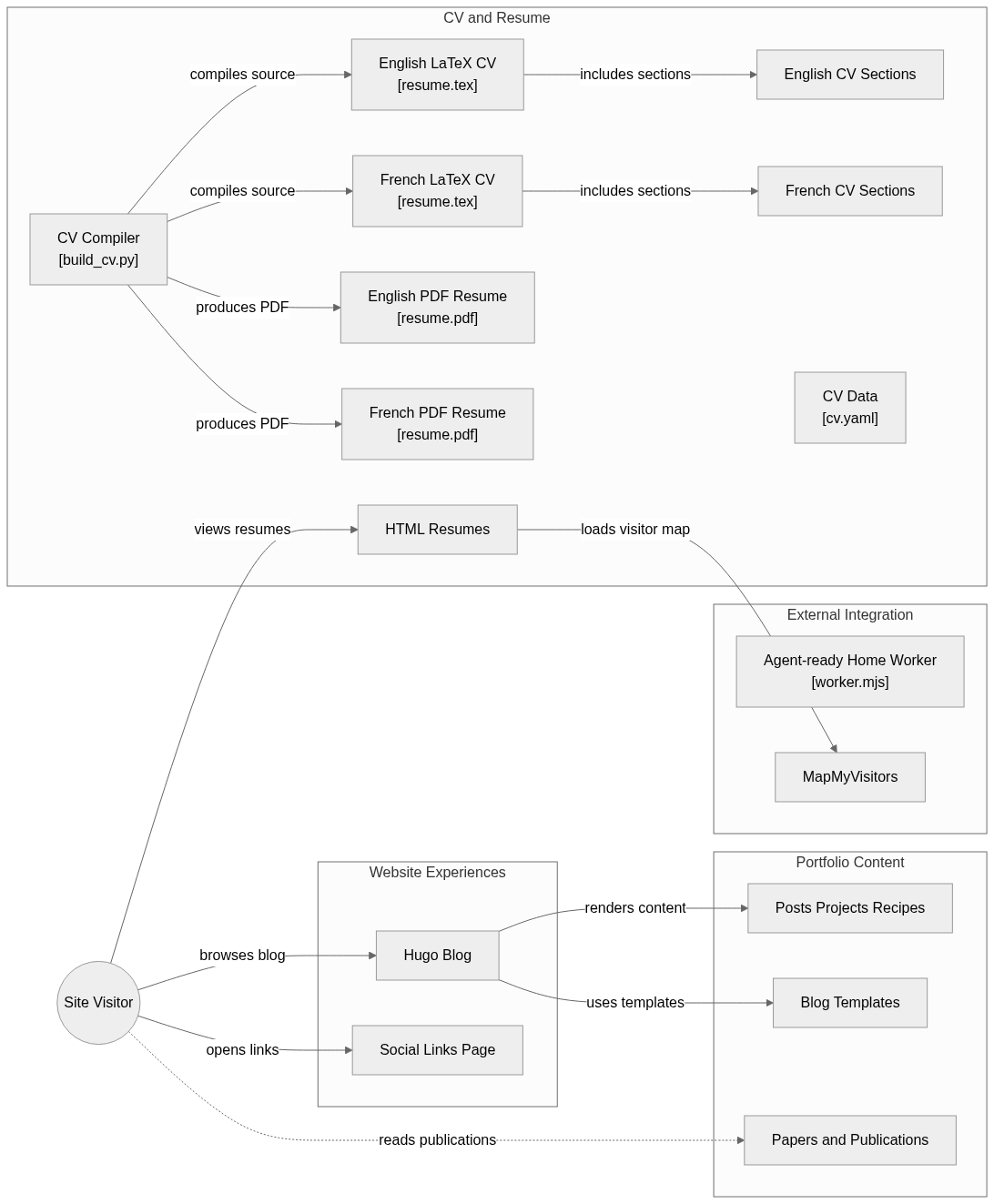
flowchart LR

subgraph group_resume["CV and Resume"]
  node_buildcv["CV Compiler<br/>[build_cv.py]"]
  node_latex_en["English LaTeX CV<br/>[resume.tex]"]
  node_latex_fr["French LaTeX CV<br/>[resume.tex]"]
  node_sections_en["English CV Sections"]
  node_sections_fr["French CV Sections"]
  node_pdf_en["English PDF Resume<br/>[resume.pdf]"]
  node_pdf_fr["French PDF Resume<br/>[resume.pdf]"]
  node_html_resume["HTML Resumes"]
  node_cv_data["CV Data<br/>[cv.yaml]"]
end

subgraph group_content["Portfolio Content"]
  node_hugo_content["Posts Projects Recipes"]
  node_hugo_layouts["Blog Templates"]
  node_papers["Papers and Publications"]
end

subgraph group_web["Website Experiences"]
  node_hugo_site["Hugo Blog"]
  node_linktree["Social Links Page"]
end

subgraph group_integration["External Integration"]
  node_agent_worker["Agent-ready Home Worker<br/>[worker.mjs]"]
  node_map_service["MapMyVisitors"]
end

node_visitor(("Site Visitor"))

node_visitor -->|"views resumes"| node_html_resume
node_visitor -->|"browses blog"| node_hugo_site
node_visitor -->|"opens links"| node_linktree
node_latex_en -->|"includes sections"| node_sections_en
node_latex_fr -->|"includes sections"| node_sections_fr
node_buildcv -->|"compiles source"| node_latex_en
node_buildcv -->|"compiles source"| node_latex_fr
node_buildcv -->|"produces PDF"| node_pdf_en
node_buildcv -->|"produces PDF"| node_pdf_fr
node_hugo_site -->|"renders content"| node_hugo_content
node_hugo_site -->|"uses templates"| node_hugo_layouts
node_visitor -.->|"reads publications"| node_papers
node_html_resume -->|"loads visitor map"| node_map_service


class node_buildcv,node_latex_en,node_latex_fr,node_sections_en,node_sections_fr,node_pdf_en,node_pdf_fr,node_html_resume,node_cv_data toneBlue
class node_hugo_content,node_hugo_layouts,node_papers toneAmber
class node_hugo_site,node_linktree toneMint
class node_agent_worker,node_map_service toneRose
class node_visitor toneIndigo
A bilingual CV and portfolio with HTML and PDF resumes, a Hugo blog, publications, social links and agent-readable routes. The build joins hand-edited content, generated resume data and deployment checks.
- Components
- 17
- Connections
- 13
- Links supported by code or README
- 11/13
Text version of the diagram
- Resume JSON and AEO data → Generated resume and About
- Generated resume and About → Staged production build
- HTML CV and LaTeX PDF → Staged production build
- Hugo Markdown → Staged production build
- Staged production build → Static docs website
Follow one path through the code
Follow a blog change from hugo/content into the Hugo build, then into the deployment staging directory. A CV data change follows another path, so updating a JSON record does not automatically rewrite every hand-edited HTML or LaTeX section.
Types and file structure
3 declared types, with 3 in the base-relationship overview.
Type diagram
classDiagram
direction TB
class tc629f4786497["LaTeXLogStats"] {
}
class tc217ab0df529["MergeRootSitemapTests"] {
  test_flattens_sitemapindex_and_adds_static_pages()
  test_urlset_passthrough()
}
class tb2eba65b8551["RenderResumeMdTests"] {
  test_render_en_contains_required_headings()
  test_all_locales_exit_zero()
}
class b539fd1ca9096["unittest.TestCase"] {
  <<unresolved_base>>
}
b539fd1ca9096 <|-- tc217ab0df529
class b18f4b7dc7f0d["unittest.TestCase"] {
  <<unresolved_base>>
}
b18f4b7dc7f0d <|-- tb2eba65b8551
Unresolved bases remain labelled; full signatures are not reconstructed.
Type index
LaTeXLogStats(class) ·build_cv.py:35MergeRootSitemapTests(class) ·scripts/tests/test_merge_root_sitemap.py:20Methods in the overview:
test_flattens_sitemapindex_and_adds_static_pages, test_urlset_passthrough.Declared bases:
unittest.TestCase.RenderResumeMdTests(class) ·scripts/tests/test_render_resume_md.py:17Methods in the overview:
test_render_en_contains_required_headings, test_all_locales_exit_zero.Declared bases:
unittest.TestCase.
Reference
43 / 43 eligible files read (2646 in the tree); 0 oversized, 0 failed reads and 0 syntax diagnostics.
What the scan covers
Known dependency/build folders, credential files and binaries are excluded. The scan covers READMEs, recognized manifests and parser-supported source files.
Linguist statistics cover the whole repository and may include other languages.
File map
flowchart TD
  root["CV"]
  f0["scripts/deploy/build_docs.py"]
  root --> f0
  f1["README.md"]
  root --> f1
  f2["build_cv.py"]
  root --> f2
  f3["docker-compose.yml"]
  root --> f3
  f4["requirements.txt"]
  root --> f4
  f5["hugo/package.json"]
  root --> f5
  f6["scripts/README.md"]
  root --> f6
  f7["scripts/_repo.py"]
  root --> f7
  f8["helm/cv-stack/README.md"]
  root --> f8
  f9["scripts/ci/spellcheck.py"]
  root --> f9
  f10["scripts/ci/update_aspell_fr_pws.py"]
  root --> f10
  f11["scripts/ci/verify-deploy-lychee.sh"]
  root --> f11
  f12["scripts/ci/write_advisory_summary.sh"]
  root --> f12
  f13["scripts/deploy/merge_root_sitemap.py"]
  root --> f13
  f14["scripts/deploy/optimize_images.py"]
  root --> f14
  f15["scripts/html/extract_cv_css.py"]
  root --> f15