ChitUI: A local bridge to resin printers
ChitUI places a browser interface in front of SDCP resin printers. A Python process serves the web assets, discovers printers on the local network and translates browser actions into printer communication.
Repository languagesJavaScript 48.61%5
Shares calculated from GitHub Linguist bytes.
| Language | % | Bytes |
|---|---|---|
| JavaScript | 21,743 | |
| HTML | 10,991 | |
| Python | 10,226 | |
| CSS | 1,572 | |
| Dockerfile | 200 |
Overview
Why it exists
Full-featured web control interface for Chitubox SDCP 3.0 resin printers with LAN UDP discovery.
Best fit
Headless remote management and real-time print monitoring for SLA 3D printers.
Getting started
These commands come from the repository documentation. They were not run during this review.
python -mvenv .venv
source .venv/bin/activate
pip install -r requirements.txtpython main.pydocker build -t chitui:latest .
docker run --rm --name chitui --net=host chitui:latestRepository references
Excerpts from the repository’s guides, in their original language. Links open the inspected source revision.
Configuration and usage
Usage
README.md
Configuration
README.md
Configuration is done via environment variables:
- PORT to set the HTTP port of the web interface (default: 54780)
- DEBUG to enable debug logging, log colorization and code reloading (default: False)
Features and components 2
- Browser and local server
- main.py builds a Flask application with web as its static folder and attaches Flask-SocketIO. Printer and WebSocket registries live in process memory. Discovery uses the local network, which explains the README’s Docker host-network requirement.
- File transfer
- The upload route validates the extension and saves the incoming file temporarily. The printer upload helper calculates an MD5 checksum and sends one-megabyte parts with offsets. A separate event-stream route reports upload progress.
Architecture
The components and their connections remain available as text. The diagram adds an interactive view.
- Browser UI
- Flask and SocketIO
- Printer discovery and session
- SDCP printer
Links verified in the repository.
Mermaid Interactive diagram (loads on open)
System overview of the components and connections verified in the repository.
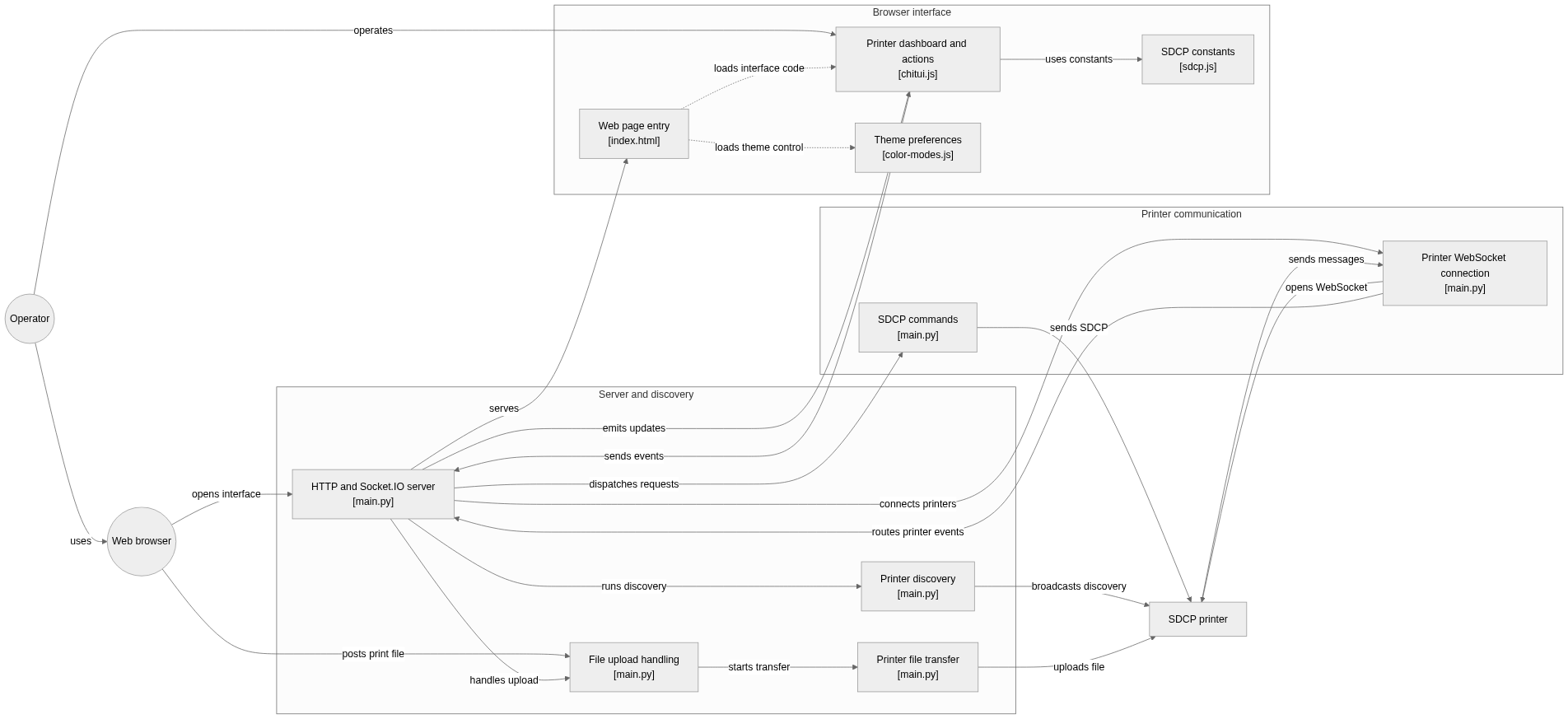
flowchart LR

subgraph group_server["Server and discovery"]
  node_app["HTTP and Socket.IO server<br/>[main.py]"]
  node_discovery["Printer discovery<br/>[main.py]"]
  node_upload["File upload handling<br/>[main.py]"]
  node_transfer["Printer file transfer<br/>[main.py]"]
end

subgraph group_printer["Printer communication"]
  node_commands["SDCP commands<br/>[main.py]"]
  node_connection["Printer WebSocket connection<br/>[main.py]"]
end

subgraph group_webui["Browser interface"]
  node_index["Web page entry<br/>[index.html]"]
  node_ui["Printer dashboard and actions<br/>[chitui.js]"]
  node_protocol["SDCP constants<br/>[sdcp.js]"]
  node_theme["Theme preferences<br/>[color-modes.js]"]
end

node_user(("Operator"))
node_browser(("Web browser"))
node_printer["SDCP printer"]

node_user -->|"uses"| node_browser
node_browser -->|"opens interface"| node_app
node_app -->|"serves"| node_index
node_user -->|"operates"| node_ui
node_ui -->|"sends events"| node_app
node_app -->|"emits updates"| node_ui
node_app -->|"runs discovery"| node_discovery
node_discovery -->|"broadcasts discovery"| node_printer
node_app -->|"connects printers"| node_connection
node_connection -->|"opens WebSocket"| node_printer
node_app -->|"dispatches requests"| node_commands
node_commands -->|"sends SDCP"| node_printer
node_printer -->|"sends messages"| node_connection
node_connection -->|"routes printer events"| node_app
node_browser -->|"posts print file"| node_upload
node_app -->|"handles upload"| node_upload
node_upload -->|"starts transfer"| node_transfer
node_transfer -->|"uploads file"| node_printer
node_ui -->|"uses constants"| node_protocol
node_index -.->|"loads interface code"| node_ui
node_index -.->|"loads theme control"| node_theme


class node_app,node_discovery,node_upload,node_transfer,node_browser toneBlue
class node_commands,node_connection toneAmber
class node_index,node_ui,node_protocol,node_theme toneMint
class node_user,node_printer toneIndigo
A browser control panel for Chitubox SDCP 3.0 resin printers. The server discovers printers, opens WebSocket connections, routes commands and status events, and transfers uploaded print files while the browser presents printer controls.
- Components
- 13
- Connections
- 21
- Links supported by code or README
- 16/21
Text version of the diagram
- Browser UI → Flask and SocketIO
- Flask and SocketIO → Printer discovery and session
- Printer discovery and session → SDCP printer
- SDCP printer → Printer discovery and session
Follow one path through the code
Follow /upload through the temporary file and the printer transfer helper. Transfer progress is global in this implementation, so simultaneous uploads would need per-job state to avoid mixing their percentages.
Workflow
Step-by-step view of the path inspected in the repository. This is not a live run.
Printer upload API
POST /upload accepts multipart fields file and printer. The printer identifier selects an entry in the discovered-printers dictionary. Supported extensions are ctb, goo and prz. The server stores a temporary file and transfers chunks to the printer’s port 3030 upload endpoint.
| Method | Path | Verified access check | File |
|---|---|---|---|
POST | /upload | No authentication check in the inspected handler. Multipart fields file and printer are required. | main.py |
GET | /upload | No authentication check. The inspected handler returns 405. | main.py |
GET | /progress | No authentication check in the inspected handler. The response is a text/event-stream shared across uploads. | main.py |
POST /upload
Content-Type: multipart/form-data

file: [supported print file]
printer: [identifier returned by discovery]
Response and errors
Authentication, limits and pagination
The inspected handlers have no authentication or rate limiter. Keep this interface on a trusted network. Progress is shared globally across uploads, so it cannot identify concurrent jobs. Pagination does not apply to this upload operation.
Deployment and operations
The ports, storage, and startup relationships below come from the repository configuration. depends_on records startup order, not service readiness.
Network. Host network (--net=host), requested in the README so UDP broadcast can reach the LAN.
File structure
The map shows the inspected files and their organization.
Reference
6 / 6 eligible files read (31 in the tree); 0 oversized, 0 failed reads and 0 syntax diagnostics.
What the scan covers
Known dependency/build folders, credential files and binaries are excluded. The scan covers READMEs, recognized manifests and parser-supported source files.
Linguist statistics cover the whole repository and may include other languages.
File map
flowchart TD
  root["ChitUI"]
  f0["main.py"]
  root --> f0
  f1["requirements.txt"]
  root --> f1
  f2["README.md"]
  root --> f2
  f3["web/js/chitui.js"]
  root --> f3
  f4["web/js/color-modes.js"]
  root --> f4
  f5["web/js/sdcp.js"]
  root --> f5