bloc: Object storage inside Blender
My bloc fork adds a Blender-facing workflow around S3 and MinIO storage. It preserves the upstream Blender-Cloud-Storage credit. The add-on translates object keys into a folder browser, then downloads assets before asking Blender to import them.
Repository languagesPython 100%1
Shares calculated from GitHub Linguist bytes.
| Language | % | Bytes |
|---|---|---|
| Python | 24,284 |
Overview
Why it exists
Direct AWS S3 object storage integration inside Blender via Boto3, eliminating local drive storage bloat for 3D assets.
Best fit
Cloud-native 3D asset synchronization, backup, and distributed rendering workflows.
Getting started
These commands come from the repository documentation. They were not run during this review.
Repository references
Excerpts from the repository’s guides, in their original language. Links open the inspected source revision.
Prerequisites and first run
Installation
README.md
To install the Blender S3 Integration add-on, follow these steps:
- Download the Add-on
- Clone the repository:
- Install the Add-on in Blender
- Open Blender.
- Go to Edit > Preferences > Add-ons.
- Click on Install at the top of the preferences window.
- Select the downloaded ZIP file.
- Enable the add-on by checking the box next to “Blender S3 Integration”.
Configuration and usage
Setup
README.md
Before using the add-on, configure your AWS credentials:
- Open Blender Preferences
- Go to Edit > Preferences > Add-ons > Blender S3 Integration.
- Enter AWS Credentials
- In the add-on preferences, enter your AWS Access Key, Secret Key, and the region where your S3 bucket is located.
- Set Your S3 Bucket Name
- Enter the name of your S3 bucket in the preferences.
Usage
README.md
Once installed and configured, use the add-on from the Blender interface:
- Open the S3 Integration Panel
- Go to View3D > Tool Shelf > S3 Integration panel to access the features.
Operations and troubleshooting
Updated Features (v2.0)
README.md
- Upload Blender files with dependencies (textures, images, etc.) to S3.
- Download Blender files with dependencies (textures, images, etc.) from S3.
Updated Features (v3.0)
README.md
- Minio and S3 support multiple endpoints
- Folder inside the Panel
- Search
Development and contributions
Contributing
README.md
Features and components 2
- Connection and listing
- CloudConnection stores provider, endpoint, bucket and region settings. The active connection determines the boto3 or MinIO client. Listing results are split on slashes to construct a nested dictionary for the panel.
- Search and import
- CloudSearchManager scores names and path segments with RapidFuzz. A download first produces a temporary local file. The load operator then chooses an STL, OBJ, PLY or USD importer, so download success and import success remain separate states.
Architecture
The components and their connections remain available as text. The diagram adds an interactive view.
- Blender panel
- Active connection
- S3 or MinIO API
- Object keys and folder tree
- Temporary file
- Blender importer
Links verified in the repository.
Mermaid Interactive diagram (loads on open)
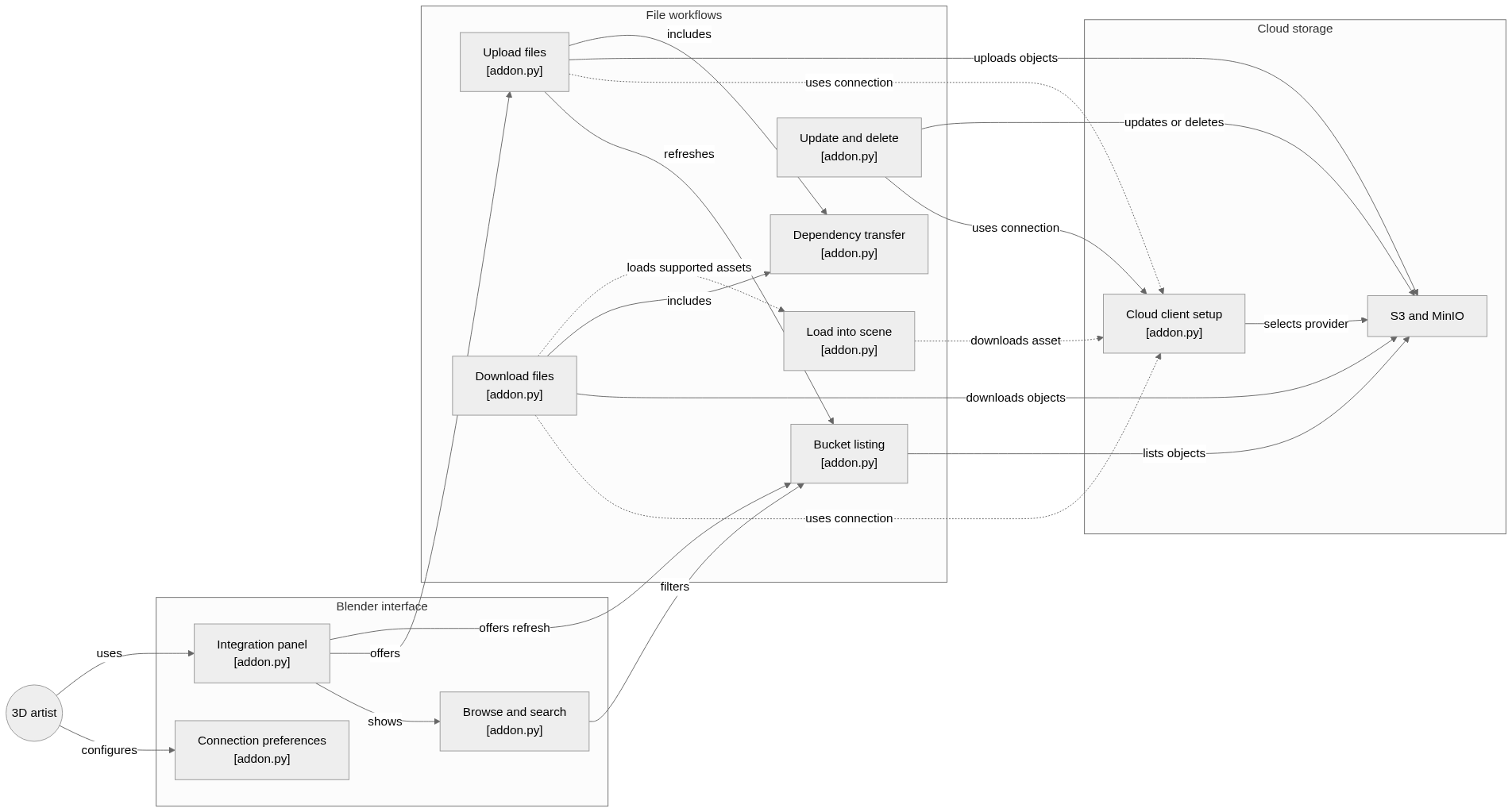
System overview of the components and connections verified in the repository.
flowchart LR

subgraph group_ui["Blender interface"]
  node_preferences["Connection preferences<br/>[addon.py]"]
  node_panel["Integration panel<br/>[addon.py]"]
  node_browse["Browse and search<br/>[addon.py]"]
end

subgraph group_workflow["File workflows"]
  node_list["Bucket listing<br/>[addon.py]"]
  node_upload["Upload files<br/>[addon.py]"]
  node_dependencies["Dependency transfer<br/>[addon.py]"]
  node_download["Download files<br/>[addon.py]"]
  node_manage["Update and delete<br/>[addon.py]"]
  node_scene["Load into scene<br/>[addon.py]"]
end

subgraph group_storage["Cloud storage"]
  node_client["Cloud client setup<br/>[addon.py]"]
  node_providers["S3 and MinIO"]
end

node_artist(("3D artist"))

node_artist -->|"configures"| node_preferences
node_artist -->|"uses"| node_panel
node_panel -->|"shows"| node_browse
node_panel -->|"offers"| node_upload
node_panel -->|"offers refresh"| node_list
node_browse -->|"filters"| node_list
node_upload -->|"refreshes"| node_list
node_upload -.->|"uses connection"| node_client
node_download -.->|"uses connection"| node_client
node_manage -->|"uses connection"| node_client
node_scene -.->|"downloads asset"| node_client
node_client -->|"selects provider"| node_providers
node_list -->|"lists objects"| node_providers
node_upload -->|"uploads objects"| node_providers
node_download -->|"downloads objects"| node_providers
node_manage -->|"updates or deletes"| node_providers
node_upload -->|"includes"| node_dependencies
node_download -->|"includes"| node_dependencies
node_download -.->|"loads supported assets"| node_scene


class node_preferences,node_panel,node_browse toneBlue
class node_list,node_upload,node_dependencies,node_download,node_manage,node_scene toneAmber
class node_client,node_providers toneMint
class node_artist toneIndigo
A Blender add-on for S3-compatible storage. Artists configure a connection, browse or search bucket files, transfer Blender dependencies, and load supported assets into the scene through operators concentrated in the add-on module.
- Components
- 12
- Connections
- 19
- Links supported by code or README
- 19/19
Text version of the diagram
- Blender panel → Active connection
- Active connection → S3 or MinIO API
- S3 or MinIO API → Object keys and folder tree
- Object keys and folder tree → Blender panel
- S3 or MinIO API → Temporary file
- Temporary file → Blender importer
Follow one path through the code
Follow refresh from object keys to the tree, then follow load from the selected key to a temporary path and an import operator. Background listing hands UI updates back through Blender timers. The stored object itself is not a local folder.
Types and file structure
13 declared types, with 12 in the base-relationship overview.
Type diagram
classDiagram
direction TB
class t1bd2f38d1df9["CloudConnection"] {
}
class tc6162ba17c1d["CLOUD_OT_ConnectionAdd"] {
  execute()
}
class tba1a8c923798["CLOUD_OT_ConnectionRemove"] {
  execute()
}
class t413b380bcb71["CloudIntegrationPreferences"] {
  draw()
}
class ta7f72565c22e["CloudIntegrationPanel"] {
  draw()
}
class t2469e84e3752["CloudToggleFolderOperator"] {
  execute()
}
class t85310a14a3c5["CloudFilePropertyGroup"] {
}
class t27a5a06619a9["CloudUpdateFileListOperator"] {
  execute()
}
class t7846b33f88df["CloudUploadFileOperator"] {
  execute()
}
class t9c44c9d5eca5["CloudLoadFileOperator"] {
  execute()
}
class t7fe9626f4380["CloudDownloadFileOperator"] {
  execute()
}
class t13452e91ae41["CloudDeleteFileOperator"] {
  execute()
}
class b7fc08f11cd57["bpy.types.PropertyGroup"] {
  <<unresolved_base>>
}
b7fc08f11cd57 <|-- t1bd2f38d1df9
class bb1aa8a371273["bpy.types.Operator"] {
  <<unresolved_base>>
}
bb1aa8a371273 <|-- tc6162ba17c1d
bb1aa8a371273 <|-- tba1a8c923798
class b4788926edee8["bpy.types.AddonPreferences"] {
  <<unresolved_base>>
}
b4788926edee8 <|-- t413b380bcb71
class bf0eb7a162f8e["bpy.types.Panel"] {
  <<unresolved_base>>
}
bf0eb7a162f8e <|-- ta7f72565c22e
bb1aa8a371273 <|-- t2469e84e3752
b7fc08f11cd57 <|-- t85310a14a3c5
bb1aa8a371273 <|-- t27a5a06619a9
bb1aa8a371273 <|-- t7846b33f88df
bb1aa8a371273 <|-- t9c44c9d5eca5
bb1aa8a371273 <|-- t7fe9626f4380
bb1aa8a371273 <|-- t13452e91ae41
Unresolved bases remain labelled; full signatures are not reconstructed.
Type index
CloudConnection(class) ·addon.py:79Declared bases:
bpy.types.PropertyGroup.CLOUD_OT_ConnectionAdd(class) ·addon.py:91Methods in the overview:
execute.Declared bases:
bpy.types.Operator.CLOUD_OT_ConnectionRemove(class) ·addon.py:101Methods in the overview:
execute.Declared bases:
bpy.types.Operator.CloudIntegrationPreferences(class) ·addon.py:142Methods in the overview:
draw.Declared bases:
bpy.types.AddonPreferences.CloudIntegrationPanel(class) ·addon.py:169Methods in the overview:
draw.Declared bases:
bpy.types.Panel.CloudToggleFolderOperator(class) ·addon.py:268Methods in the overview:
execute.Declared bases:
bpy.types.Operator.CloudFilePropertyGroup(class) ·addon.py:282Declared bases:
bpy.types.PropertyGroup.CloudUpdateFileListOperator(class) ·addon.py:300Methods in the overview:
execute.Declared bases:
bpy.types.Operator.CloudUploadFileOperator(class) ·addon.py:328Methods in the overview:
execute.Declared bases:
bpy.types.Operator.CloudLoadFileOperator(class) ·addon.py:341Methods in the overview:
execute.Declared bases:
bpy.types.Operator.CloudDownloadFileOperator(class) ·addon.py:388Methods in the overview:
execute.Declared bases:
bpy.types.Operator.CloudDeleteFileOperator(class) ·addon.py:413Methods in the overview:
execute.Declared bases:
bpy.types.Operator.
Reference
3 / 3 eligible files read (5 in the tree); 0 oversized, 0 failed reads and 0 syntax diagnostics.
What the scan covers
Known dependency/build folders, credential files and binaries are excluded. The scan covers READMEs, recognized manifests and parser-supported source files.
Linguist statistics cover the whole repository and may include other languages.
File map
flowchart TD
  root["bloc"]
  f0["addon.py"]
  root --> f0
  f1["README.md"]
  root --> f1
  f2["pyproject.toml"]
  root --> f2
Files to read 2
References
- GitHubSource repository
- READMERepository documentation
- My bloc fork: browsing S3 and MinIO from BlenderBlog article