AudioTranscript: From WAV chunks to transcription
AudioTranscript breaks a WAV recording into chunks around silence, sends each chunk to a recognition service and concatenates the results. The current implementation uses Amazon recognition, even though its docstrings still mention Google.
Repository languagesPython 100%1
Shares calculated from GitHub Linguist bytes.
| Language | % | Bytes |
|---|---|---|
| Python | 6,443 |
Overview
Why it exists
Audio ingestion and transcription worker pipeline with timestamp alignment.
Best fit
Batch automated audio recording transcription and indexing.
Getting started
These commands come from the repository documentation. They were not run during this review.
python main.py --path <audio_file_path> --min-silence-len <min_silence_length> --silence-thresh <silence_threshold> --keep-silence <keep_silence_duration> --language <language_code>Repository references
Excerpts from the repository’s guides, in their original language. Links open the inspected source revision.
Prerequisites and first run
Requirements
README.md
- Python 3.x
- pydub
- speech_recognition
- rich
- typer
- dotenv
Installation
README.md
- Clone the repository
- Navigate to the project directory
- Install the required packages
- Create a .env file and add your AWS credentials
Configuration and usage
Usage
README.md
Parameters:
README.md
- –path: Path of the audio file to transcribe.
- –min-silence-len: Minimum length of silence required to detect the end of a speech segment in milliseconds.
- –silence-thresh: Threshold value in dBFS below which the audio is considered silent.
- –keep-silence: Duration of silence to be kept at the beginning and end of each chunk in milliseconds.
- –language: Language code of the audio file to be transcribed.
Development and contributions
Contributing
README.md
Features and components 2
- Audio segmentation
- main.py loads a WAV through pydub and calls split_on_silence. The threshold is calculated relative to the recording’s dBFS level. Each chunk is exported to audio-chunks before recognition.
- Recognition and output
- A SpeechRecognition Recognizer reads each exported file and calls recognize_amazon. The loop appends the returned text to whole_text, which is printed and returned. Typer exposes the file and segmentation parameters.
Architecture
The components and their connections remain available as text. The diagram adds an interactive view.
- WAV recording
- pydub silence split
- Temporary WAV chunks
- Amazon recognition
- Combined text
Links verified in the repository.
Mermaid Interactive diagram (loads on open)
System overview of the components and connections verified in the repository.
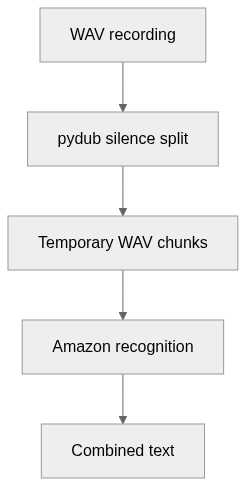
flowchart LR
  n0["WAV recording"]
  n1["pydub silence split"]
  n2["Temporary WAV chunks"]
  n3["Amazon recognition"]
  n4["Combined text"]
  n0 --> n1
  n1 --> n2
  n2 --> n3
  n3 --> n4
Text version of the diagram
- WAV recording → pydub silence split
- pydub silence split → Temporary WAV chunks
- Temporary WAV chunks → Amazon recognition
- Amazon recognition → Combined text
Follow one path through the code
Follow transcribe_audio_file rather than its docstring: the function checks AWS environment variables immediately before recognize_amazon. Its language argument is exposed by the CLI but is not passed into that call.
File structure
The map shows the inspected files and their organization.
Reference
4 / 4 eligible files read (6 in the tree); 0 oversized, 0 failed reads and 0 syntax diagnostics.
What the scan covers
Known dependency/build folders, credential files and binaries are excluded. The scan covers READMEs, recognized manifests and parser-supported source files.
Linguist statistics cover the whole repository and may include other languages.
File map
flowchart TD
  root["AudioTranscript"]
  f0["main.py"]
  root --> f0
  f1["requirements.txt"]
  root --> f1
  f2["README.md"]
  root --> f2
  f3["ai.py"]
  root --> f3