architecture: Architecture as editable documentation
This archived repository stores a home-infrastructure diagram in several formats. Its architecture is a documentation workflow: editable sources produce diagrams that can be opened or viewed without a running application.
Repository languagesHTML 100%1
Shares calculated from GitHub Linguist bytes.
| Language | % | Bytes |
|---|---|---|
| HTML | 704,499 |
Overview
Why it exists
Editable home-infrastructure diagrams preserved as PlantUML and draw.io sources, with HTML and image exports.
Best fit
Reading an archived infrastructure snapshot or editing its diagram sources to document a homelab.
Getting started
These commands come from the repository documentation. They were not run during this review.
Repository references
The repository does not provide a detailed guide for these steps. Start with its README and the source walkthrough above.
Features and components 2
- Editable sources
- The root includes both a PlantUML source and a draw.io document. These are separate diagram representations. Their presence does not mean that one is automatically generated from the other.
- Published views
- PNG and HTML files provide convenient viewing formats. The README links readers to those representations. The repository describes infrastructure; it does not deploy or monitor the services shown.
Architecture
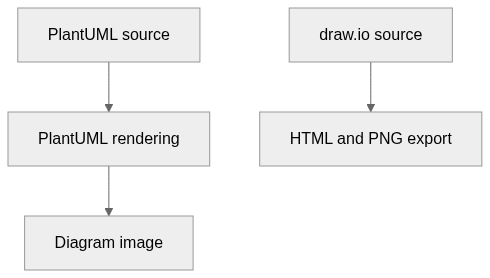
The components and their connections remain available as text. The diagram adds an interactive view.
- PlantUML source
- PlantUML rendering
- Diagram image
- draw.io source
- HTML and PNG export
Links verified in the repository.
Mermaid Interactive diagram (loads on open)
System overview of the components and connections verified in the repository.
flowchart LR
  n0["PlantUML source"]
  n1["PlantUML rendering"]
  n2["Diagram image"]
  n3["draw.io source"]
  n4["HTML and PNG export"]
  n0 --> n1
  n1 --> n2
  n3 --> n4
Text version of the diagram
- PlantUML source → PlantUML rendering
- PlantUML rendering → Diagram image
- draw.io source → HTML and PNG export
Follow one path through the code
Choose the editable format first, then compare its rendered view with the exported image. Keeping both paths visible helps prevent a screenshot from becoming the only surviving description of the system.
File structure
The map shows the inspected files and their organization.
Reference
1 / 1 eligible files read (7 in the tree); 0 oversized, 0 failed reads and 0 syntax diagnostics.
What the scan covers
Known dependency/build folders, credential files and binaries are excluded. The scan covers READMEs, recognized manifests and parser-supported source files.
Linguist statistics cover the whole repository and may include other languages.
File map
flowchart TD
  root["architecture"]
  f0["README.md"]
  root --> f0