antoinebou12: How the GitHub profile is assembled
This is the repository behind my GitHub profile README. It combines ordinary Markdown with images, embedded widgets and scheduled updates. There is no application server in the profile itself.
Repository languages
Shares calculated from GitHub Linguist bytes.
GitHub reports no language bytes for this repository.
Overview
Why it exists
Automated SVG and metrics rendering workflow maintaining dynamic profile assets.
Best fit
Automated profile asset generation.
Getting started
These commands come from the repository documentation. They were not run during this review.
Repository references
Excerpts from the repository’s guides, in their original language. Links open the inspected source revision.
Operations and troubleshooting
Deployment
README.md
Features and components 2
- README and assets
- README.md is the visible profile document. The images, models and profile-3d-contrib directories hold assets used alongside it. GitHub renders the document, while linked services may generate their own images separately.
- Scheduled changes
- The update-readme workflow fetches LeetCode statistics, builds badge URLs and replaces the text between dedicated README markers. Separate workflows handle the contribution graphic, link checks and Pages.
Architecture
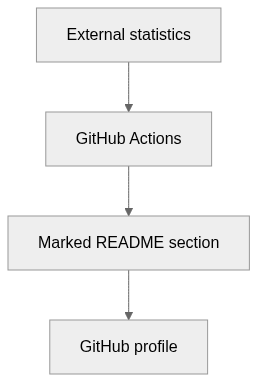
The components and their connections remain available as text. The diagram adds an interactive view.
- External statistics
- GitHub Actions
- Marked README section
- GitHub profile
Links verified in the repository.
Mermaid Interactive diagram (loads on open)
System overview of the components and connections verified in the repository.
flowchart LR
  n0["External statistics"]
  n1["GitHub Actions"]
  n2["Marked README section"]
  n3["GitHub profile"]
  n0 --> n1
  n1 --> n2
  n2 --> n3
Text version of the diagram
- External statistics → GitHub Actions
- GitHub Actions → Marked README section
- Marked README section → GitHub profile
Follow one path through the code
In update-readme.yml, follow the HTTP response into the badge strings and then into the marker replacement. If either marker is missing, that replacement block is skipped.
File structure
The map shows the inspected files and their organization.
Reference
1 / 1 eligible files read (88 in the tree); 0 oversized, 0 failed reads and 0 syntax diagnostics.
What the scan covers
Known dependency/build folders, credential files and binaries are excluded. The scan covers READMEs, recognized manifests and parser-supported source files.
Linguist statistics cover the whole repository and may include other languages.
File map
flowchart TD
  root["antoinebou12"]
  f0["README.md"]
  root --> f0