another-install-script: A menu for homelab installation
another-install-script is a shell entry point for choosing system setup and container installations. Its structure separates the menu from the service definitions so that adding a service does not require putting every command in setup.sh.
Repository languagesShell 93.8%3
Shares calculated from GitHub Linguist bytes.
| Language | % | Bytes |
|---|---|---|
| Shell | 129,426 | |
| Dockerfile | 4,311 | |
| Python | 4,242 |
Overview
Why it exists
Interactive TUI shell installer automating deployment of Docker containers and server configurations.
Best fit
One-command server provisioning for homelabs and development VPS.
Getting started
These commands come from the repository documentation. They were not run during this review.
git clone https://github.com/antoinebou13/another-install-script.git
cd another-install-script
sudo bash setup.shcd tests
bash test.shcd tests
bash coverage.shgit submodule update --init --recursive
git pull --recurse-submodules
git submodule update --remote
cd docs/generator
chmod +x generate_docs.sh
bash generate_docs.sh ../docs.md+-- docs
| +-- vendor
| +-- ...
| +-- docs.md
| +-- generate_docs.md
| +-- ...
+-- containers
| +-- $container_name
| | | +-- docker-compose.yml
| | | +-- $container_name.sh
| | | +-- ...
+-- srcRepository references
Excerpts from the repository’s guides, in their original language. Links open the inspected source revision.
Prerequisites and first run
How to install
README.md
List of other installed program that you can chose to install
README.md
This script also offers optional installation of several other programs including git, python3, docker, docker-compose, snapd, curl, vim, and more.
- build-essential
- git
- python3
- python3-pip
- wireless-tools
- wpasupplicant
- default-jre
- jq
- net-tools
- firefox
- lxde
- vim
- snapd
- nmap
- wget
- curl
- mlocate
- cmake
- docker
- docker-compose
- dry
- ctop
- emojify
- dokku
- lynk
Development and contributions
How to run coverage and tests
README.md
Contributing
README.md
Contributing
.github/CONTRIBUTING.md
Features and components 2
- Entry point and menus
- setup.sh sources src/menu.sh and calls main_setup_menu. The root script handles arguments, while the sourced module controls navigation. config.yml sits beside the launcher as the project’s configuration surface.
- Service definitions
- The containers directory holds installation material for individual services. Keeping that material outside the menu makes the repository easier to extend, but each installation still changes the host or its Docker environment.
Architecture
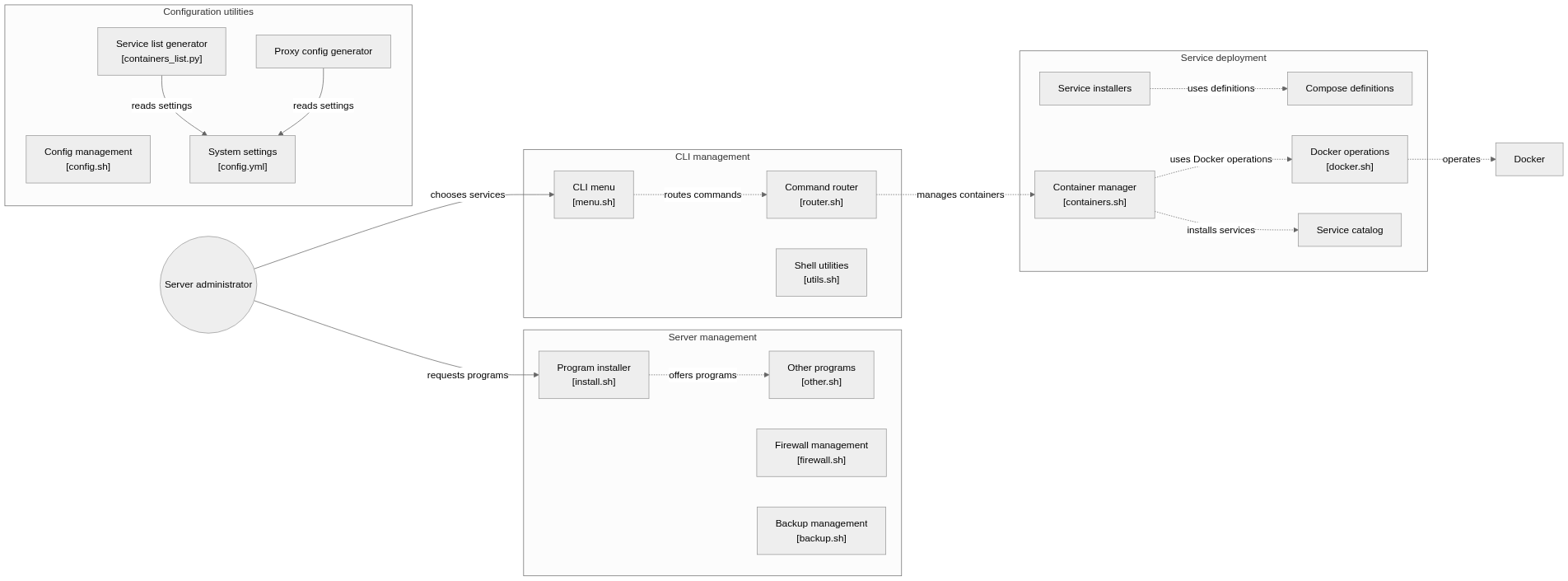
The components and their connections remain available as text. The diagram adds an interactive view.
- setup.sh
- src/menu.sh
- Configuration and selection
- Container installation
Links verified in the repository.
Mermaid Interactive diagram (loads on open)
System overview of the components and connections verified in the repository.
flowchart LR

subgraph group_cli["CLI management"]
  node_menu["CLI menu<br/>[menu.sh]"]
  node_router["Command router<br/>[router.sh]"]
  node_utilities["Shell utilities<br/>[utils.sh]"]
end

subgraph group_services["Service deployment"]
  node_service_catalog["Service catalog"]
  node_service_scripts["Service installers"]
  node_compose_definitions["Compose definitions"]
  node_container_manager["Container manager<br/>[containers.sh]"]
  node_docker_manager["Docker operations<br/>[docker.sh]"]
end

subgraph group_system["Server management"]
  node_program_installer["Program installer<br/>[install.sh]"]
  node_other_tools["Other programs<br/>[other.sh]"]
  node_firewall["Firewall management<br/>[firewall.sh]"]
  node_backup["Backup management<br/>[backup.sh]"]
end

subgraph group_config["Configuration utilities"]
  node_config_loader["Config management<br/>[config.sh]"]
  node_list_generator["Service list generator<br/>[containers_list.py]"]
  node_proxy_generator["Proxy config generator"]
  node_settings["System settings<br/>[config.yml]"]
end

node_user(("Server administrator"))
node_docker["Docker"]

node_user -->|"chooses services"| node_menu
node_menu -.->|"routes commands"| node_router
node_router -.->|"manages containers"| node_container_manager
node_container_manager -.->|"uses Docker operations"| node_docker_manager
node_docker_manager -.->|"operates"| node_docker
node_service_scripts -.->|"uses definitions"| node_compose_definitions
node_container_manager -.->|"installs services"| node_service_catalog
node_user -->|"requests programs"| node_program_installer
node_program_installer -.->|"offers programs"| node_other_tools
node_list_generator -->|"reads settings"| node_settings
node_proxy_generator -->|"reads settings"| node_settings


class node_menu,node_router,node_utilities toneBlue
class node_service_catalog,node_service_scripts,node_compose_definitions,node_container_manager,node_docker_manager toneAmber
class node_program_installer,node_other_tools,node_firewall,node_backup,node_user toneMint
class node_config_loader,node_list_generator,node_proxy_generator,node_settings toneRose
class node_docker toneIndigo
A command-line manager for installing and configuring self-hosted services. The documented flow starts in the menu, selects a service or program, and delegates container, proxy and configuration work to shell and Python utilities.
- Components
- 18
- Connections
- 11
- Links supported by code or README
- 4/11
Text version of the diagram
- setup.sh → src/menu.sh
- src/menu.sh → Configuration and selection
- Configuration and selection → Container installation
Follow one path through the code
Start with the main_setup_menu call, then inspect the selected service under containers before executing it. The menu is a dispatcher; the selected service determines the actual side effects.
Deployment and operations
The ports, storage, and startup relationships below come from the repository configuration. depends_on records startup order, not service readiness.
Types and file structure
2 declared types, with 2 in the base-relationship overview.
Type diagram
classDiagram
direction TB
class t9c1d5cd3c00c["GeneratorAIS"] {
  __init__()
  read_yml()
  generate_containers_list()
  write_containers_list_text()
}
class t51dcacef3aad["ReverseProxy"] {
  read_yml()
  generate_nginx_conf()
  generate_server_block()
}
class bb0976d8612e0["object"] {
  <<unresolved_base>>
}
bb0976d8612e0 <|-- t9c1d5cd3c00c
Unresolved bases remain labelled; full signatures are not reconstructed.
Type index
GeneratorAIS(class) ·src/containers_list.py:8Methods in the overview:
__init__, read_yml, generate_containers_list, write_containers_list_text.Declared bases:
object.ReverseProxy(class) ·src/nginx_reverse_proxy.py:9Methods in the overview:
read_yml, generate_nginx_conf, generate_server_block.
Reference
203 / 203 eligible files read (291 in the tree); 0 oversized, 0 failed reads and 1 syntax diagnostics.
What the scan covers
Known dependency/build folders, credential files and binaries are excluded. The scan covers READMEs, recognized manifests and parser-supported source files.
Linguist statistics cover the whole repository and may include other languages.
File map
flowchart TD
  root["another-install-script"]
  f0["setup.sh"]
  root --> f0
  f1["src/menu.sh"]
  root --> f1
  f2["README.md"]
  root --> f2
  f3["uninstall.sh"]
  root --> f3
  f4["version.sh"]
  root --> f4
  f5["src/backup.sh"]
  root --> f5
  f6["src/config.sh"]
  root --> f6
  f7["src/containers.sh"]
  root --> f7
  f8["src/containers_list.py"]
  root --> f8
  f9["src/docker.sh"]
  root --> f9
  f10["src/firewall.sh"]
  root --> f10
  f11["src/install.sh"]
  root --> f11
  f12["src/nginx_reverse_proxy.py"]
  root --> f12
  f13["src/other.sh"]
  root --> f13
  f14["src/router.sh"]
  root --> f14
  f15["src/utils.sh"]
  root --> f15
Files to read 3
References
- GitHubSource repository
- READMERepository documentation
- MediaBox homelab — what I run in Docker (and what stayed a bookmark)Blog article