Skip to content
← All articles
Article

ESP32-7SEG

Listen to the audio story

A tiny display, a timer, and a web page on the device · 1:26 · AI-written script, synthetic voices

Transcript

Ava: What if a seven-segment display, the kind on an old clock, had its own web page? That's ESP32-7SEG, a small firmware project by Antoine.

Andrew: A web server on the clock itself?

Ava: Basically. The firmware runs on an ESP32 FireBeetle board and drives an Adafruit seven-segment display over I2C. It also serves a local web interface, so you control the display from a browser on the same network.

Andrew: What can you do from that page?

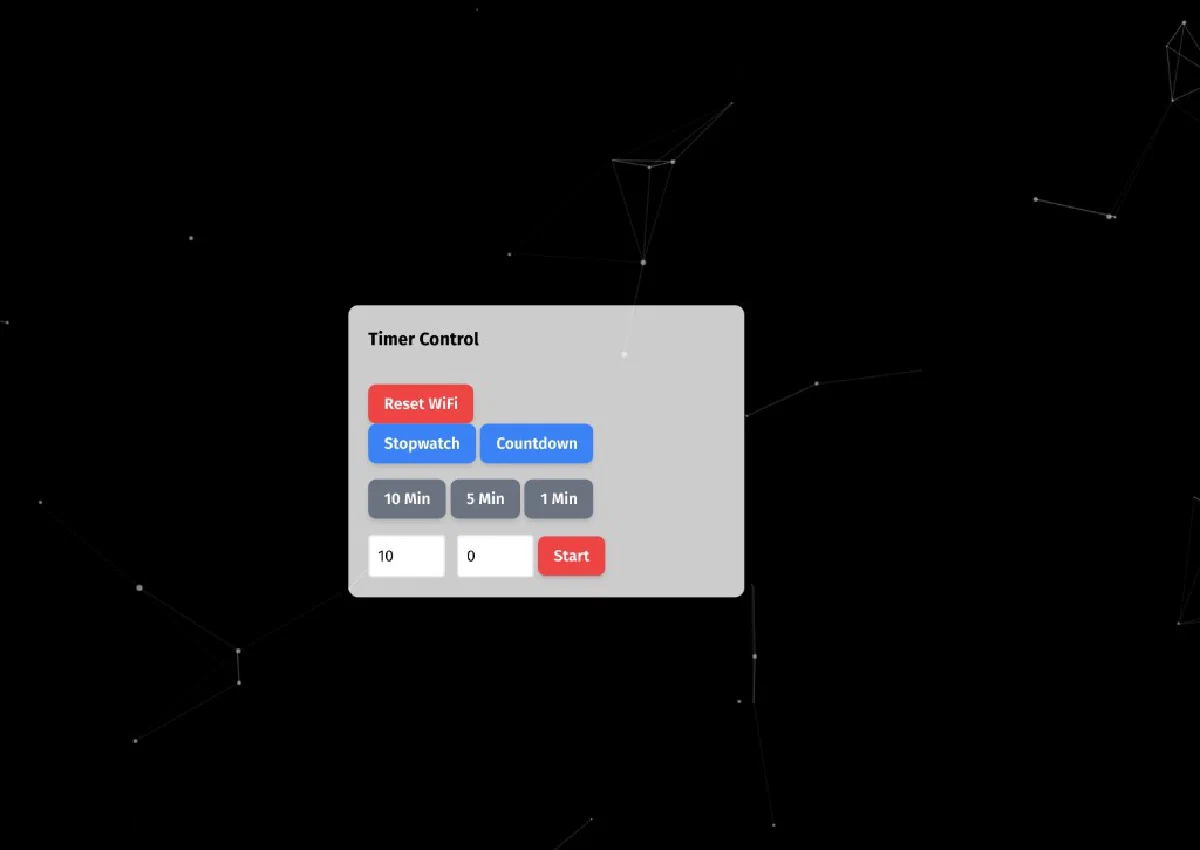
Ava: It's a Timer Control panel. You pick stopwatch or countdown mode. There are quick presets for ten, five and one minute, or you can type minutes and seconds yourself and press start. And there's a button to reset the WiFi, which clears the stored credentials so you can set the device up again.

Andrew: How hard is the hardware?

Ava: Pretty simple. The board, the display with its backpack, a breadboard and four jumper wires: SCL, SDA, power and ground.

Andrew: And getting it running?

Ava: It's a PlatformIO project. You clone the repo, build, and flash the ESP32. After boot, you read the device's IP address from the serial monitor and open it in a browser. The repository also has Android and firmware subprojects for a fuller setup around the same device.

Andrew: A neat little build, then.

Ava: It's MIT licensed, and the project page links to the repository.

ESP32-7SEG
Table of contents

ESP32-7SEG

GitHub last commit

Repository · MIT License

Firmware for an ESP32 FireBeetle that drives an Adafruit 7-segment display (I2C backpack) and exposes a local web interface for timer modes and WiFi management.

Web interface

The built-in server serves a Timer Control panel in the browser:

  • Stopwatch and Countdown modes
  • Quick presets: 10 Min, 5 Min, 1 Min
  • Manual minutes and seconds fields plus Start
  • Reset WiFi to clear stored credentials when you need to re-provision the device

Hardware

  • ESP32 FireBeetle (v1.0)
  • Adafruit 7-segment display with I2C backpack
  • Breadboard and jumper wires (SCL, SDA, VCC, GND)

Software

  • PlatformIO project; see platformio.ini in the repo for board and library configuration.
  • The repository also includes Android and firmware subprojects for a fuller stack around the same device.

Quick start

git clone https://github.com/antoinebou12/ESP32-7SEG.git
cd ESP32-7SEG

Open the project in PlatformIO (or Arduino IDE with equivalent libraries), build, and flash the ESP32. After boot, check the serial monitor for the device IP address, then open it in a browser on the same network to use the web UI.