I kept a private list of self-hosted apps I wanted to try — mostly so I would stop assigning random ports and forgetting what lived on :8096. That list turned into MediaBoxDockerCompose on GitHub. This post is the short version: what I wired up, how I install on Proxmox when compose is not the right shape, and where the full port map lives so this page does not become a spreadsheet with SEO. Version française.
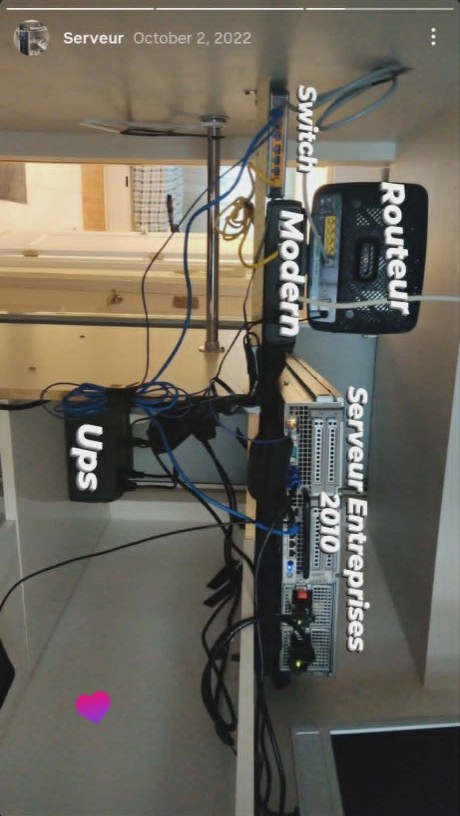
Same chapter as networking evolution — cables on the wall, then services in git. The photo is from when I was still labeling ports with tape; the compose file is what survived.
What MediaBox is
One docker-compose.yml, shared ROOT paths on disk, and opinions I earned from breaking things locally. I use it when I want one host, many containers, shared volumes — Jellyfin next to Deluge next to FreshRSS without spinning up a new LXC per hobby.
The repo README has default ports, credentials, backup notes, and the install path I actually follow. Treat this post as context; treat the README as the manual.
What I wired up (by job, not by checkbox)
These are the services that made it into compose long enough to matter. Ports are how I reached them on the LAN (:800x families on purpose — easier behind Caddy).
Media and files
| Service | Port | Why I kept it |
|---|---|---|
| Jellyfin | :8096 | Library playback without Plex account drama |
| Airsonic | :4040 | Music and podcasts in one place |
| Deluge | :8112 | Torrent client I could automate around |
| Cloud torrent | :6889 | Remote queue when I was away from the box |
| Mylar | :8090 | Comics without manual hunting |
| Piwigo | :8049 | Photo gallery for family stuff |
| Lychee | :8035 | Lighter photo sharing experiments |
I still bookmark *Plex, Sonarr, Radarr, arr-adjacent tools — same homelab aisle, not in my compose file today. When I want them on Proxmox I use helper-scripts (below) instead of hand-writing another stack.
Dashboards, remote access, ops
| Service | Port | Why I kept it |
|---|---|---|
| Dashmachine | :5000 | One page of links when I forgot URLs |
| Netdata | :19999 | “Is the disk full again?” at a glance |
| Guacamole | :8012 | Browser RDP/VNC without installing clients |
| KDE in Docker | :8100 | Full desktop in a tab (debugging habit) |
| Ubuntu XRDP | :3389 | Pairs with Guacamole for a real desktop session |
| TeamSpeak | — | Voice with friends during lockdown-era gaming |
| Linkd | — | Short links on my domain |
Notes, RSS, money, diagrams
| Service | Port | Why I kept it |
|---|---|---|
| BookStack | :6875 | Homelab docs that are not random Markdown files |
| Wallabag | :8899 | Read-it-later without a subscription |
| FreshRSS | :8007 | Feeds in one place |
| DailyNotes | :5001 | Daily log when I actually used it |
| Firefly III | :8006 | Personal finance tracking (repo sync still catching up) |
| Grocy | :9283 | Pantry ERP — more fun than useful, still educational |
| draw.io | :8005 | Diagrams without leaving the network |
| Gitea | :8008 | Git for experiments before pushing to GitHub |
| Calibre | :8001, :8002 | E-books |
| Huginn | :8013 | “If this then that” I host myself |
Oddballs I still like
| Service | Port | Note |
|---|---|---|
| Neko | :8032 | Shared browser room — rabbit-hole energy |
| Deezloader Remix | :1730 | Legacy stack; kept for history more than daily use |
| OpenTogetherTube | :6666 | My fork — watch party experiments |
Proxmox when compose is the wrong tool
On Proxmox I often use Proxmox VE Helper-Scripts — community-maintained one-liners (built on tteck’s work). Search on community-scripts.org, paste into the Proxmox shell, pick default or advanced, get an LXC plus a post-install menu for updates.
Same names as my old wish list — Jellyfin, Vaultwarden, AdGuard, Home Assistant — different packaging. I have run compose on one VM and separate CTs from helper-scripts on the same rack depending on whether I wanted shared volumes or hard isolation.
Host tools (not in compose)
Ansible, Cockpit (:9090), Dokku, and Lynk install on the host when the job is “manage the metal” or “expose a TCP service safely,” not “run another container row.”
The long wish list
The original tracking sheet had 86 Docker names and dozens more I never wired up — Nextcloud, Vaultwarden, mail stacks, game servers, the full *Arr parade. I am not pasting that grid here; it ages badly and reads like a status dashboard.
If you want the exhaustive map, open the MediaBoxDockerCompose repo and issues, or browse community-scripts.org/categories for the Proxmox side. For one container on a fresh Linux box before full compose, I used another-install-script — menu-driven bash, same era as the homelab.
What stuck with me
- Plan ports in families —
:800xsaved my firewall rules and my sanity. - Running something once ≠ operating it — LAN-only experiments are still valuable.
- Forks are where ideas go — OpenTogetherTube, wireguardweb.
- Pick compose or Proxmox scripts for the shape of the problem, not because a blog post said one is cooler.
Related posts
- Networking evolution — home lab — physical network, Proxmox, Caddy/WireGuard
- Renpho + Home Assistant — another “own your data at home” project
- Caddy on AWS — when the reverse proxy leaves the basement