In this article
Dimension is my Rust workspace for mathematics and graphics experiments. The useful starting point is mathlib: it exposes matrix storage, numerical solvers and the transformations that the rendering crate uses on the CPU.
Architecture
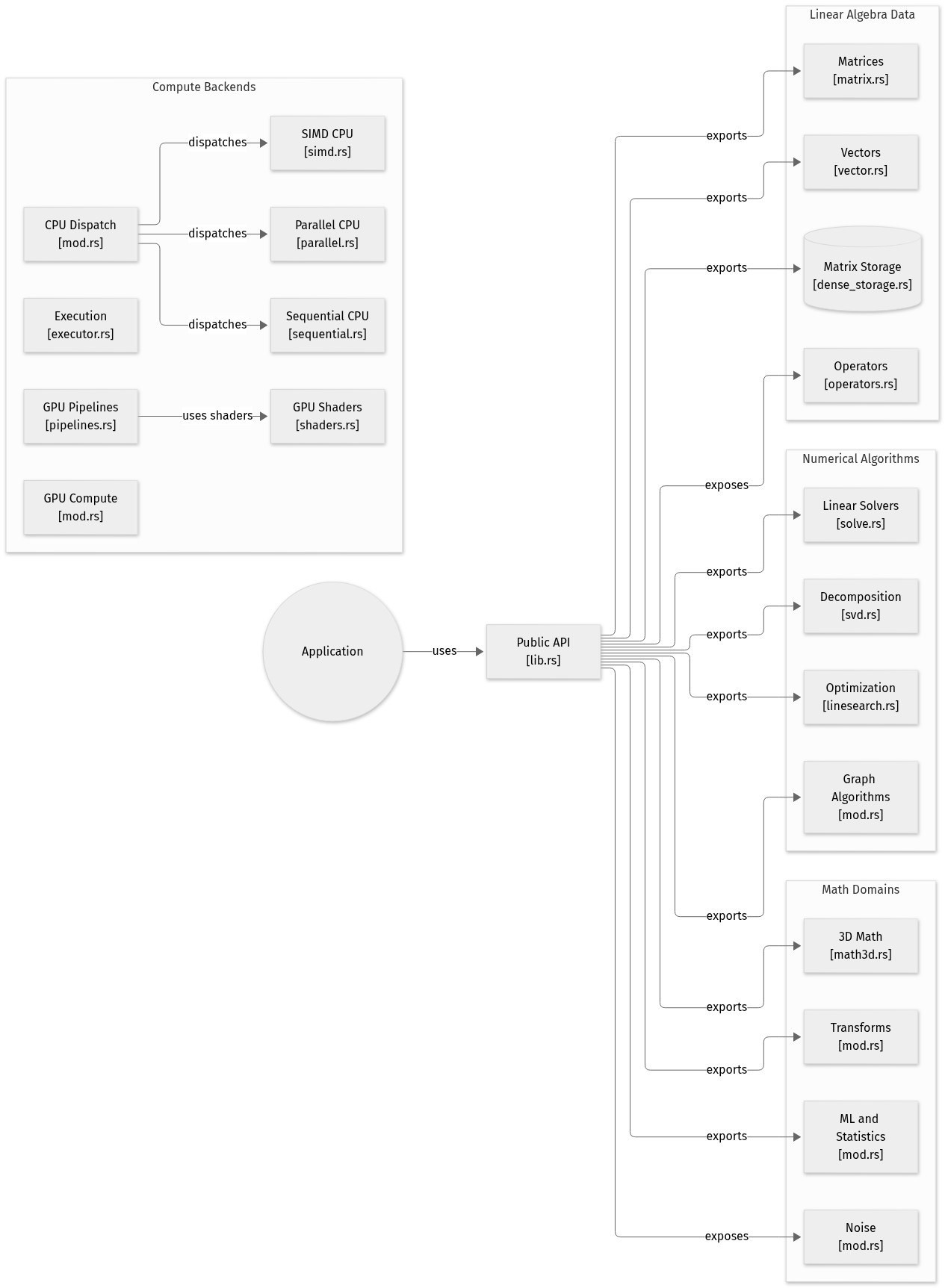
System overview of the components and connections verified in the repository.
flowchart LR

subgraph group_data["Linear Algebra Data"]
  node_matrix["Matrices<br/>[matrix.rs]"]
  node_vector["Vectors<br/>[vector.rs]"]
  node_storage[("Matrix Storage<br/>[dense_storage.rs]")]
  node_operators["Operators<br/>[operators.rs]"]
end

subgraph group_compute["Compute Backends"]
  node_cpu["CPU Dispatch<br/>[mod.rs]"]
  node_parallel["Parallel CPU<br/>[parallel.rs]"]
  node_sequential["Sequential CPU<br/>[sequential.rs]"]
  node_simd["SIMD CPU<br/>[simd.rs]"]
  node_executor["Execution<br/>[executor.rs]"]
  node_gpu["GPU Compute<br/>[mod.rs]"]
  node_pipelines["GPU Pipelines<br/>[pipelines.rs]"]
  node_shaders["GPU Shaders<br/>[shaders.rs]"]
end

subgraph group_algorithms["Numerical Algorithms"]
  node_linear["Linear Solvers<br/>[solve.rs]"]
  node_decomposition["Decomposition<br/>[svd.rs]"]
  node_optimization["Optimization<br/>[linesearch.rs]"]
  node_graph["Graph Algorithms<br/>[mod.rs]"]
end

subgraph group_domains["Math Domains"]
  node_math3d["3D Math<br/>[math3d.rs]"]
  node_transforms["Transforms<br/>[mod.rs]"]
  node_ml["ML and Statistics<br/>[mod.rs]"]
  node_noise["Noise<br/>[mod.rs]"]
end

node_application(("Application"))
node_api["Public API<br/>[lib.rs]"]

node_application -->|"uses"| node_api
node_api -->|"exports"| node_matrix
node_api -->|"exports"| node_vector
node_api -->|"exports"| node_storage
node_api -->|"exposes"| node_operators
node_api -->|"exports"| node_linear
node_api -->|"exports"| node_decomposition
node_api -->|"exports"| node_optimization
node_api -->|"exports"| node_graph
node_api -->|"exports"| node_math3d
node_api -->|"exports"| node_transforms
node_api -->|"exports"| node_ml
node_api -->|"exposes"| node_noise
node_cpu -->|"dispatches"| node_parallel
node_cpu -->|"dispatches"| node_sequential
node_cpu -->|"dispatches"| node_simd
node_pipelines -->|"uses shaders"| node_shaders


class node_matrix,node_vector,node_storage,node_operators toneBlue
class node_cpu,node_parallel,node_sequential,node_simd,node_executor,node_gpu,node_pipelines,node_shaders toneAmber
class node_linear,node_decomposition,node_optimization,node_graph,node_api toneMint
class node_math3d,node_transforms,node_ml,node_noise toneRose
class node_application toneIndigo
A Rust mathematics workspace centred on mathlib. Applications construct vectors, matrices and cubes, then use numerical, geometric and analytical operations before data reaches the wider rendering workspace.
- Components
- 22
- Connections
- 17
- Links supported by code or README
- 16/17
Text version of the diagram
- Application or demo → mathlib data and transforms
- mathlib data and transforms → Scene hierarchy and camera
- Scene hierarchy and camera → wgpu resources and passes
- wgpu resources and passes → Native window or web canvas
The application supplies geometry and transforms. The scene layer organizes entities and cameras; the rendering layer prepares the GPU work for a native window or web canvas. This is the rendering path, not a claim that every numerical operation runs on the GPU.
Open the component-by-component code walkthrough.
Start with the storage
mathlib/src/lib.rs exports dense storage alongside sparse formats such as CRS and CCS. The public API also includes matrix and vector types, matrix views and submatrices. Those choices matter before a renderer draws anything: they determine how a caller represents and passes its data.
The same entry point exposes LU, Cholesky and SVD decompositions, plus root finding and numerical integration. Optional GPU functionality sits behind a feature flag. The presence of an executor abstraction is a design choice, not a measured speedup; I have not included performance comparisons here.
Follow a transform into the scene
render/src/lib.rs describes a wgpu renderer that uses mathlib for CPU transforms and camera mathematics. Its exports include World, EntityId, Transform, cameras and render targets.
The scene represents parent-child relationships with a tree. A local transform therefore belongs to a hierarchy: moving a parent changes the context in which its children are rendered. Serialization is optional and enabled through the serde feature.
The platform layer supports native windows and WebAssembly canvas targets. Keeping platform code apart from scene and numerical code gives those targets shared building blocks, although it does not prove identical behavior on every GPU or browser.
Read the workspace, not only the README
The root Cargo.toml lists crates for rendering, geometry, collision, kinematics, physics, networking, parsing and neural work alongside mathlib. The README still focuses on the mathematics crate. I use the manifest and module entry points to understand the current structure.
This is exploratory code. Performance comparisons would need a reproducible benchmark with its input size and target hardware.