I got tired of one-off ChatGPT threads that “draw a sequence diagram” and return half-random syntax. AIPRM helps because the template lives in the browser; I lock four fields — diagram type, elements, purpose, tool — and the model stops guessing whether I want PlantUML, Mermaid, or notes for Draw.io. Related: the D2C OpenAI diagram plugin post. Version française.
AIPRM prompt template (copy and adapt)
Fill one line per dimension. You can paste the block below into ChatGPT (with or without AIPRM) and edit the bracketed values.
[DIAGRAM TYPE] - Sequence | Use Case | Class | Activity | Component | State | Object | Deployment | Timing | Network | Wireframe | Archimate | Gantt | MindMap | WBS | JSON | YAML

[ELEMENT TYPE] - Actors | Messages | Objects | Classes | Interfaces | Components | States | Nodes | Edges | Links | Frames | Constraints | Entities | Relationships | Tasks | Events | Modules

[PURPOSE] - Communication | Planning | Design | Analysis | Modeling | Documentation | Implementation | Testing | Debugging
(optional: add your stack or scenario, e.g. "Communication: React server frontend — FastAPI backend — Redis cache — MongoDB database")

[DIAGRAMMING TOOL] - PlantUML | Mermaid | Draw.io | Lucidchart | Creately | Gliffy
Example: sequence diagram for a cached API stack
[DIAGRAM TYPE] - Sequence
[ELEMENT TYPE] - Messages
[PURPOSE] - Communication Frontend React Server - Backend FastAPI - Cache Redis - Database MongoDB
[DIAGRAMMING TOOL] - PlantUML
Public AIPRM link
I published a prompt you can add from the AIPRM library here: AIPRM prompt (LinkedIn). Use it as a starting point, then narrow [PURPOSE] and [DIAGRAMMING TOOL] for your team’s stack and deliverables.
Introduction to sequence diagrams
Sequence diagrams are a type of UML diagram that show how parts of a system exchange messages over time. They are useful for onboarding, design reviews, and documenting request paths (especially when a cache or database sits on the critical path).
Frontend–backend communication with caching
The figure below is a concrete example: a user request flows through a React frontend and FastAPI backend, with Redis as a cache and MongoDB as the system of record. The source listings that follow include both a cache hit and a cache miss branch.
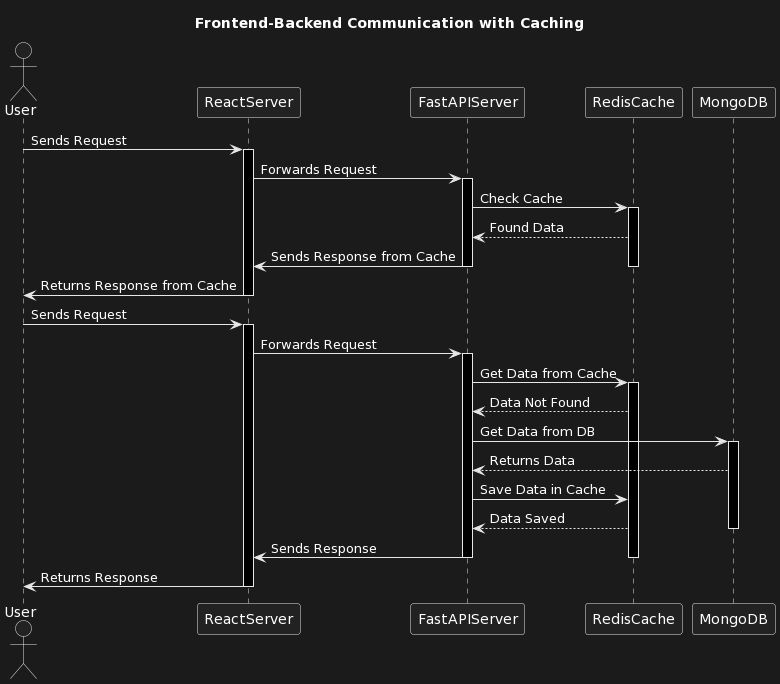
PlantUML (cache hit and cache miss)
@startuml
actor User
participant "ReactServer" as RS
participant "FastAPIServer" as API
participant "RedisCache" as R
database "MongoDB" as M

User -> RS: Sends Request
RS -> API: Forwards Request

alt Cache hit
  API -> R: Check Cache
  R --> API: Found Data
  API -> RS: Sends Response from Cache
  RS -> User: Returns Response from Cache
else Cache miss
  API -> R: Get Data from Cache
  R --> API: Data Not Found
  API -> M: Get Data from DB
  M --> API: Returns Data
  API -> R: Save Data in Cache
  R --> API: Data Saved
  API -> RS: Sends Response
  RS -> User: Returns Response
end
@enduml
Mermaid (cache hit and cache miss)
sequenceDiagram
    actor User
    participant ReactServer
    participant FastAPIServer
    participant RedisCache
    participant MongoDB

    User->>ReactServer: Sends Request
    ReactServer->>FastAPIServer: Forwards Request

    alt Cache hit
        FastAPIServer->>RedisCache: Check Cache
        RedisCache-->>FastAPIServer: Found Data
        FastAPIServer->>ReactServer: Sends Response from Cache
        ReactServer->>User: Returns Response from Cache
    else Cache miss
        FastAPIServer->>RedisCache: Get Data from Cache
        RedisCache-->>FastAPIServer: Data Not Found
        FastAPIServer->>MongoDB: Get Data from DB
        MongoDB-->>FastAPIServer: Returns Data
        FastAPIServer->>RedisCache: Save Data in Cache
        RedisCache-->>FastAPIServer: Data Saved
        FastAPIServer->>ReactServer: Sends Response
        ReactServer->>User: Returns Response
    end
Draw.io, Lucidchart, Creately, and Gliffy
These tools are canvas-first: the fastest path is often to generate PlantUML or Mermaid in ChatGPT, then:
- Export from a PlantUML server or CLI to SVG or PNG and import that graphic into your diagram tool as a baseline layer, or
- Ask ChatGPT (using your template) for a numbered list of lifelines and messages in order, and recreate them with the tool’s shapes and connectors.
That avoids blank-canvas syndrome while keeping the diagram editable for styling and annotations your team expects.
When to use this workflow
| Situation | Use structured ChatGPT + AIPRM |
|---|---|
| Teaching a stack pattern once | Yes — same template for every cohort |
| One-off whiteboard photo | No — draw or photograph |
| Regulated architecture review | Yes — text diagrams diff in git |
| Pretty slides for executives | Export SVG, polish in Draw.io |
Pitfalls
- Models confuse cache hit branches with database syntax — always render PlantUML/Mermaid locally before publishing.
- AIPRM template drift — copy the four lines into your repo README so you are not locked to a browser extension version.
- Hashtag-style prompts (“make a diagram”) without naming tool and diagram type — you get generic boxes.
Related posts
Takeaway
Once the four-line template is in AIPRM, diagram requests feel like filling a form instead of negotiating with the model. I still edit the output — but the first draft lands in the right language (PlantUML vs Mermaid vs bullet list for a canvas tool) often enough that reviews are faster.