
In this article
My bloc repository is a fork of MrKuros/Blender-Cloud-Storage. It keeps the upstream author credit and explores a Blender panel for browsing assets in AWS S3 and MinIO.
The browsing and import paths
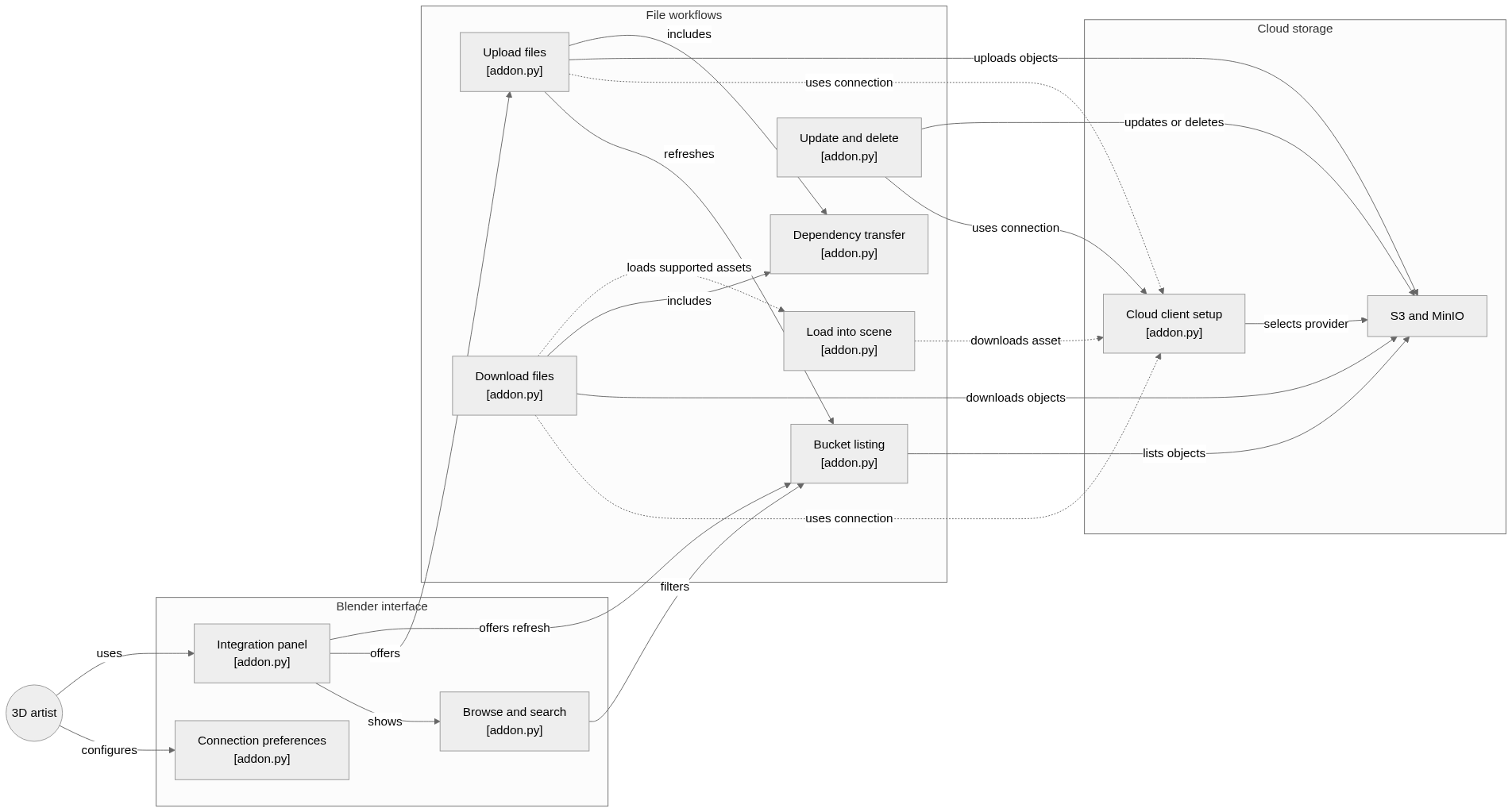
System overview of the components and connections verified in the repository.
flowchart LR

subgraph group_ui["Blender interface"]
  node_preferences["Connection preferences<br/>[addon.py]"]
  node_panel["Integration panel<br/>[addon.py]"]
  node_browse["Browse and search<br/>[addon.py]"]
end

subgraph group_workflow["File workflows"]
  node_list["Bucket listing<br/>[addon.py]"]
  node_upload["Upload files<br/>[addon.py]"]
  node_dependencies["Dependency transfer<br/>[addon.py]"]
  node_download["Download files<br/>[addon.py]"]
  node_manage["Update and delete<br/>[addon.py]"]
  node_scene["Load into scene<br/>[addon.py]"]
end

subgraph group_storage["Cloud storage"]
  node_client["Cloud client setup<br/>[addon.py]"]
  node_providers["S3 and MinIO"]
end

node_artist(("3D artist"))

node_artist -->|"configures"| node_preferences
node_artist -->|"uses"| node_panel
node_panel -->|"shows"| node_browse
node_panel -->|"offers"| node_upload
node_panel -->|"offers refresh"| node_list
node_browse -->|"filters"| node_list
node_upload -->|"refreshes"| node_list
node_upload -.->|"uses connection"| node_client
node_download -.->|"uses connection"| node_client
node_manage -->|"uses connection"| node_client
node_scene -.->|"downloads asset"| node_client
node_client -->|"selects provider"| node_providers
node_list -->|"lists objects"| node_providers
node_upload -->|"uploads objects"| node_providers
node_download -->|"downloads objects"| node_providers
node_manage -->|"updates or deletes"| node_providers
node_upload -->|"includes"| node_dependencies
node_download -->|"includes"| node_dependencies
node_download -.->|"loads supported assets"| node_scene


class node_preferences,node_panel,node_browse toneBlue
class node_list,node_upload,node_dependencies,node_download,node_manage,node_scene toneAmber
class node_client,node_providers toneMint
class node_artist toneIndigo
A Blender add-on for S3-compatible storage. Artists configure a connection, browse or search bucket files, transfer Blender dependencies, and load supported assets into the scene through operators concentrated in the add-on module.
- Components
- 12
- Connections
- 19
- Links supported by code or README
- 19/19
Text version of the diagram
- Blender panel → Active connection
- Active connection → S3 or MinIO API
- S3 or MinIO API → Object keys and folder tree
- Object keys and folder tree → Blender panel
- S3 or MinIO API → Temporary file
- Temporary file → Blender importer
Listing creates the panel’s folder view; loading an asset downloads its bytes and invokes a local importer. A listing refresh can therefore succeed while an import fails on an unsupported format. The background refresh hands UI updates back through Blender timers instead of treating the storage request as a UI operation.
Read the architecture note with the connection and import boundaries.
Make the connection explicit
addon.py defines a CloudConnection property group with a provider, endpoint, bucket and region. Preferences hold multiple connections and an active connection index. The client setup chooses the S3 or MinIO path from that selection.
This is the part that interests me as both graphics and platform work: the artist works inside Blender, while the add-on translates those actions into object-storage operations.
Turn object names into folders
Object storage uses keys. The refresh operator splits those keys on / and builds a nested dictionary for the panel. Folder expansion is tracked separately, so the UI can browse a hierarchy without pretending it is a local filesystem.
CloudSearchManager adds fuzzy matching with RapidFuzz. It scores filenames and path segments, gives direct substring matches priority and supports filters for scenes, meshes, images and materials.
Downloading and importing are different actions
The download helper saves an object to a temporary local path. The load operator then selects a Blender importer for STL, OBJ, PLY or USD variants. Other extensions are rejected with a message. A successful transfer alone does not mean Blender has imported a usable object.
The upload-current-file operator sends the saved .blend file. Although the README discusses dependencies, I would verify texture packaging and relative paths before relying on this path to move a complete scene.
Keep the fork’s scope visible
The public upstream comparison showed 10 commits ahead and 5 behind on October 23, 2026. The changed files include the add-on, packaging metadata and README. That describes repository history; it does not establish that upstream accepted those changes.
The source also uses a single S3 list_objects_v2 request, so buckets beyond one response need pagination work. These are the kinds of small workflow boundaries I want to keep visible when revisiting the project.