uml-mcp : D’un appel MCP à un diagramme
uml-mcp expose des outils de diagrammes aux clients MCP. Le client fournit une source et des options; le serveur valide la demande, l’oriente vers les services de rendu et retourne les résultats avec des liens d’édition.
Langages du dépôtPython 90.9%9
Parts calculées à partir des octets GitHub Linguist.
| Langage | % | Octets |
|---|---|---|
| Python | 1 642 190 | |
| TypeScript | 144 367 | |
| Shell | 5 667 | |
| CSS | 4 713 | |
| Go Template | 4 227 | |
| Makefile | 2 522 |
3 autres langages
| Dockerfile | 0.11% | 1 964 |
| JavaScript | 0.03% | 587 |
| HTML | 0.02% | 422 |
Aperçu
Pourquoi il existe
Serveur phare Model Context Protocol (MCP) générant PlantUML, Mermaid et Kroki directement depuis des LLMs (Claude, Cursor, ChatGPT) sans dépendance locale.
Cas d’usage
Génération interactive de diagrammes d'architecture pour le pair programming avec IA et la documentation.
Démarrage
Ces commandes viennent de la documentation du dépôt. Elles n’ont pas été exécutées pendant cette revue.
git clone https://github.com/antoinebou12/uml-mcp.git
cd uml-mcp
uv sync
uv run python server.pygit remote add origin https://github.com/antoinebou12/uml-mcp.gitmake mcp-riguvx [email protected] run tests/mcp-rig/
uvx [email protected] run tests/mcp-rig/ --tag smoke
uvx [email protected] run tests/mcp-rig/generate.yaml --case "batch*"
uvx [email protected] run tests/mcp-rig/ --server-logs # show server stderr when debuggingCommandes déclarées dans les manifestes
frontend/package.json
devvitebuildnpm run typecheck && vite buildtypechecknode node_modules/typescript-7/bin/tsc --noEmitlinteslint .testvitest run
Références du dépôt
Extraits des guides du dépôt, dans leur langue d’origine. Les liens ouvrent la version du code consultée.
Prérequis et premier essai
Quick start
README.md
Remote (recommended) — add to your MCP client: Use /mcp, not the site root. Then ask: “Draw a sequence diagram of a user logging in through an API gateway.” or paste PlantUML / Mermaid / Kroki source. Repo defaults: .cursor/mcp.json · .vscode/mcp.json · .codex/config.toml.
| Client | Config | Guide |
|---|---|---|
| Cursor | .cursor/mcp.json | docs/integrations/cursor.md |
| VS Code / Copilot | .vscode/mcp.json | docs/integrations/vscode_copilot.md |
| OpenAI Codex | .codex/config.toml | docs/integrations/openai_codex.md |
| Ollama / Open WebUI | config/openwebui_mcp.json | docs/integrations/ollama.md |
| Claude Desktop | config/claude_desktop_*.json | docs/integrations/claude_desktop.md |
| All snippets: config/README.md | ||
| Install locally (guided): | ||
| Path | Command | |
| — | — | |
| Installer (needs only Python + typer + tqdm) | python scripts/install.py | |
| Setup wizard | uv tool… |
Prerequisites
CONTRIBUTING.md
- Python 3.12+ (supported range is >=3.12,<3.16 in pyproject.toml; CI exercises 3.12 and 3.15; Docker uses 3.15)
- uv, Poetry, or pip
Lockfile and `requirements.txt`
CONTRIBUTING.md
Installation
docs/installation.md
| Path | Best for | Command |
|---|---|---|
| Installer | Anyone; needs only Python 3.12+, typer and tqdm | python scripts/install.py |
| Setup wizard | Terminal users | uv tool install uml-mcp && uml-mcp setup |
| Web setup | A guided form in the browser | uml-mcp setup –web |
| Server / Kubernetes | Teams | Docker · Helm + SSO |
1. Quick install
docs/installation.md
The installer picks uv (uv tool install), then pipx, then pip –user, shows progress and then starts the setup wizard.
| Option | Meaning |
|---|---|
| –method uv|pipx|pip | Force an installer |
| –version 1.4.0 | Pin a version |
| –extras otel | Optional extras (otel = OpenTelemetry) |
| –web | Run the browser setup form instead of the terminal wizard |
| –no-setup | Install only |
| –dry-run | Print the commands, change nothing |
| Prefer doing it yourself? uv tool install uml-mcp (or pipx install uml-mcp). |
Configuration et utilisation
Development setup
CONTRIBUTING.md
- Fork and clone the repo:
- Create a virtual environment and install dependencies (including dev): With uv (recommended): With Poetry: With pip:
- (Optional) Install pre-commit hooks so lint/format run before each commit:
MCP Client Configuration Examples
config/README.md
Client matrix
config/README.md
| Client | Hosted HTTP | Local stdio | Guide |
|---|---|---|---|
| Cursor | cursor_http.json · .cursor/mcp.json | cursor_config.json | docs/integrations/cursor.md |
| Claude Desktop | claude_desktop_http.json | claude_desktop_config.json | docs/integrations/claude_desktop.md |
| VS Code / GitHub Copilot | vscode_mcp.json · .vscode/mcp.json | vscode_mcp_stdio.json | docs/integrations/vscode_copilot.md |
| OpenAI Codex | codex_config.toml · .codex/config.toml | codex_stdio.toml | docs/integrations/openai_codex.md |
| Open WebUI + Ollama | openwebui_mcp.json | Optional via mcpo | docs/integrations/ollama.md |
| Continue + Ollama | continue_config.yaml | See comments in that file | docs/integrations/ollama.md |
OpenAI Codex (CLI + IDE)
config/README.md
- User: ~/.codex/config.toml
- Project: .codex/config.toml (loads only when the project is trusted)
- Verify: codex mcp list or /mcp in a session
2. Setup wizard (`uml-mcp setup`)
docs/installation.md
The wizard asks for:
- a profile (local, docker or enterprise)
- which features to turn on (each one is explained, with whether it applies live or needs a restart)
- a Kroki server
- which MCP clients to register It then runs, with a progress bar:
- validate the configuration
- write ~/.config/uml-mcp/config.yaml (mode 0600, with a backup of any previous file)
- register the clients
- run a health check
Feature key What it does Applies memory_only Keep diagrams in memory; return URLs/bytes, no files restart diagram_fallback Retry with PlantUML server or mermaid.ink when Kroki fails restart audit MXCP-style audit trail of every call (redacted) live json_logs One JSON object per log line live metrics_endpoint Prometheus /metrics restart otel OpenTelemetry traces (needs uml-mcp[otel]) live rate_limit …
Exploitation et dépannage
Uninstall
docs/installation.md
Troubleshooting
docs/installation.md
| Symptom | Fix |
|---|---|
| uml-mcp: command not found | Open a new terminal, or run uv tool update-shell or pipx ensurepath |
| Setup page says “Enter the setup token” | Use the token printed by uml-mcp admin, or set UML_MCP_ADMIN_TOKEN |
| Diagrams fail to render | Check rendering.kroki_server reachability; enable diagram_fallback |
| Settings are read-only | The file is mounted read-only (e.g. Kubernetes); use Download YAML and apply it through your deployment |
| uml-mcp lint reports CFG010 | pip install “uml-mcp[otel]” or turn OpenTelemetry off |
Health check (HTTP deployment)
docs/configuration.md
When running the FastAPI app (app.py) for HTTP deployment (e.g. Vercel, Docker, uvicorn), a health endpoint is available:
- Endpoint: GET /health (no authentication required)
- Response: {“status”: “healthy”, “modules_available”: true|false}
- status: Always “healthy” when the server is up.
- modules_available: Whether diagram backends (Kroki, PlantUML, etc.) could be loaded. Use /health for load balancers, Kubernetes or Docker liveness/readiness probes, Vercel checks, and similar monitoring whenever you run the FastAPI app (app.py). When running the MCP server via fastmcp run with HTTP transport only (no FastAPI app), the standalone server does not expose /health unless you add a custom route; use the FastAPI app if you need the health endpoint.
Troubleshooting
docs/admin/install.md
| Symptom | Cause and fix |
|---|---|
| 404 on /admin of a server | Auth is off and admin.allow_local_without_auth is not true, or the request didn’t come from loopback |
| Buttons are disabled, “Enter the setup token” | Use the link printed by uml-mcp admin, or paste the token into the key icon in the top bar |
| docker is not installed / the Docker daemon is not running | Install Docker Desktop or Engine, start it, then run uml-mcp kroki up again |
| port is already allocated | Another service uses 8001: uml-mcp kroki up –port 8002 –use |
| A companion shows HTTP 500 right after start | It is still starting. Run uml-mcp kroki status again after a few seconds; up already waits up to 5 minutes |
| KROKI_SERVER is set by the environment (409) | An environment variable wins over uml-mcp.yaml. Change or unset it where the server is started |
| Rendering works in the playground but… |
Développement et contributions
Contributing to UML-MCP
CONTRIBUTING.md
Running tests
CONTRIBUTING.md
Development install (from a clone)
docs/installation.md
Contributing
docs/developers/contributing.md
Thanks for your interest in improving UML-MCP. The full guidelines live in the repo root; this page summarises the most useful entry points.
| Document | Why |
|---|---|
| CONTRIBUTING.md | Local setup, branching model, commit and PR conventions. |
| CODE_OF_CONDUCT.md | Community expectations. |
| SECURITY.md | How to responsibly report a security issue. |
Documentation source
README.mdCONTRIBUTING.md.plan/README.mdconfig/README.mdexamples/README.mddocs/installation.mddocs/configuration.mddocs/installation-local.mddocs/admin/install.mdtests/mcp-rig/README.mddocs/enterprise/README.mddocs/developers/contributing.mddocs/enterprise/configuration.mddocs/tutorials/getting-started.mddocs/enterprise/troubleshooting.mdexamples/plugins/uml-mcp-plugin-d3/README.mdexamples/plugins/uml-mcp-plugin-hello/README.md
17 documents lus parmi 17 candidats.
Fonctions et composants 2
- Un point d’entrée sans sortie parasite
- server.py délègue le démarrage à mcp_core.core.server. L’objet mcp est résolu à la demande par __getattr__, ce qui évite de construire le serveur ou d’écrire sur stdout lors d’un simple import. C’est important quand stdout transporte le protocole stdio.
- Transport et rendu
- Le serveur propose des parcours stdio et HTTP. Le cœur regroupe l’enregistrement des outils, la configuration et l’intégration Kroki. Le rendu reste une opération en aval: la couche MCP décrit les outils et transporte leurs entrées et résultats.
Architecture
Les composants et leurs liens restent lisibles en texte. Le diagramme ajoute une vue interactive.
- Client MCP
- Transport stdio ou HTTP
- Outils FastMCP et validation
- Moteur Kroki
- Résultat et liens
Liens vérifiés dans le dépôt.
Mermaid Diagramme interactif (chargement à l’ouverture)
Vue générale des composants et des échanges vérifiés dans le dépôt.
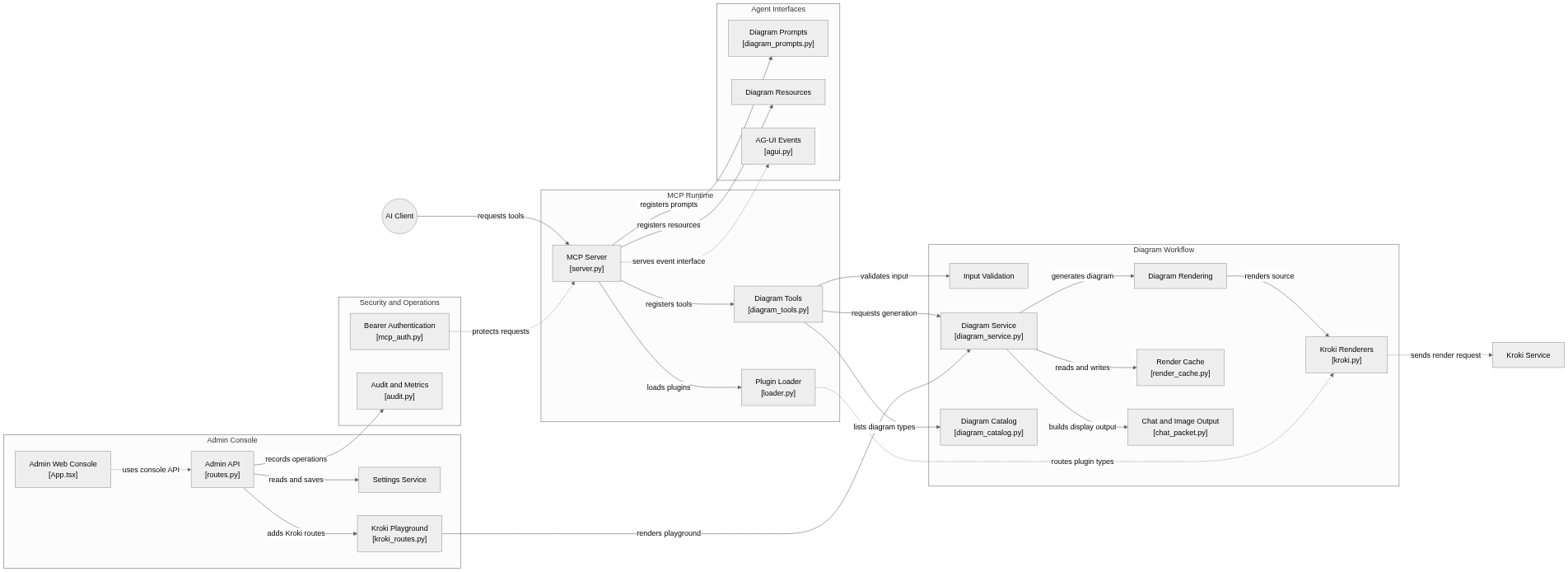
flowchart LR

subgraph group_runtime["MCP Runtime"]
  node_mcp_server["MCP Server<br/>[server.py]"]
  node_diagram_tools["Diagram Tools<br/>[diagram_tools.py]"]
  node_plugin_loader["Plugin Loader<br/>[loader.py]"]
end

subgraph group_diagrams["Diagram Workflow"]
  node_validation["Input Validation"]
  node_diagram_service["Diagram Service<br/>[diagram_service.py]"]
  node_rendering["Diagram Rendering"]
  node_kroki["Kroki Renderers<br/>[kroki.py]"]
  node_render_cache["Render Cache<br/>[render_cache.py]"]
  node_delivery["Chat and Image Output<br/>[chat_packet.py]"]
  node_catalog["Diagram Catalog<br/>[diagram_catalog.py]"]
end

subgraph group_agent["Agent Interfaces"]
  node_prompts["Diagram Prompts<br/>[diagram_prompts.py]"]
  node_resources["Diagram Resources"]
  node_agui["AG-UI Events<br/>[agui.py]"]
end

subgraph group_admin["Admin Console"]
  node_admin_api["Admin API<br/>[routes.py]"]
  node_admin_settings["Settings Service"]
  node_kroki_admin["Kroki Playground<br/>[kroki_routes.py]"]
  node_console_ui["Admin Web Console<br/>[App.tsx]"]
end

subgraph group_operations["Security and Operations"]
  node_enterprise_auth["Bearer Authentication<br/>[mcp_auth.py]"]
  node_audit["Audit and Metrics<br/>[audit.py]"]
end

node_client(("AI Client"))
node_kroki_service["Kroki Service"]

node_client -->|"requests tools"| node_mcp_server
node_mcp_server -->|"registers tools"| node_diagram_tools
node_diagram_tools -->|"validates input"| node_validation
node_diagram_tools -->|"requests generation"| node_diagram_service
node_diagram_service -->|"generates diagram"| node_rendering
node_diagram_service -->|"reads and writes"| node_render_cache
node_rendering -->|"renders source"| node_kroki
node_kroki -.->|"sends render request"| node_kroki_service
node_diagram_service -->|"builds display output"| node_delivery
node_diagram_tools -->|"lists diagram types"| node_catalog
node_mcp_server -->|"registers prompts"| node_prompts
node_mcp_server -->|"registers resources"| node_resources
node_mcp_server -.->|"serves event interface"| node_agui
node_console_ui -.->|"uses console API"| node_admin_api
node_admin_api -->|"reads and saves"| node_admin_settings
node_admin_api -->|"adds Kroki routes"| node_kroki_admin
node_kroki_admin -->|"renders playground"| node_diagram_service
node_enterprise_auth -.->|"protects requests"| node_mcp_server
node_admin_api -->|"records operations"| node_audit
node_mcp_server -->|"loads plugins"| node_plugin_loader
node_plugin_loader -.->|"routes plugin types"| node_kroki


class node_mcp_server,node_diagram_tools,node_plugin_loader,node_client toneBlue
class node_validation,node_diagram_service,node_rendering,node_kroki,node_render_cache,node_delivery,node_catalog toneAmber
class node_prompts,node_resources,node_agui toneMint
class node_admin_api,node_admin_settings,node_kroki_admin,node_console_ui toneRose
class node_enterprise_auth,node_audit,node_kroki_service toneIndigo
Un serveur MCP pour découvrir, valider, rendre et livrer des diagrammes. Le runtime enregistre les outils, invites et ressources, puis dirige la source vers les moteurs, le cache et une sortie adaptée au chat; l’administration et l’observabilité suivent un parcours distinct.
- Composants
- 21
- Connexions
- 21
- Liens appuyés par le code ou le README
- 16/21
Version texte du diagramme
- Client MCP → Transport stdio ou HTTP
- Transport stdio ou HTTP → Outils FastMCP et validation
- Outils FastMCP et validation → Moteur Kroki
- Moteur Kroki → Résultat et liens
- Résultat et liens → Client MCP
Suivre un parcours dans le code
Partez de server.py, suivez main dans mcp_core, puis examinez l’outil de diagramme avant son moteur. Un appel fournit des arguments structurés, sans rendre automatiquement un texte quelconque valide en Mermaid ou PlantUML.
Contrat des outils MCP
Le service hébergé accepte les messages MCP JSON-RPC sur /mcp. tools/list retourne les schémas d’entrée et de sortie. Le client envoie tools/call avec le nom d’un outil et des arguments structurés.
{
  "jsonrpc": "2.0",
  "id": 1,
  "method": "tools/call",
  "params": {
    "name": "generate_uml",
    "arguments": {
      "diagram_type": "mermaid",
      "code": "flowchart LR\n  Client --> Server",
      "output_format": "svg"
    }
  }
}
Réponse et erreurs
Authentification, limites et pagination
Ce point d’accès public a répondu à la génération documentaire sans en-tête Authorization. Cette observation ne définit pas l’authentification de tous les déploiements. tools/list n’annonçait aucun quota fixe. Le rendu retourne un résultat; la découverte du catalogue doit suivre la pagination MCP si le serveur retourne un curseur.
Schéma du service consulté le 2026-10-24 · MCP
Types et structure des fichiers
264 types déclarés, dont 12 dans l’aperçu des relations de base.
Diagramme des types
classDiagram
direction TB
class t8c933d751656["_MCPAcceptHeaderMiddleware"] {
  __init__()
  __call__()
}
class tbbd7d80c6537["_MCPOriginValidationMiddleware"] {
  __init__()
  __call__()
}
class t633b66ae0a60["DiagramRequest"] {
  validate_code_length()
}
class tb2bc4a0b3d1b["DiagramResponse"] {
}
class t57c712c6e160["KrokiEncodeRequest"] {
}
class t3cbf0983a349["KrokiEncodeResponse"] {
}
class teae27f6a16b7["AguiRunRequest"] {
  _normalize_format()
}
class t32b0b600cbbf["AguiRunResponse"] {
}
class t3cbf9378a674["AguiProtocolRunInput"] {
}
class tb9167f0f3b08["D3Renderer"] {
  __init__()
  configure()
  validate()
  render()
}
class t69997369a348["ForceModel"] {
}
class t69a1ba4997d9["Provider"] {
}
class bda110f9bf6d7["BaseModel"] {
  <<unresolved_base>>
}
bda110f9bf6d7 <|-- t633b66ae0a60
bda110f9bf6d7 <|-- tb2bc4a0b3d1b
bda110f9bf6d7 <|-- t57c712c6e160
bda110f9bf6d7 <|-- t3cbf0983a349
bda110f9bf6d7 <|-- teae27f6a16b7
bda110f9bf6d7 <|-- t32b0b600cbbf
bda110f9bf6d7 <|-- t3cbf9378a674
Les bases non résolues restent identifiées; les signatures complètes ne sont pas reconstruites.
Index des types
_MCPAcceptHeaderMiddleware(class) ·app.py:184Méthodes dans l’aperçu :
__init__, __call__._MCPOriginValidationMiddleware(class) ·app.py:207Méthodes dans l’aperçu :
__init__, __call__.DiagramRequest(class) ·app.py:324Méthodes dans l’aperçu :
validate_code_length.Bases déclarées :
BaseModel.DiagramResponse(class) ·app.py:364Bases déclarées :
BaseModel.KrokiEncodeRequest(class) ·app.py:521Bases déclarées :
BaseModel.KrokiEncodeResponse(class) ·app.py:549Bases déclarées :
BaseModel.AguiRunRequest(class) ·app.py:612Méthodes dans l’aperçu :
_normalize_format.Bases déclarées :
BaseModel.AguiRunResponse(class) ·app.py:635Bases déclarées :
BaseModel.AguiProtocolRunInput(class) ·app.py:644Bases déclarées :
BaseModel.D3Renderer(class) ·examples/plugins/uml-mcp-plugin-d3/src/uml_mcp_plugin_d3/__init__.py:44Méthodes dans l’aperçu :
__init__, configure, validate, render.ForceModel(class) ·examples/plugins/uml-mcp-plugin-d3/src/uml_mcp_plugin_d3/force.py:27Provider(class) ·examples/plugins/uml-mcp-plugin-d3/src/uml_mcp_plugin_d3/icons.py:20
Référence
297 / 297 fichiers admissibles lus (706 dans l’arbre); 0 trop volumineux, 0 échec de lecture et 0 diagnostic de syntaxe.
Ce que couvre l’analyse
Les dossiers connus de dépendances et de compilation, les fichiers d’identifiants et les binaires sont exclus. La collecte couvre les README, les manifestes reconnus et les fichiers source pris en charge.
Les statistiques Linguist couvrent l’ensemble du dépôt et peuvent inclure d’autres langages.
Carte des fichiers
flowchart TD
  root["uml-mcp"]
  f0["README.md"]
  root --> f0
  f1["server.py"]
  root --> f1
  f2["mcp_core/core/server.py"]
  root --> f2
  f3["Makefile"]
  root --> f3
  f4["app.py"]
  root --> f4
  f5["docker-compose.yml"]
  root --> f5
  f6["pyproject.toml"]
  root --> f6
  f7[".plan/README.md"]
  root --> f7
  f8["api/app.py"]
  root --> f8
  f9["config/README.md"]
  root --> f9
  f10["examples/README.md"]
  root --> f10
  f11["examples/generate_example_files.py"]
  root --> f11
  f12["examples/generate_kroki_url.py"]
  root --> f12
  f13["examples/kroki_standalone_encoding.py"]
  root --> f13
  f14["examples/test_fallback.py"]
  root --> f14
  f15["frontend/eslint.config.js"]
  root --> f15
Fichiers à lire 3
Références
- GitHubDépôt source
- READMEDocumentation du dépôt
- Figurines IA pour impression 3DArticle du blog
- Plugin OpenAI D2C — diagrammes PlantUML, Mermaid et D2Article du blog
- GraphQuon 2025 — Université de TorontoArticle du blog
- Plateformes de chat en direct et de support (3CX, ManyChat, Kommunicate, Chatwoot)Article du blog
- Mon parcours en génie logicielArticle du blog
- uml-mcp — diagrammes UML depuis le chat via MCPArticle du blog