hass_renpho : Interroger une API cloud pour Home Assistant
hass_renpho est un fork d’intégration Home Assistant pour les mesures Renpho. Un coordinateur actualise les données cloud et les entités de capteurs exposent cet état. Le dépôt avertit que l’ancien parcours API ne fonctionne plus de façon fiable.
Langages du dépôtPython 99.51%2
Parts calculées à partir des octets GitHub Linguist.
| Langage | % | Octets |
|---|---|---|
| Python | 144 406 | |
| Dockerfile | 711 |
Aperçu
Pourquoi il existe
Composant Home Assistant personnalisé décodant la télémétrie biométrique des balances connectées Renpho.
Cas d’usage
Centralisation des données de santé privées dans Home Assistant.
Démarrage
Ces commandes viennent de la documentation du dépôt. Elles n’ont pas été exécutées pendant cette revue.
Stable
Use the latest release
Not stable
git clone https://github.com/antoinebou12/hass_renpho
Références du dépôt
Extraits des guides du dépôt, dans leur langue d’origine. Les liens ouvrent la version du code consultée.
Prérequis et premier essai
Prerequisites
README.md
- You must have a Renpho scale. If you don’t have one, you can purchase one here.
- You must have the Renpho app installed on your mobile device. You can download it here for Android and here for iOS.
- You must have the Home Assistant Community Store (HACS) installed and running.
Installation
README.md
Prerequisites
docs/README.md
- You must have a Renpho account. If you don’t have one, you can create one here.
- You must have a Renpho scale. If you don’t have one, you can purchase one here.
- You must have the Renpho app installed on your mobile device. You can download it here for Android and here for iOS.
- You must have Home Assistant installed and running.
- You must have the Home Assistant Community Store (HACS) installed and running.
- Visual Studio Code is recommended for editing the files.
Installation
docs/README.md
- Copy this folder to /custom_components/hass_renpho/.
- Add the necessary configuration to your configuration.yaml file.
Configuration et utilisation
Configuration
README.md
Add the following entry in your configuration.yaml: And then add the sensor platform:
:warning: Note: Refresh is the time in seconds to check for updates. Keep in mind that logging in will log you out of the app. Restart home assistant and you should see the sensors:
Configuration
docs/README.md
Parameters
docs/README.md
Parameters
docs/README.md
Parameters
docs/README.md
API et intégration
API Documentation
docs/README.md
API endpoints
docs/README.md
This document describes the API endpoints and methods utilized by the RenphoWeight class in the Home Assistant custom component for Renpho weight scales. It outlines the endpoints, expected parameters, and returned data.
API Documentation
docs/README.md
Endpoint: /api/v3/users/sign_in.json Method: POST Parameters:
- app_id: Application identifier.
- secure_flag: Indicates secure login.
- email: User’s email address.
- password: User’s password.
Exploitation et dépannage
Troubleshooting
README.md
- Legacy Renpho app vs Renpho Health This integration uses the legacy Renpho cloud API (renpho.qnclouds.com) and the same account type as the older Renpho mobile app (not Renpho Health). Credentials and APIs differ; Renpho Health is not supported here.
- “No users found” / empty scale_users Renpho sometimes returns an empty list_scale_user list while sign-in and measurements still work. The integration now falls back to the account user id from the sign-in response. The hosted API explorer behaves the same: if the list is empty but you are logged in, /users returns a single synthetic user built from that account id.
- Rate limiting and IP blocks Polling too often can trigger blocks from Renpho’s servers. Prefer a moderate refresh interval (for example several minutes or more). Some home or ISP egress IPs are also blocked or throttled; see Network access (VPN / proxy). If you configure a…
Step by Step debugging
.devcontainer/README.md
Développement et contributions
List Latest Device Model
docs/README.md
Endpoint: /api/v3/devices/list_lastest_model.json Method: GET (attempted but failed due to parameter issues) and POST Parameters:
- user_id: The user’s identifier.
- last_updated_at: Timestamp for last update.
- locale: Locale setting.
- app_id: Application identifier.
- terminal_user_session_key: Session key obtained from signing in.
- internal_model_json: An array of model identifiers.
Developing with Visual Studio Code + devcontainer
.devcontainer/README.md
The easiest way to get started with custom integration development is to use Visual Studio Code with devcontainers. This approach will create a preconfigured development environment with all the tools you need. In the container you will have a dedicated Home Assistant core instance running with your custom component code. You can configure this instance by updating the ./devcontainer/configuration.yaml file. Prerequisites
- git
- Docker
- For Linux, macOS, or Windows 10 Pro/Enterprise/Education use the current release version of Docker
- Windows 10 Home requires WSL 2 and the current Edge version of Docker Desktop (see instructions here). This can also be used for Windows Pro/Enterprise/Education.
- Visual Studio code
- [Remote - Containers (VSC Extension)][extension-link] More info about requirements and devcontainer in general Getting started:
- Fork the repository.
- Clone the…
Documentation source
3 documents lus parmi 3 candidats.
Fonctions et composants 2
- Actualisation coordonnée
- RenphoWeightCoordinator étend DataUpdateCoordinator avec un intervalle configurable. Une actualisation appelle get_measurements, list_girth et list_girth_goal, puis conserve l’heure de mise à jour.
- Erreurs et état des capteurs
- Le coordinateur transforme les délais et erreurs API en UpdateFailed. L’annulation lors de l’arrêt est traitée séparément. Les définitions des capteurs et le client API restent hors de cette classe.
Architecture
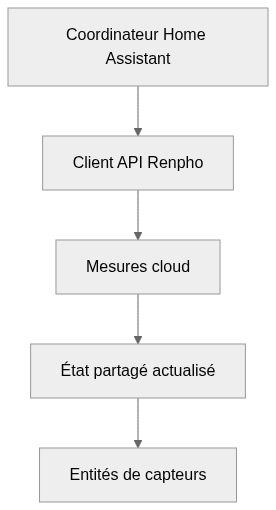
Les composants et leurs liens restent lisibles en texte. Le diagramme ajoute une vue interactive.
- Coordinateur Home Assistant
- Client API Renpho
- Mesures cloud
- État partagé actualisé
- Entités de capteurs
Liens vérifiés dans le dépôt.
Mermaid Diagramme interactif (chargement à l’ouverture)
Vue générale des composants et des échanges vérifiés dans le dépôt.
flowchart LR
  n0["Coordinateur Home Assistant"]
  n1["Client API Renpho"]
  n2["Mesures cloud"]
  n3["État partagé actualisé"]
  n4["Entités de capteurs"]
  n0 --> n1
  n1 --> n2
  n2 --> n3
  n3 --> n4
Version texte du diagramme
- Coordinateur Home Assistant → Client API Renpho
- Client API Renpho → Mesures cloud
- Mesures cloud → État partagé actualisé
- État partagé actualisé → Entités de capteurs
Suivre un parcours dans le code
Suivez _async_update_data à travers ses trois appels et exceptions. Une valeur peut être la dernière lecture réussie; l’état et l’heure d’actualisation permettent de la distinguer d’une nouvelle mesure.
Types et structure des fichiers
33 types déclarés, dont 12 dans l’aperçu des relations de base.
Diagramme des types
classDiagram
direction TB
class t1c013f7e1614["RenphoWeight"] {
  __init__()
  _json_session_headers()
  get_timestamp()
  prepare_data()
}
class t018fc6091cac["AuthenticationError"] {
}
class tf6d6f400bcb6["APIError"] {
}
class t3f96fd588bea["ClientSSLError"] {
}
class teb0533bd5d5d["RenphoWeightCoordinator"] {
  __init__()
  _async_update_data()
  last_updated()
}
class t16ebe0abcf92["RenphoSensor"] {
  __init__()
  _apply_native_metadata()
  _schedule_update()
  _handle_coordinator_update()
}
class t21aebcf929af["DeviceBind"] {
  get()
}
class ta3053775281d["UserResponse"] {
  get()
}
class t7807df8cb6f0["MeasurementDetail"] {
  get()
}
class ta4f92b147e4f["MeasurementResponse"] {
  get()
}
class td4123c774424["Users"] {
  get()
}
class t9147ce26b037["GirthGoal"] {
  get()
}
class bbff3815f3008["Exception"] {
  <<unresolved_base>>
}
bbff3815f3008 <|-- t018fc6091cac
bbff3815f3008 <|-- tf6d6f400bcb6
bbff3815f3008 <|-- t3f96fd588bea
class b86550088d462["DataUpdateCoordinator"] {
  <<unresolved_base>>
}
b86550088d462 <|-- teb0533bd5d5d
class b861c1788888f["SensorEntity"] {
  <<unresolved_base>>
}
b861c1788888f <|-- t16ebe0abcf92
class bb33e03eb53a5["BaseModel"] {
  <<unresolved_base>>
}
bb33e03eb53a5 <|-- t21aebcf929af
bb33e03eb53a5 <|-- ta3053775281d
bb33e03eb53a5 <|-- t7807df8cb6f0
bb33e03eb53a5 <|-- ta4f92b147e4f
bb33e03eb53a5 <|-- td4123c774424
bb33e03eb53a5 <|-- t9147ce26b037
Les bases non résolues restent identifiées; les signatures complètes ne sont pas reconstruites.
Index des types
RenphoWeight(class) ·custom_components/renpho/api_renpho.py:42Méthodes dans l’aperçu :
__init__, _json_session_headers, get_timestamp, prepare_data.AuthenticationError(class) ·custom_components/renpho/api_renpho.py:783Bases déclarées :
Exception.APIError(class) ·custom_components/renpho/api_renpho.py:787Bases déclarées :
Exception.ClientSSLError(class) ·custom_components/renpho/api_renpho.py:791Bases déclarées :
Exception.RenphoWeightCoordinator(class) ·custom_components/renpho/coordinator.py:20Méthodes dans l’aperçu :
__init__, _async_update_data, last_updated.Bases déclarées :
DataUpdateCoordinator.RenphoSensor(class) ·custom_components/renpho/sensor.py:84Méthodes dans l’aperçu :
__init__, _apply_native_metadata, _schedule_update, _handle_coordinator_update.Bases déclarées :
SensorEntity.DeviceBind(class) ·api/app.py:59Méthodes dans l’aperçu :
get.Bases déclarées :
BaseModel.UserResponse(class) ·api/app.py:77Méthodes dans l’aperçu :
get.Bases déclarées :
BaseModel.MeasurementDetail(class) ·api/app.py:137Méthodes dans l’aperçu :
get.Bases déclarées :
BaseModel.MeasurementResponse(class) ·api/app.py:224Méthodes dans l’aperçu :
get.Bases déclarées :
BaseModel.Users(class) ·api/app.py:236Méthodes dans l’aperçu :
get.Bases déclarées :
BaseModel.GirthGoal(class) ·api/app.py:246Méthodes dans l’aperçu :
get.Bases déclarées :
BaseModel.
Référence
17 / 17 fichiers admissibles lus (59 dans l’arbre); 0 trop volumineux, 0 échec de lecture et 0 diagnostic de syntaxe.
Ce que couvre l’analyse
Les dossiers connus de dépendances et de compilation, les fichiers d’identifiants et les binaires sont exclus. La collecte couvre les README, les manifestes reconnus et les fichiers source pris en charge.
Les statistiques Linguist couvrent l’ensemble du dépôt et peuvent inclure d’autres langages.
Carte des fichiers
flowchart TD
  root["hass_renpho"]
  f0["custom_components/renpho/api_renpho.py"]
  root --> f0
  f1["custom_components/renpho/coordinator.py"]
  root --> f1
  f2["custom_components/renpho/sensor.py"]
  root --> f2
  f3["README.md"]
  root --> f3
  f4["requirements.txt"]
  root --> f4
  f5[".devcontainer/README.md"]
  root --> f5
  f6["api/__init__.py"]
  root --> f6
  f7["api/app.py"]
  root --> f7
  f8["api/docker-compose.yml"]
  root --> f8
  f9["api/http_fingerprint.py"]
  root --> f9
  f10["api/requirements.txt"]
  root --> f10
  f11["custom_components/renpho/__init__.py"]
  root --> f11
  f12["custom_components/renpho/api_object.py"]
  root --> f12
  f13["custom_components/renpho/config_flow.py"]
  root --> f13
  f14["custom_components/renpho/const.py"]
  root --> f14
  f15["custom_components/renpho/http_fingerprint.py"]
  root --> f15
Fichiers à lire 3
Références
- GitHubDépôt source
- READMEDocumentation du dépôt
- Balance Renpho, Home Assistant et rétro-ingénierie de l’APIArticle du blog