Artemis-Switch : Une image du PC à l’écran
Artemis-Switch est un fork de la famille Moonlight. L’hôte exécute le jeu; le client reçoit l’audio et la vidéo compressés tout en renvoyant les commandes. L’affichage d’une image constitue une étape de cet aller-retour.
Langages du dépôtC++ 53.78%11
Parts calculées à partir des octets GitHub Linguist.
| Langage | % | Octets |
|---|---|---|
| C++ | 2 312 036 | |
| C | 1 428 795 | |
| Java | 244 691 | |
| CMake | 150 826 | |
| Objective-C++ | 83 846 | |
| Shell | 32 086 |
5 autres langages
| Swift | 0.38% | 16 275 |
| Python | 0.35% | 15 226 |
| GLSL | 0.34% | 14 440 |
| Makefile | 0.02% | 662 |
| PowerShell | 0.01% | 271 |
Aperçu
Pourquoi il existe
Client GameStream C++ accéléré matériellement avec calage d'images NVN pour une fluidité sans saccade.
Cas d’usage
Diffusion de jeux PC vers Nintendo Switch en mode portable avec latence minimale.
Démarrage
Ces commandes viennent de la documentation du dépôt. Elles n’ont pas été exécutées pendant cette revue.
git clone --recursive https://github.com/antoinebou12/Artemis-Switch.git
cd Artemis-Switch
cmake -B build/switch -DCMAKE_BUILD_TYPE=Release -DPLATFORM_SWITCH=ON -DUSE_DEKO3D=ON
cmake --build build/switch --target Moonlight.nro --parallelpython tests/i18n_consistency_test.py
python tests/release_contract_test.py
cmake -S tests -B build/tests -DCMAKE_BUILD_TYPE=Debug
cmake --build build/tests --parallel
ctest --test-dir build/tests --output-on-failurepython -m pip install ruff==0.12.10
python scripts/lint.py
cmake -S tests -B build/lint -DCMAKE_BUILD_TYPE=Debug -DARTEMIS_STRICT_WARNINGS=ON -DARTEMIS_ENABLE_CLANG_TIDY=ON
cmake --build build/lint --parallelcmake -S ci/integration -B build/integration -DCMAKE_BUILD_TYPE=Debug
cmake --build build/integration --parallel
ctest --test-dir build/integration --output-on-failurecd android-project./build_libromfs_generator.shexport JAVA_HOME=/Applications/Android\ Studio.app/Contents/jbr/Contents/Home
export ANDROID_SDK_ROOT=~/Library/Android/sdk
./gradlew assembleDebug
./gradlew installDebugRéférences du dépôt
Extraits des guides du dépôt, dans leur langue d’origine. Les liens ouvrent la version du code consultée.
Prérequis et premier essai
Install the Artemis Switch NRO
docs/NRO_INSTALL.md
Use one of these files from dist/nro:
- Easy install: extract Artemis-Switch-SD.zip to the root of the Switch SD card.
- Manual install: copy Artemis-Switch.nro to sdmc:/switch/Artemis-Switch/Artemis-Switch.nro. Launch the Homebrew Menu with title redirection/full RAM mode, then select Artemis Switch. Applet mode is not supported for reliable streaming. The ZIP contains only the ready-to-copy switch/Artemis-Switch/Artemis-Switch.nro layout. Apollo and Sunshine both use the normal Moonlight/GameStream pairing flow.
Install
docs/source/install.md
Easy install
docs/source/install.md
Manual install
docs/source/install.md
Configuration et utilisation
Recommended host and clients
README.md
Client (device)
README.md
| Client | Device | Notes |
|---|---|---|
| Artemis Switch (this app) | Nintendo Switch | Moonlight-Switch fork with FSR/RCAS, stream profiles, and Switch presentation. |
| Artemide | Android | Highly recommended on Android: ultra-low latency (ULL), direct presentation, built-in FSR upscaling. FSR Performance / Balanced / Quality presets inspired this fork. |
| Artemis (Moonlight Noir) | Android | Apollo’s companion client (virtual display / host UX inspiration). |
| Moonlight | PC, Android, iOS, … | Official clients. |
| Moonlight V+ | Android | Alternative Android fork (frame-gen and extra host tools). |
| Why this stack: Vibeshine, Vibepollo, Apollo, or GameStream-enabled Punktfunk on the PC plus Artemide on Android (and Artemis Switch on the docked/handheld Switch) is the closest to a console-like session: the host manages display behavior, while the client stays low-latency and can… |
Développement et contributions
Developer build
README.md
Prerequisites: Git, CMake 3.20 or newer, and a standard devkitPro devkitA64 environment. Clone recursively so every dependency under extern/ is initialized: Repository layout
| Path | Purpose |
|---|---|
| app/src/ | Application, streaming, renderer, input, and feature implementation |
| app/include/ | UI and application declarations |
| resources/ | Borealis XML, images, shaders, and translations |
| tests/ | Portable unit and contract tests |
| ci/integration/ | Cross-feature integration test build |
| docs/ | GitHub Pages source and engineering notes |
| .github/workflows/ | Build, test, sanitizer, and release automation |
| extern/ | Pinned third-party dependencies and Git submodules |
| Keep Switch-specific behavior behind the existing platform and capability gates. | |
| Do not make project-specific changes inside vendored extern/ dependencies. | |
| Moonlight.nro and Moonlight.elf remain… |
Developer validation
README.md
Documentation source
README.mddocs/README.mddocs/NRO_INSTALL.mddocs/source/install.mdapp/platforms/android-project/README.mdapp/platforms/android-project/README_ZH.md
6 documents lus parmi 6 candidats.
Fonctions et composants 2
- Session et interface
- L’interface Borealis gère le choix de l’hôte et les réglages. MoonlightSession coordonne le streaming et son fournisseur Switch choisit les implémentations vidéo et audio. L’interface et le traitement des médias ont des cycles de vie différents.
- Sortie propre à la plateforme
- Le fournisseur construit FFmpegVideoDecoder. Avec BOREALIS_USE_DEKO3D, il choisit ArtemisDKVideoRenderer; d’autres options choisissent d’autres moteurs. L’audio Switch utilise AudrenAudioRenderer. Ces choix sont explicites à la compilation.
Architecture
Les composants et leurs liens restent lisibles en texte. Le diagramme ajoute une vue interactive.
- Hôte GameStream
- Session de streaming
- Décodeur vidéo FFmpeg
- Rendu deko3d
- Écran Switch
- Commandes manette
Liens vérifiés dans le dépôt.
Mermaid Diagramme interactif (chargement à l’ouverture)
Vue générale des composants et des échanges vérifiés dans le dépôt.
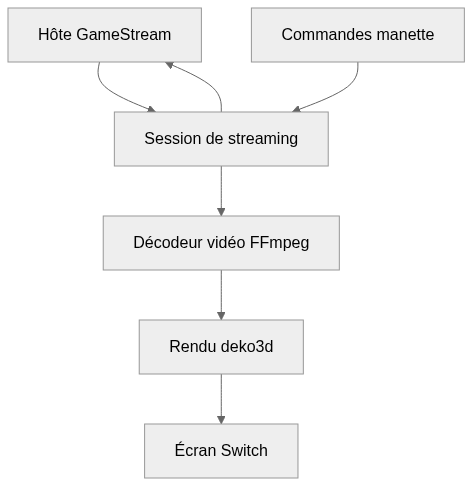
flowchart LR
  n0["Hôte GameStream"]
  n1["Session de streaming"]
  n2["Décodeur vidéo FFmpeg"]
  n3["Rendu deko3d"]
  n4["Écran Switch"]
  n5["Commandes manette"]
  n0 --> n1
  n1 --> n2
  n2 --> n3
  n3 --> n4
  n5 --> n1
  n1 --> n0
Version texte du diagramme
- Hôte GameStream → Session de streaming
- Session de streaming → Décodeur vidéo FFmpeg
- Décodeur vidéo FFmpeg → Rendu deko3d
- Rendu deko3d → Écran Switch
- Commandes manette → Session de streaming
- Session de streaming → Hôte GameStream
Suivre un parcours dans le code
Lisez les méthodes du fournisseur pour identifier le moteur compilé, puis suivez les images décodées vers ce moteur. Les délais réseau, de décodage et d’affichage doivent être mesurés séparément pour expliquer un flux lent.
Types et structure des fichiers
651 types déclarés, dont 12 dans l’aperçu des relations de base.
Diagramme des types
classDiagram
direction TB
class t27b200e5e641["AboutTab"] {
}
class t1d8fa37de9f9["ActiveRemoteRoute"] {
  <<struct>>
}
class t76b3bc05a24d["AddHostTab"] {
  findHost()
  stopSearchHost()
  connectHost()
  fillSearchBox()
}
class t71f8fd94394b["AppCell"] {
  setFavorite()
  updateFavoriteAction()
}
class tcb6c23872ee9["AppListView"] {
  onLayout()
  willAppear()
  draw()
  blockInput()
}
class t5416fcf29d4d["ArtemisSettingsTab"] {
  refreshValues()
  editWidth()
  editHeight()
  refreshRemoteAccessRows()
}
class taa0a005beea4["ButtonSelectingDialog"] {
  open()
  reloadLabel()
  buttonsText()
  draw()
}
class t0cab5ff3d09b["DiscoveryCandidate"] {
  <<struct>>
  isDirect()
}
class t9649c53d1d2d["FavoriteTab"] {
  refreshIfNeeded()
  setRefreshNeeded()
  updateAppList()
}
class tae773a498879["ClickGestureRecognizer"] {
  recognitionLoop()
}
class t03d6e2ef334c["FingersGestureRecognizer"] {
  recognitionLoop()
}
class t96b64c4eb4d8["TwoFingerScrollState"] {
  <<struct>>
}
class b66d2434ea20a["brls::Box"] {
  <<unresolved_base>>
}
b66d2434ea20a <|-- t27b200e5e641
class b12e371ab4244["brls::Box"] {
  <<unresolved_base>>
}
b12e371ab4244 <|-- t76b3bc05a24d
class b9fb6426c89d6["Box"] {
  <<unresolved_base>>
}
b9fb6426c89d6 <|-- t71f8fd94394b
class bd9fae1c39e24["Box"] {
  <<unresolved_base>>
}
bd9fae1c39e24 <|-- tcb6c23872ee9
class bc8de2cffa73c["brls::Box"] {
  <<unresolved_base>>
}
bc8de2cffa73c <|-- t5416fcf29d4d
class b4629afd0f9ec["Dialog"] {
  <<unresolved_base>>
}
b4629afd0f9ec <|-- taa0a005beea4
class b3def5b4c744e["brls::Box"] {
  <<unresolved_base>>
}
b3def5b4c744e <|-- t9649c53d1d2d
class b1c2ec6b5bcbd["brls::GestureRecognizer"] {
  <<unresolved_base>>
}
b1c2ec6b5bcbd <|-- tae773a498879
class b905c043cc5ee["brls::GestureRecognizer"] {
  <<unresolved_base>>
}
b905c043cc5ee <|-- t03d6e2ef334c
Les bases non résolues restent identifiées; les signatures complètes ne sont pas reconstruites.
Index des types
AboutTab(class) ·app/include/about_tab.hpp:13Bases déclarées :
brls::Box.ActiveRemoteRoute(struct) ·app/include/active_remote_route.hpp:4AddHostTab(class) ·app/include/add_host_tab.hpp:21Méthodes dans l’aperçu :
findHost, stopSearchHost, connectHost, fillSearchBox.Bases déclarées :
brls::Box.AppCell(class) ·app/include/app_cell.hpp:15Méthodes dans l’aperçu :
setFavorite, updateFavoriteAction.Bases déclarées :
Box.AppListView(class) ·app/include/app_list_view.hpp:22Méthodes dans l’aperçu :
onLayout, willAppear, draw, blockInput.Bases déclarées :
Box.ArtemisSettingsTab(class) ·app/include/artemis_settings_tab.hpp:8Méthodes dans l’aperçu :
refreshValues, editWidth, editHeight, refreshRemoteAccessRows.Bases déclarées :
brls::Box.ButtonSelectingDialog(class) ·app/include/button_selecting_dialog.hpp:14Méthodes dans l’aperçu :
open, reloadLabel, buttonsText, draw.Bases déclarées :
Dialog.DiscoveryCandidate(struct) ·app/include/discovery_candidate.hpp:4Méthodes dans l’aperçu :
isDirect.FavoriteTab(class) ·app/include/favorite_tab.hpp:14Méthodes dans l’aperçu :
refreshIfNeeded, setRefreshNeeded, updateAppList.Bases déclarées :
brls::Box.ClickGestureRecognizer(class) ·app/include/gestures/click_gesture_recognizer.hpp:13Méthodes dans l’aperçu :
recognitionLoop.Bases déclarées :
brls::GestureRecognizer.FingersGestureRecognizer(class) ·app/include/gestures/fingers_gesture_recognizer.hpp:13Méthodes dans l’aperçu :
recognitionLoop.Bases déclarées :
brls::GestureRecognizer.TwoFingerScrollState(struct) ·app/include/gestures/two_finger_scroll_recognizer.hpp:12
Référence
616 / 616 fichiers admissibles lus (962 dans l’arbre); 0 trop volumineux, 0 échec de lecture et 88 diagnostic de syntaxe.
Ce que couvre l’analyse
Les dossiers connus de dépendances et de compilation, les fichiers d’identifiants et les binaires sont exclus. La collecte couvre les README, les manifestes reconnus et les fichiers source pris en charge.
Les statistiques Linguist couvrent l’ensemble du dépôt et peuvent inclure d’autres langages.
Carte des fichiers
flowchart TD
  root["Artemis-Switch"]
  f0["app/src/main.cpp"]
  root --> f0
  f1["app/src/streaming/MoonlightSession.cpp"]
  root --> f1
  f2["app/src/streaming/switch/SwitchMoonlightSessionDecoderAndRenderProvider.cpp"]
  root --> f2
  f3["CMakeLists.txt"]
  root --> f3
  f4["README.md"]
  root --> f4
  f5["build_libromfs_generator.sh"]
  root --> f5
  f6["docker-compose.yml"]
  root --> f6
  f7["pyproject.toml"]
  root --> f7
  f8["scripts/docker-build-nro.sh"]
  root --> f8
  f9["scripts/lint.py"]
  root --> f9
  f10["scripts/package-linux.sh"]
  root --> f10
  f11["scripts/package-release-source.sh"]
  root --> f11
  f12["scripts/psv-dev.sh"]
  root --> f12
  f13["tests/CMakeLists.txt"]
  root --> f13
  f14["tests/active_session_guard_test.cpp"]
  root --> f14
  f15["tests/add_host_peer_filter_test.cpp"]
  root --> f15
Fichiers à lire 3
Références
- GitHubDépôt source
- READMEDocumentation du dépôt
- Artemis Switch : suivre une image du réseau à l’écranArticle du blog
- Streaming portable et homebrew — Artemis-Switch, moonlight-N3DS, sm64coopdx-switchArticle du blog