Économie des boîtes LEGO avec science des données
Passionné de données et de LEGO, j’ai exploré l’univers LEGO avec des données historiques : tendances, prix et caractéristiques des boîtes dans le temps. À partir des jeux Rebrickable et d’outils comme Pandas, Matplotlib et Scikit-Learn, voici un parcours sur l’histoire et l’économie des sets LEGO.
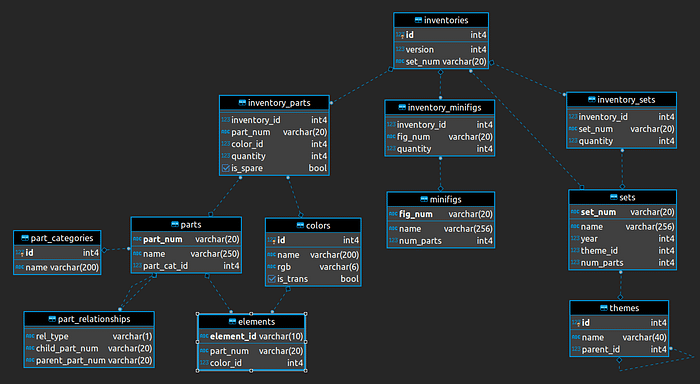
Vue d’ensemble des jeux de données
Les fichiers utilisés couvrent sets, pièces et thèmes :
- colors.csv : couleurs LEGO (ID, noms, RGB, transparence).
- inventories.csv : inventaires (ID, versions, numéros de set).
- inventory_parts.csv : pièces par inventaire (quantités, couleurs, pièces de rechange).
- inventory_sets.csv : lien inventaires ↔ sets.
- part_categories.csv : catégories de pièces.
- part_relationships.csv : relations entre pièces.
- parts.csv : pièces (numéros, noms, catégories).
- sets.csv : sets (numéros, noms, années, thèmes, nombre de pièces).
- themes.csv : thèmes (ID, noms, thèmes parents).

Analyse des sets : tendances dans le temps
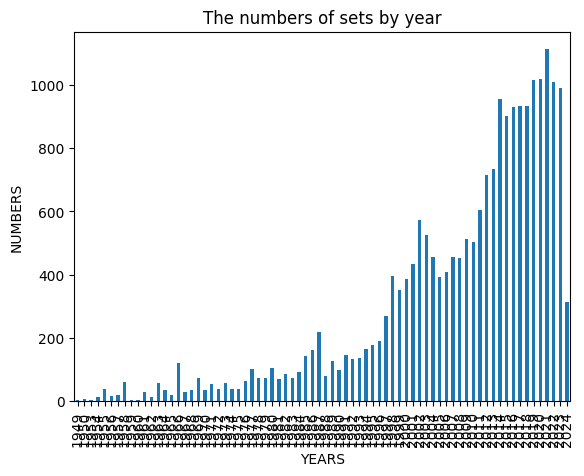
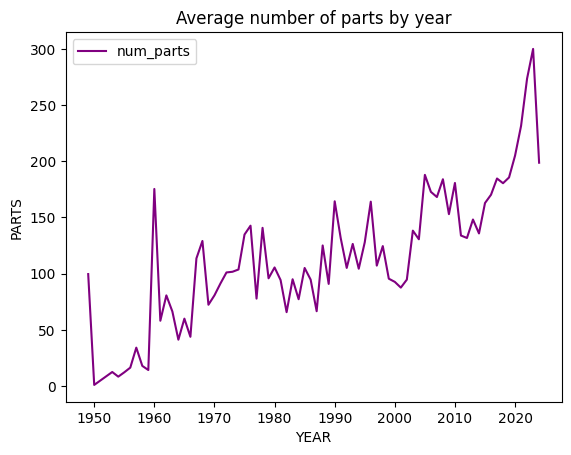
Nombre de sets publiés par année et nombre moyen de pièces par set.
sets.groupby(‘year’)[’name’].nunique().plot(kind=‘bar’)
plt.title(“The Numbers of Sets by Year”)
plt.xlabel(“Year”)
plt.ylabel(“Numbers”)
plt.show()
parts_by_year = sets[[‘year’, ’num_parts’]].groupby(‘year’, as_index=False).mean()
parts_by_year.plot(x=‘year’, y=‘num_parts’, color=“purple”)
plt.title(“Average Number of Parts by Year”)
plt.xlabel(“Year”)
plt.ylabel(“Parts”)
plt.show()


Thèmes : top 10
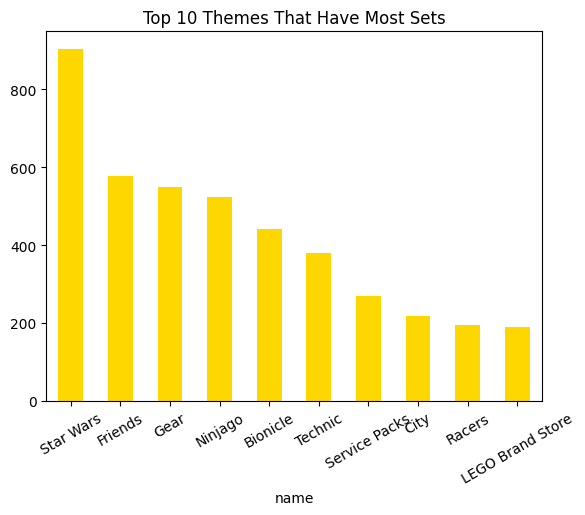
Les dix thèmes avec le plus grand nombre de sets.
set_themes = sets[“theme_id”].value_counts()
set_themes = pd.DataFrame({“id”: set_themes.index, “count”: set_themes.values})
set_themes = pd.merge(set_themes, themes, on=“id”)
set_themes_no_parent = set_themes[pd.isnull(set_themes[“parent_id”])]
set_themes_top_10 = set_themes_no_parent.sort_values(by=[“count”], ascending=False)[:10]
top_10 = set_themes_top_10[“count”]
top_10.index = set_themes_top_10[“name”]
top_10.plot.bar(color=“gold”, rot=30)
plt.title(“Top 10 Themes That Have Most Sets”)
plt.show()

Collecte avec un scraper
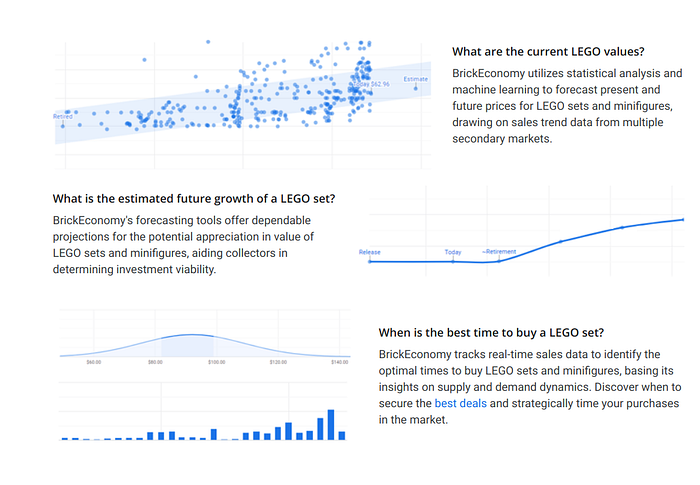
Pour l’historique et les prix, j’ai développé un scraper (Playwright, asyncio, pydantic, aiohttp). Les données Rebrickable ne couvraient pas l’historique de prix voulu ; BrickEconomy fournit détails et prix historiques sur les sets. Le scraper automatise la collecte pour alimenter l’analyse.

Mise en place de l’environnement
First, we need to install the required packages:
!pip install playwright asyncio pydantic aiohttp
!playwright install
Imports and Initial Setup
The necessary libraries are imported, and the initial setup is done. Playwright is used for web scraping, asyncio for asynchronous programming, pydantic for data validation, and aiohttp for asynchronous HTTP requests.
import csv
from pydantic import BaseModel
from typing import Dict, List, Optional
from playwright.async_api import async_playwright
import asyncio
import json
import re
from datetime import datetime
Data Models
We define data models using pydantic to structure the data we will scrape. These models help ensure the data is clean and well-organized.
class SetDetails(BaseModel):
name: str
value: str
class HistoryEntry(BaseModel):
date: datetime
number: float
tooltip: Optional[str]
annotation: Optional[str]
annotationText: Optional[str]
class NewEntry(BaseModel):
date: datetime
value1: float
value2: float
value3: float
value4: float
description: Optional[str] = None
class LegoSet(BaseModel):
details: List[SetDetails]
pricing: List[SetDetails]
quick_buy: List[SetDetails]
set_predictions: List[SetDetails]
set_facts: str
subtheme_analysis: List[SetDetails]
Scraper Class
The LegoAPI class is responsible for scraping the data from BrickEconomy. It initializes with a list of LEGO set numbers, navigates to the BrickEconomy website, and extracts the required information.
class LegoAPI:
root_url = “https://www.brickeconomy.com”
def \_\_init\_\_(self, set\_list):
self.set\_list = set\_list
self.output\_file = "lego\_sets.csv"
async def start(self):
try:
with open(self.set\_list, "r") as f:
set\_list = \[line.rstrip() for line in f.readlines()\]
except Exception as e:
print("Error opening input file")
raise e
async with async\_playwright() as p:
browser = await p.chromium.launch(headless=False)
page = await browser.new\_page()
for set\_num in set\_list:
search\_url = f"{self.root\_url}/search?query={set\_num}"
await page.wait\_for\_load\_state("load")
await page.goto(search\_url)
try:
possible\_links = await page.query\_selector\_all(
"#ContentPlaceHolder1\_ctlSetsOverview\_GridViewSets > tbody > tr:nth-child(2) > td.ctlsets-left > div.mb-5 > h4 > a"
)
except Exception as e:
raise ValueError(f"Error parsing HTML: {e}")
if not possible\_links:
raise ValueError(f"No links found for set number: {set\_num}")
for link in possible\_links:
href = await link.get\_attribute("href")
print(href)
test\_num = href.split("/")\[2\].split("-")\[0\]
print(test\_num)
if str(test\_num) in str(set\_num):
set\_details = href.split("/")\[2:4\]
await page.goto(self.root\_url + href)
await page.wait\_for\_load\_state("load")
await self.parse\_history(page, set\_num)
await self.parse\_set(page, set\_details)
await browser.close()
Initialization and Input Handling:
- The constructor (
__init__) initializes the class with a list of LEGO set numbers and the output file name. - The
startmethod reads the set numbers from a file and starts the Playwright browser.
Navigation and Data Extraction:
- For each set number, the scraper navigates to the search results page on BrickEconomy.
- It extracts links to individual set pages and checks if the set number matches.
- The scraper then navigates to the set’s page and calls methods to parse historical data and set details.
Press enter or click to view image in full size

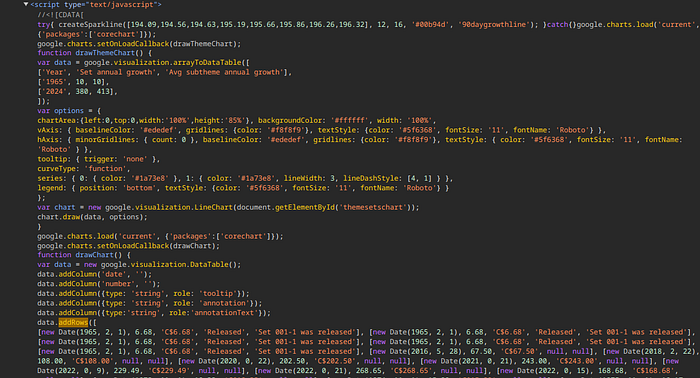
The data is in a script data at the end of the html
Parsing Historical Data
La méthode parse_history extrait l’historique de prix depuis la page du set.
async def parse\_history(self, page, set\_num):
try:
script\_tags = await page.query\_selector\_all("script")
desired\_script\_content = None
for script\_tag in script\_tags:
script\_content = await script\_tag.inner\_text()
if "data.addRows(\[" in script\_content:
desired\_script\_content = script\_content
break
if desired\_script\_content:
pattern = r"data\\.addRows\\((\\\[.\*?\\\]\\));"
matches = re.findall(pattern, desired\_script\_content, re.DOTALL)
if matches:
history\_data = matches\[0\].replace("\\n", "").replace("null", "'null'")
history\_entries = \[\]
pattern\_date = re.compile(r"new Date\\((\\d+), (\\d+), (\\d+)\\), (\\d+\\.?\\d\*), '(\[^'\]\*)', '(\[^'\]\*)'(?:, '(\[^'\]\*)')?(?:, '(\[^'\]\*)')?")
for match in pattern\_date.finditer(history\_data):
year, month, day = map(int, match.groups()\[:3\])
month += 1
date = datetime(year, month, day)
value = match.group(4)
currency\_value = match.group(5)
status = match.group(6) if match.group(6) else None
description = match.group(7) if match.group(7) else None
history\_entries.append(
HistoryEntry(
date=date,
number=value,
tooltip=currency\_value,
annotation=status,
annotationText=description,
)
)
with open(f"{set\_num}\_history.csv", mode="w", newline="", encoding="utf-8") as file:
writer = csv.writer(file)
writer.writerow(
\["Date", "Value", "Currency Value", "Status", "Description"\]
)
for entry in history\_entries:
writer.writerow(
\[
entry.date,
entry.number,
entry.tooltip,
entry.annotation,
entry.annotationText,
\]
)
if len(matches) > 1:
new\_data = matches\[1\].replace("\\n", "").replace("null", "'null'")
pattern\_new = re.compile(r"new Date\\((\\d+), (\\d+), (\\d+)\\), (\\d+\\.?\\d\*), (\\d+\\.?\\d\*), (\\d+\\.?\\d\*), (\\d+\\.?\\d\*), '(\[^'\]\*)'")
new\_entries = \[\]
for match in pattern\_new.finditer(new\_data):
year, month, day = map(int, match.groups()\[:3\])
month += 1
date = datetime(year, month, day)
value1, value2, value3, value4 = map(float, match.groups()\[3:7\])
description = match.group(8)
new\_entries.append(
NewEntry(
date=date,
value1=value1,
value2=value2,
value3=value3,
value4=value4,
description=description,
)
)
with open(f"{set\_num}\_new.csv", mode="w", newline="", encoding="utf-8") as file:
writer = csv.writer(file)
writer.writerow(
\["Date", "Value 1", "Value 2", "Value 3", "Value 4", "Description"\]
)
for entry in new\_entries:
writer.writerow(
\[
entry.date,
entry.value1,
entry.value2,
entry.value3,
entry.value4,
entry.description,
\]
)
else:
pass
else:
print("Could not find 'data.addRows(\[...\]);' in the script content.")
else:
print("Script tag with 'data.addRows(\[' not found.")
except Exception as e:
print(f"An error occurred while extracting data: {e}")
Extraction du script : recherche d’une balise script contenant data.addRows.
Analyse et écriture : si trouvé, extraction et parsing (regex) vers des objets HistoryEntry, puis écriture CSV.
Détails du set
La méthode parse_set récupère prix, options d’achat rapide, prédictions et analyse de sous-thème.
async def parse\_set(self, page, set\_details):
set\_details\_div = await page.query\_selector("div#ContentPlaceHolder1\_SetDetails")
set\_details\_rows = await set\_details\_div.query\_selector\_all(".row.rowlist")
set\_info = \[\]
for row in set\_details\_rows:
key\_element = await row.query\_selector(".text-muted")
value\_element = await row.query\_selector(".col-xs-7")
if key\_element and value\_element:
key = await key\_element.inner\_text()
value = await value\_element.inner\_text()
set\_info.append(SetDetails(name=key.strip(), value=value.strip()))
set\_pricing\_div = await page.query\_selector("div#ContentPlaceHolder1\_PanelSetPricing")
pricing\_rows = await set\_pricing\_div.query\_selector\_all(".row.rowlist")
pricing\_info = \[\]
for row in pricing\_rows:
key\_element = await row.query\_selector(".text-muted")
value\_element = await row.query\_selector(".col-xs-7")
if key\_element and value\_element:
key = await key\_element.inner\_text()
value = await value\_element.inner\_text()
pricing\_info.append(SetDetails(name=key.strip(), value=value.strip()))
quick\_buy\_div = await page.query\_selector("div#ContentPlaceHolder1\_PanelSetBuying")
quick\_buy\_rows = await quick\_buy\_div.query\_selector\_all(".row.rowlist")
quick\_buy\_info = \[\]
for row in quick\_buy\_rows:
key\_element = await row.query\_selector(".text-muted")
value\_element = await row.query\_selector(".col-xs-7")
if key\_element and value\_element:
key = await key\_element.inner\_text()
value = await value\_element.inner\_text()
quick\_buy\_info.append(SetDetails(name=key.strip(), value=value.strip()))
set\_predictions\_div = await page.query\_selector("div#ContentPlaceHolder1\_PanelSetPredictions")
set\_predictions\_rows = await set\_predictions\_div.query\_selector\_all(".row.rowlist")
set\_predictions\_info = \[\]
for row in set\_predictions\_rows:
key\_element = await row.query\_selector(".text-muted")
value\_element = await row.query\_selector(".col-xs-7")
if key\_element and value\_element:
key = await key\_element.inner\_text()
value = await value\_element.inner\_text()
set\_predictions\_info.append(SetDetails(name=key.strip(), value=value.strip()))
set\_facts\_div = await page.query\_selector("div#ContentPlaceHolder1\_PanelSetFacts")
if set\_facts\_div:
set\_facts = await set\_facts\_div.inner\_text()
set\_facts = set\_facts.strip()
else:
set\_facts = "No set facts available"
subtheme\_analysis\_div = await page.query\_selector("div#ContentPlaceHolder1\_PanelSetAnalysis")
subtheme\_analysis\_rows = await subtheme\_analysis\_div.query\_selector\_all(".row.rowlist")
subtheme\_analysis\_info = \[\]
for row in subtheme\_analysis\_rows:
key\_element = await row.query\_selector(".text-muted")
value\_element = await row.query\_selector(".col-xs-7")
if key\_element and value\_element:
key = await key\_element.inner\_text()
value = await value\_element.inner\_text()
subtheme\_analysis\_info.append(SetDetails(name=key.strip(), value=value.strip()))
lego\_set = LegoSet(
details=set\_info,
pricing=pricing\_info,
quick\_buy=quick\_buy\_info,
set\_predictions=set\_predictions\_info,
set\_facts=set\_facts,
subtheme\_analysis=subtheme\_analysis\_info,
)
await self.write\_to\_csv(lego\_set)
Extracting Set Details:
- The method extracts various details about the set, such as general information, pricing, quick buy options, predictions, and subtheme analysis.
Creating and Writing Data:
- These details are stored in
SetDetailsobjects and combined into aLegoSetobject, which is then written to a CSV file.
Writing Data to CSV
The write_to_csv method writes the scraped data to a CSV file.
async def write\_to\_csv(self, lego\_set):
with open(self.output\_file, mode="a", newline="", encoding="utf-8") as file:
writer = csv.writer(file)
writer.writerow(
\[
"Details",
"Pricing",
"Quick Buy",
"Set Predictions",
"Set Facts",
"Subtheme Analysis",
\]
)
max\_length = max(
len(lego\_set.details),
len(lego\_set.pricing),
len(lego\_set.quick\_buy),
len(lego\_set.set\_predictions),
len(lego\_set.subtheme\_analysis),
)
for i in range(max\_length):
row = \[
lego\_set.details\[i\].value if i < len(lego\_set.details) else "",
lego\_set.pricing\[i\].value if i < len(lego\_set.pricing) else "",
lego\_set.quick\_buy\[i\].value if i < len(lego\_set.quick\_buy) else "",
lego\_set.set\_predictions\[i\].value if i < len(lego\_set.set\_predictions) else "",
lego\_set.set\_facts if i == 0 else "",
lego\_set.subtheme\_analysis\[i\].value if i < len(lego\_set.subtheme\_analysis) else "",
\]
writer.writerow(row)
Preparing the CSV File:
- The method opens the CSV file in append mode and writes the headers.
Writing Rows:
- It writes rows of data to the CSV file, ensuring that all details are included, even if some lists are shorter than others.
Running the Scraper
Finally, the main function runs the scraper.
async def main():
with open(“lego_sets.csv”, mode=“w”, newline="", encoding=“utf-8”) as file:
pass
lego\_api = LegoAPI("set\_list.txt")
await lego\_api.start()
loop = asyncio.get_event_loop()
asyncio.run_coroutine_threadsafe(main(), loop)
By using this scraper, I was able to gather detailed historical and current data on LEGO sets, enabling comprehensive analysis and insights into the world of LEGO.
Press enter or click to view image in full size

001–1_history.csv
Press enter or click to view image in full size

001–1_new.csv
Press enter or click to view image in full size

Analyse des prix : historique et prévisions
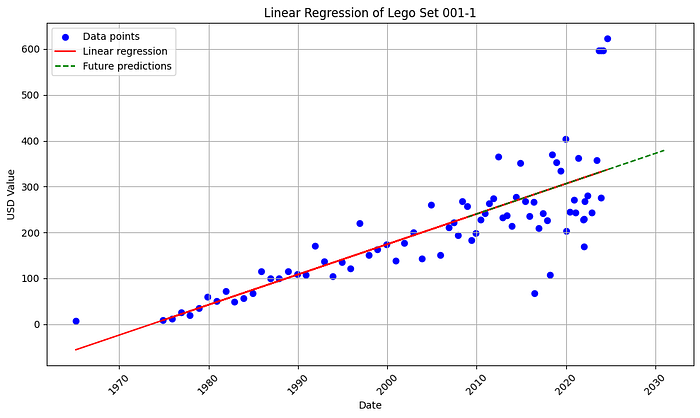
Focus sur l’historique de prix d’un set (001–1) et prévisions par régression linéaire.
Nettoyage des données historiques
Étape clé pour fiabiliser l’analyse — déroulé du nettoyage :
import pandas as pd
import matplotlib.pyplot as plt
from sklearn.linear_model import LinearRegression
from sklearn.tree import DecisionTreeRegressor
from sklearn.ensemble import RandomForestRegressor
from sklearn.ensemble import GradientBoostingRegressor
import numpy as np
from scipy import stats
from scipy.stats import norm, skew
df = pd.read_csv(“data/lego_sets.csv”)
# Remove duplicate rows
df.drop_duplicates(inplace=True)
# Handle missing values in other columns
df[‘Pricing’] = df[‘Pricing’].fillna(0)
# Convert “Details” column to string data type
df[‘Details’] = df[‘Details’].astype(str)
# Standardize currency values to USD
# Ensure the column containing currency values exists and has the correct name
if ‘Pricing’ in df.columns:
# Remove currency symbols and any other non-numeric characters
df[‘Pricing’] = df[‘Pricing’].str.replace(’[^\d.]’, ‘’, regex=True)
# Convert to float
df[‘Pricing’] = pd.to_numeric(df[‘Pricing’], errors=‘coerce’)
if ‘Set Predictions’ in df.columns:
df[‘Set Predictions’] = df[‘Set Predictions’].astype(str)
df[‘Set Predictions’].fillna(’’, inplace=True)
df[‘Set Predictions’] = df[‘Set Predictions’].str.replace(’[^\d.]’, ‘’, regex=True)
df[‘Set Predictions’] = pd.to_numeric(df[‘Set Predictions’], errors=‘coerce’)
# Drop irrelevant columns
df.drop([‘Subtheme Analysis’], axis=1, inplace=True)
# Rename columns for clarity
df.rename(columns={‘Details’: ‘Set Number’, ‘Set Facts’: ‘Facts’}, inplace=True)
# Remove leading and trailing whitespace from the “Facts” column
df[‘Facts’] = df[‘Facts’].str.strip().replace(’\n’, ‘’, regex=True)
# Replace non-numeric characters in “Quick Buy” with empty strings
if ‘Quick Buy’ in df.columns and df[‘Quick Buy’].dtype == ‘object’:
df[‘Quick Buy’] = df[‘Quick Buy’].str.replace(’[^\d.]’, ‘’, regex=True)
# Convert “Quick Buy” column to numeric, coercing errors to NaN
if ‘Quick Buy’ in df.columns:
df[‘Quick Buy’] = pd.to_numeric(df[‘Quick Buy’], errors=‘coerce’)
# Drop rows with NaN values in the “Quick Buy” column
df.dropna(subset=[‘Quick Buy’], inplace=True)
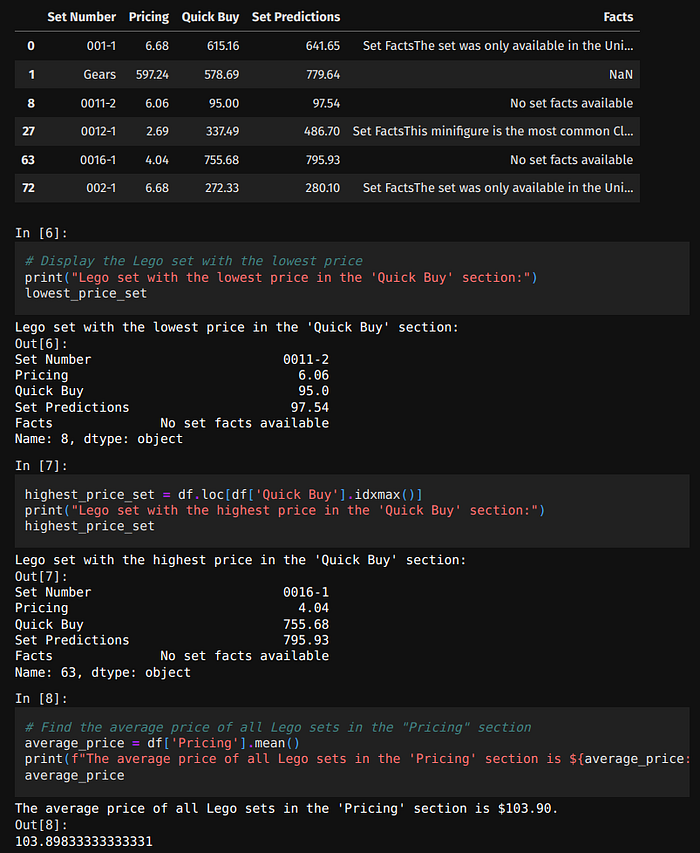
# Find the Lego set with the lowest price in the “Quick Buy” section
if ‘Quick Buy’ in df.columns:
lowest_price_set = df.loc[df[‘Quick Buy’].idxmin()]
Press enter or click to view image in full size

# Step 1: Remove duplicate rows
df_0011.drop_duplicates(inplace=True)
# Step 2: Handle missing values in the ‘Currency Value’ column
df_0011[‘Currency Value’] = df_0011[‘Currency Value’].fillna(0)
# Step 3: Standardize currency values to USD
# Remove currency symbols and any other non-numeric characters
df_0011[‘Currency Value’] = df_0011[‘Currency Value’].str.replace(’[^\d.]’, ‘’, regex=True)
# Convert to float
df_0011[‘Currency Value’] = pd.to_numeric(df_0011[‘Currency Value’], errors=‘coerce’)
# Step 4: Drop unnecessary columns
df_0011.drop([‘Value’, ‘Status’], axis=1, inplace=True)
df_0011[‘Date’] = pd.to_datetime(df_0011[‘Date’], errors=‘coerce’)
# Step 5: Rename columns for clarity
df_0011.rename(columns={‘Currency Value’: ‘USD Value’, ‘Description’: ‘Set Description’}, inplace=True)
# remove NAN values
df_0011[‘USD Value’] = df_0011[‘USD Value’].fillna(0)
df_0011 = df_0011[df_0011[‘USD Value’] != 0]
# remove nan values description remplace by ’’
df_0011[‘Set Description’] = df_0011[‘Set Description’].fillna(’’)
Régression linéaire et prévisions
Une fois les données nettoyées, on projette les prix futurs avec une régression linéaire.
X = df_0011[‘Date’].map(pd.Timestamp.toordinal).values.reshape(-1, 1)
y = df_0011[‘USD Value’].values
# Fit the model
model = LinearRegression().fit(X, y)
# Prepare future dates and predict
future_dates = pd.date_range(‘2008-12-31’, ‘2030-12-31’, freq=‘Y’)
future_dates_ordinal = future_dates.map(pd.Timestamp.toordinal).values.reshape(-1, 1)
future_predictions = model.predict(future_dates_ordinal)
# Plotting, making sure to convert ordinal dates back to datetime for readability
plt.figure(figsize=(10, 6))
plt.scatter(df_0011[‘Date’], df_0011[‘USD Value’], color=‘blue’, label=‘Data points’)
plt.plot(df_0011[‘Date’], model.predict(X), color=‘red’, label=‘Linear regression’)
plt.plot(future_dates, future_predictions, color=‘green’, label=‘Future predictions’, linestyle=’–’)
plt.title(‘Linear Regression of Lego Set 001-1’)
plt.xlabel(‘Date’)
plt.ylabel(‘USD Value’)
plt.xticks(rotation=45)
plt.legend()
plt.grid(True)
plt.tight_layout()
plt.show()
Once the historical data is cleaned, we can use it to make future price predictions using linear regression.
Press enter or click to view image in full size

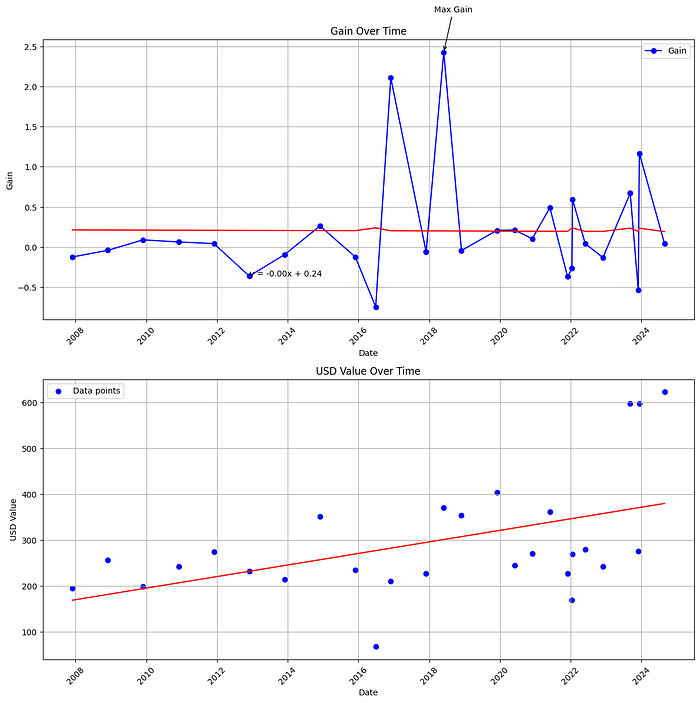
# Create subplots
fig, axes = plt.subplots(nrows=2, ncols=1, figsize=(12, 12))
# Plot 1: Gain Over Time
axes[0].plot(df_0011[‘Date’], df_0011[‘Gain’], marker=‘o’, linestyle=’-’, color=‘b’, label=‘Gain’)
axes[0].set_title(‘Gain Over Time’)
axes[0].set_xlabel(‘Date’)
axes[0].set_ylabel(‘Gain’)
axes[0].grid(True)
axes[0].legend()
# Add trend line to the first plot
slope, intercept, r_value, p_value, std_err = stats.linregress(df_0011.index, df_0011[‘Gain’])
axes[0].plot(df_0011[‘Date’], intercept + slope * df_0011.index, color=‘red’, label=‘Trend line’)
# Annotate the trend line equation
axes[0].text(df_0011[‘Date’].iloc[5], df_0011[‘Gain’].iloc[5], f’y = {slope:.2f}x + {intercept:.2f}’, fontsize=10, color=‘black’)
# Rotate x-axis labels for better readability
axes[0].tick_params(axis=‘x’, rotation=45)
# Annotate the maximum gain if df_0011 is not empty
if not df_0011.empty:
max_gain_index = df_0011[‘Gain’].idxmax()
if not pd.isna(max_gain_index):
max_gain_date = df_0011.loc[max_gain_index, ‘Date’]
max_gain_value = df_0011.loc[max_gain_index, ‘Gain’]
axes[0].annotate(‘Max Gain’, xy=(max_gain_date, max_gain_value),
xytext=(max_gain_date - pd.Timedelta(days=100), max_gain_value + 0.5),
arrowprops=dict(facecolor=‘black’, arrowstyle=’->’))
# Highlight points of interest if df_0011 is not empty
if not df_0011.empty:
points_of_interest_index = [5, 11, 13, 23]
points_of_interest = df_0011.iloc[points_of_interest_index]
axes[0].scatter(points_of_interest[‘Date’], points_of_interest[‘Gain’], color=‘red’, label=‘Points of Interest’)
# Plot 2: USD Value Over Time
axes[1].scatter(df_0011[‘Date’], df_0011[‘USD Value’], color=‘blue’, label=‘Data points’)
axes[1].set_title(‘USD Value Over Time’)
axes[1].set_xlabel(‘Date’)
axes[1].set_ylabel(‘USD Value’)
axes[1].legend()
axes[1].grid(True)
# Linear Regression for USD Value over Time
X = df_0011[‘Date’].astype(int).values.reshape(-1, 1) # Convert datetime to numerical representation
y = df_0011[‘USD Value’].values
model = LinearRegression().fit(X, y)
axes[1].plot(df_0011[‘Date’], model.predict(X), color=‘red’, label=‘Linear regression’)
# Rotate x-axis labels for better readability
for ax in axes:
ax.tick_params(axis=‘x’, rotation=45)
plt.tight_layout()
plt.show()
Press enter or click to view image in full size

Conclusion
Cette analyse parcourt l’univers LEGO — des couleurs aux tendances de prix et aux prévisions. Les outils de science des données permettent de mettre en lumière des motifs sur ces « jouets » devenus objets de collection.
Références
Publié à l’origine sur Medium.